Battery models & part numbers
| Reference / P/N |
|---|
| Toshiba-PA5157U-1BRS-50Wh |
Compatible laptop models
| Model |
|---|
| Toshiba G71C000GC110 |
| Toshiba G71C000GC510 |
| Toshiba P000577250 |
| Toshiba P000697290 |
| Toshiba P71C0000GC5AA |
| Toshiba Satellite E45T E55 E55T U940s |
| Toshiba Satellite M40-A |
| Toshiba Satellite M50-A |
| Toshiba Satellite M50D-A |
| Toshiba Satellite M50DT-A |
| Toshiba Satellite M50T-A |
| Toshiba Satellite U40t-A |
| Toshiba Satellite U40T-A-105 |
| Toshiba Satellite U50T-A |
Introduction
If your Toshiba laptop is struggling to hold charge or won’t power on, you likely need a replacement battery. Our genuine Toshiba PA5157U-1BRS-50Wh battery is designed specifically for your laptop model and meets Australian safety standards.
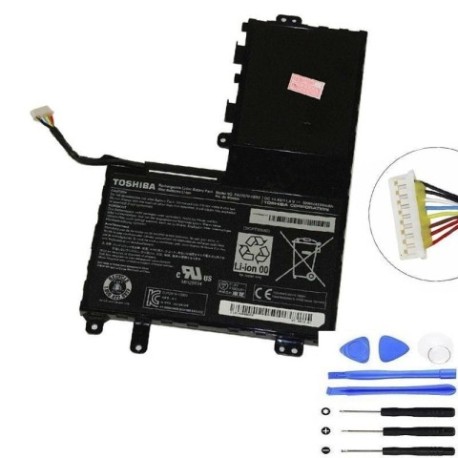
Common signs you need a replacement
| Symptom | Possible Cause | How to Verify | Recommendation |
|---|---|---|---|
| Short battery life | Battery degradation over time | Check power settings & usage time | Consider replacement if under 2 hours |
| Laptop won’t hold charge | Faulty battery cells | Test with power adapter removed | Immediate replacement needed |
| Battery swelling | Internal damage or age | Visual inspection of battery compartment | Stop using immediately & replace |
| Overheating during use | Battery stress or failure | Monitor temperature with software | Replace to prevent damage |
How to check compatibility
Verify your laptop model matches one in our compatibility table above. You can also check the original battery’s part number (usually printed on the battery itself) matches PA5157U-1BRS-50Wh.
When to replace
Replace your battery when it no longer holds sufficient charge for your needs, shows physical damage, or is over 2-3 years old. In Australia/NZ, extreme temperatures can accelerate battery degradation.
Installation guide (overview)
1. Power off laptop and disconnect charger
2. Remove the battery compartment cover
3. Carefully disconnect old battery
4. Insert new battery and secure connections
5. Replace cover and charge fully before first use
Usage & care tips
• Avoid extreme temperatures (store between 15-25°C)
• Calibrate battery monthly by fully charging then discharging
• Don’t leave laptop plugged in constantly
• Use authorised chargers only
Safety & recycling in AU/NZ
Never dispose of batteries in household waste. In Australia and New Zealand, take old batteries to authorised recycling centres. Many electronics retailers offer free battery recycling services.
FAQ
How long does this battery last?
Typically 2-3 years with normal use, depending on charging habits and environmental conditions.
Is this battery genuine Toshiba?
Yes, this is an original Toshiba battery meeting all manufacturer specifications.
What’s the warranty period?
Most replacement batteries come with 12-month warranty coverage.
Can I use this battery with different Toshiba models?
Only with the compatible models listed in our table above to ensure proper fit and safety.
How do I recycle my old battery in Australia?
Visit BatteryRecycling.org.au to find your nearest drop-off location.
What charging time should I expect?
Approximately 2-3 hours for full charge from empty, depending on your charger.
Is installation difficult?
Most Toshiba laptop batteries are user-replaceable with simple tools. Follow our guide or seek professional help if unsure.