HP Laptop Battery Replacement — The Complete 2025 Guide
Everything you need to know about HP battery replacement: price, sizing, diagnostics, “near me” options, model lookup, and whether it’s worth doing.
Is it worth replacing the battery on an HP laptop?
In most cases, yes. If your HP is otherwise healthy (CPU, SSD, keyboard, display), a new battery restores mobility for a fraction of the cost of a new laptop. You’ll especially benefit if:
- Full charge capacity has dropped below ~60–70% of original (typical after many cycles).
- The battery is swollen or fails health diagnostics.
- Runtime under normal use is < 1 hour and you need portability.
HP Battery Price: What Affects Cost
| Factor | Why it matters | What to know |
|---|---|---|
| Capacity (Wh) & cell count | Higher Wh => longer runtime | Common HP packs: 41–52.5Wh (3-cell), 56–68Wh (4-cell). Larger packs typically cost more. |
| Battery family / code | Model-specific fit | Popular codes include HT03XL, LK03XL, JC04, CS03XL. Availability influences price. |
| OEM vs compatible | Brand & warranty | Original OEM is usually pricier; quality third-party compatible options offer strong value when properly specified. |
| Labor (if not DIY) | Service time | Internal batteries require disassembly; add professional labor if you don’t DIY. |
Tip: Compare battery Wh (watt-hours), warranty length, and seller return policy — not just price.
“HP battery near me” — Local vs Online
Local repair shops can install for you and handle disposal; online stores offer broader selection and detailed compatibility lists.
Bring to a local shop:
- Your laptop’s exact model (e.g., “HP 15-dyXXXX”) and product number (often on bottom cover).
- Battery code (e.g., HT03XL, LK03XL) or a clear photo of the battery label.
HP Battery Size, Cells, Wh & Voltage
- Wh (Watt-hours) = “gas tank” size. More Wh ⇒ longer runtime.
- Cell count: 3-cell packs are common (e.g., 41–52.5Wh); 4-cell packs offer more runtime and slightly higher weight.
- Voltage: Many modern HP packs are nominal 11.4–11.55V (3-series cells). Always match your original battery code; don’t mix incompatible voltages.
- Codes like HT03XL/LK03XL/JC04/CS03XL identify the battery family and fit, not just capacity.
HP Battery Check & Diagnostics
Option A — Windows Battery Report
- Press Win + X → choose Windows Terminal (Admin).
- Run:
powercfg /batteryreport /output "%USERPROFILE%\Desktop\battery-report.html" - Open the report on your Desktop. Compare Design Capacity vs Full Charge Capacity and review recent battery life graphs.
Option B — HP utilities
- HP Battery Check in HP’s support tools can run a health test and flag “Replace”, “Calibrate”, or “OK”.
- HP PC Hardware Diagnostics (UEFI) can perform battery tests without Windows.
How to Find Your HP Laptop Battery Model Number
- On the battery label (best): codes like HT03XL, LK03XL, JC04, CS03XL. You may need to remove the bottom cover (power off, unplug, use ESD care).
- In Windows: check Settings → System → About or run
msinfo32to see the Product Name; use it to look up the battery family on a trusted store page. - On the chassis: the product number and model label (often on the bottom case) also help identify the correct pack.
HP Laptop Battery Finder (by model or serial number)
By model name: Use your exact model (e.g., “HP 15-dwXXXX”) to search a store’s compatibility list and match the battery family (HT03XL/LK03XL/JC04/CS03XL, etc.).
By serial number: HP’s official support site can identify your exact configuration when you enter the device serial. From there, note the battery part family and capacity listed for your unit.
What Are the Signs of a Failing HP Battery?
- Rapid drop from, say, 40% to 0% or unexpected shutdowns on battery.
- Battery health marked “Poor/Replace”, or Windows reports “Consider replacing your battery”.
- Bulging bottom cover or trackpad issues (swelling is urgent — stop using and replace safely).
- Short runtime (<1–2 hours doing light tasks when new it lasted much longer).
- Charging stuck at a fixed percent; or charges very slowly/overheats.
What can be mistaken for a bad battery?
- Faulty AC adapter or cable (test with a known-good charger).
- Loose/oxidized DC jack on the laptop.
- Outdated BIOS/firmware or power-plan misconfiguration.
- High background CPU use, malware, or a failing SSD causing freezes and perceived “power” issues.
- Thermal throttling or dust buildup raising temps and power draw.
How to Diagnose & Test If Your HP Battery Needs Replacing
Battery Problem Checklist — tick what you observe:
Selections: 0. Select 2+ items to flag likely replacement.
Run-time test
- Charge to 100% → unplug.
- Use a light workload (web + docs, 50% brightness) and time to 10%.
- If runtime is far below the original spec and health is low, replacement is indicated.
Charger rule-out
Test with a known-good HP-spec charger (voltage/amp and connector must match). If issues vanish, the adapter may be the culprit.
Can You Replace an HP Battery Yourself?
Yes—if you’re comfortable removing the bottom cover and following ESD-safe steps. External/removable packs are trivial; internal packs require gentle cable handling.
- Shut down, unplug, hold power 10 seconds to discharge.
- Remove bottom screws; pry clips carefully with a plastic tool.
- Disconnect battery cable; remove battery screws.
- Install the new battery; reconnect cable; reassemble.
- First boot: let the system idle on AC for 30–60 minutes; then charge to 100%.
Recommended HP Batteries & Charger (Quick Picks)
Match by battery family (HT03XL, LK03XL, JC04, CS03XL, etc.). Always compare photos, connector, and listed compatibilities on the product page.
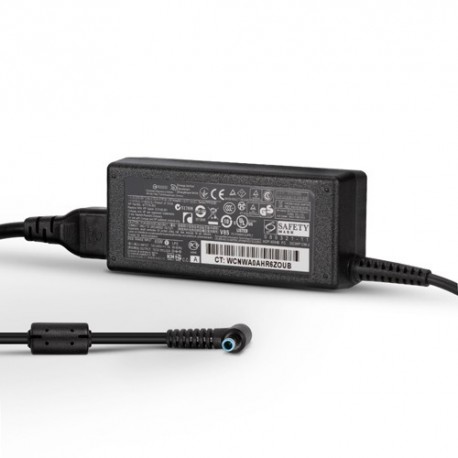
HP 45W Smart AC Adapter Charger
Correct voltage/amp and connector are essential when ruling out charger issues or replacing a lost adapter.

HP 800513-001 CS03XL Battery
Popular 46Wh internal pack (CS03XL family). Check listing for supported EliteBook/ProBook models.
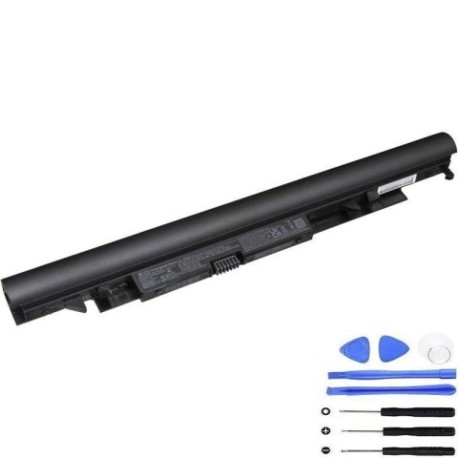
HP 919700-850 JC04 Battery
Widely used 41.6Wh battery for mainstream HP 14/15 series. Confirm exact sub-model before purchase.
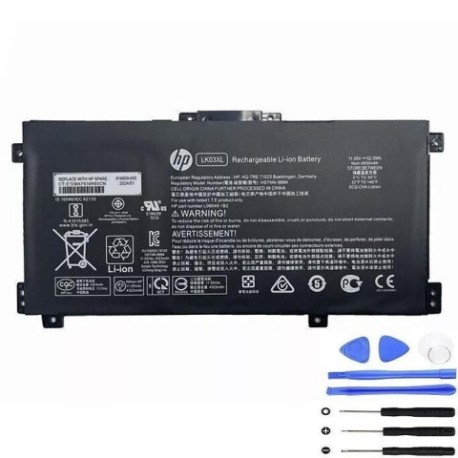
HP L09281-855 LK03XL Battery
52.5Wh internal pack for many thin-and-light HP models. Compare connector and footprint on the product page.
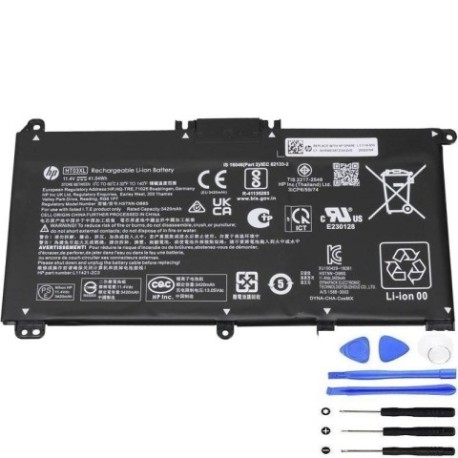
HP L11119-855 HT03XL Battery
Common 41.04Wh pack for many Pavilion/15-series units. Match by HT03XL code and layout.
HP Battery FAQs
- How much does it cost to replace an HP battery?
- Cost depends on Wh/cell count, battery family (HT03XL/LK03XL/JC04/CS03XL), OEM vs compatible, and labor if you don’t DIY. Compare Wh, warranty, and returns when shopping.
- Can you replace an HP battery yourself?
- Yes for most models. External packs are simple; internal packs require careful disassembly. If the battery is swollen or you’re unsure, use a professional.
- What are signs of a failing HP battery?
- Short runtime, sudden shutdowns, health marked “Replace/Weak”, charging anomalies, or swelling.
- What is the average lifespan of an HP laptop battery?
- Varies by usage and temperature. Many packs maintain good capacity for a few hundred cycles; heavy use or heat accelerates wear.
- Main causes of HP battery failure?
- Cycle wear, heat, deep discharges, prolonged high charge voltage, and storage at high temperature or 100% for extended periods.
- One of the first indications of a failing HP battery?
- Noticeable runtime drop and faster percentage swings under light load.
- How to diagnose a failing HP battery?
- Run Windows Battery Report and HP diagnostics; compare Full Charge Capacity vs Design Capacity; perform a controlled runtime test.
- How to tell if a battery is not holding charge?
- If the percentage plunges under light load or FFC is far below design, the pack isn’t retaining energy well.
- What can be mistaken for a bad battery?
- Faulty charger/DC jack, outdated BIOS, heavy background tasks, or thermal issues.
- HP Battery Check?
- Use HP’s tools to run a health test. Results like “Replace” or “Weak” indicate you should plan a new battery.
- HP battery size?
- Look at Wh (e.g., 41.0, 46, 52.5Wh) and cell count (3-cell vs 4-cell). Match the family code and physical layout.
- HP laptop battery Finder (by serial number)?
- On HP’s support site, enter your serial to view parts information and identify the correct battery family for your exact unit.
Compatibility Note
This guide references battery families such as HT03XL, LK03XL, JC04, and CS03XL. Product names and codes are for identification; items are compatible replacements unless explicitly described as original OEM on their pages. Always verify photos, connector, and fitment against your existing part.