Asus C21 X202 38Wh Battery Replacement: Complete Guide for Australian & New Zealand Users
If your Asus VivoBook is struggling to hold a charge or showing battery warning signs, this comprehensive guide covers everything you need to know about the C21 X202 38Wh replacement battery. We’ll help you verify compatibility, understand when to replace, and provide expert installation guidance specifically for AU/NZ consumers.
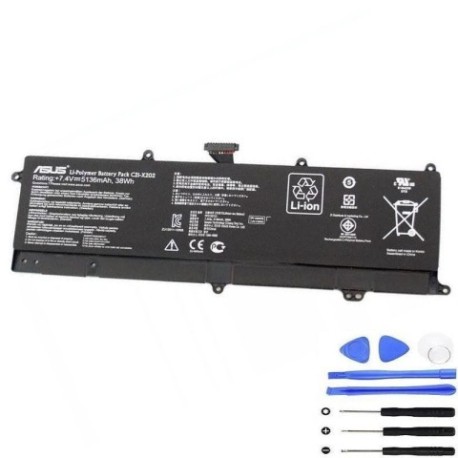
Battery models & part numbers
| Reference / P/N |
|---|
| 0B200-00230000 |
| 0B200-00230100 |
| 0B200-00230200 |
| 0B200-00230300 |
| 0B200-00230300M |
| Asus-C21-X202-38Wh |
| PGF6354B3A |
Compatible models
| Model |
|---|
| Asus VivoBook F202E |
| Asus VivoBook Q200 |
| Asus VivoBook Q200E |
| Asus VivoBook S200 |
| Asus VivoBook S200E |
| Asus VivoBook X201E |
| Asus VivoBook X202E |
Common signs you need a replacement
| Symptoms | Causes | Verification | Recommendation |
|---|---|---|---|
| Battery drains in under 1 hour | Ageing cells, reduced capacity | Check Windows battery report | Replace if capacity below 60% |
| Laptop shuts down unexpectedly | Voltage drops under load | Monitor battery health in BIOS | Immediate replacement needed |
| Battery won’t charge past 80% | Protection circuit failure | Test with different charger | Replace battery module |
| Battery swelling or bulging | Gas buildup from degradation | Visual inspection, feel for bumps | Replace immediately – safety risk |
| Overheating during charging | Internal resistance increase | Check temperature with software | Replace to prevent damage |
How to check compatibility
Before purchasing any replacement battery for your Asus VivoBook, proper compatibility verification is essential. Start by locating your laptop’s model number, typically found on the bottom casing sticker or in the system information. For VivoBook models, you can access detailed specifications through the Asus support website by entering your serial number. The C21 X202 38Wh battery is specifically designed for the 11.6-inch VivoBook series from 2012-2014, featuring the distinctive wedge-shaped design. Cross-reference the part numbers listed above with your current battery’s markings. If you’re unsure, authorised Asus service centres in Australia and New Zealand can provide definitive compatibility confirmation using their internal databases.
When to replace your battery
Lithium-ion batteries in laptops like the VivoBook series typically maintain optimal performance for 2-3 years under normal usage conditions. After this period, gradual capacity loss is expected. Consider replacement when your battery health drops below 70% of original capacity, or if you notice significant runtime reduction affecting your daily workflow. Australian climate conditions, particularly in warmer regions, can accelerate battery degradation, so monitor performance closely if you frequently use your laptop in temperatures above 35°C. The C21 X202 38Wh replacement restores your VivoBook to its original 4-6 hour runtime, depending on usage patterns and power settings.
Installation guide
Replacing the battery in your Asus VivoBook is straightforward with proper preparation. First, ensure you have a clean, static-free workspace and the correct tools – typically a small Phillips screwdriver. Power down the laptop completely and disconnect the AC adapter. Flip the device over and locate the battery compartment. For most VivoBook models compatible with the C21 X202 38Wh, you’ll need to remove several screws securing the bottom panel. Carefully lift the panel to access the internal battery connector. Gently disconnect the battery cable from the motherboard, noting the orientation for reinstallation. Remove any screws securing the battery itself, then lift it out. Position your new C21 X202 38Wh battery, secure it with screws, reconnect the cable, and replace the bottom panel. The entire process should take 15-20 minutes for most users.
Usage & care tips
Maximise your new C21 X202 38Wh battery’s lifespan with these expert recommendations. Avoid frequent full discharges – instead, keep your battery between 20-80% charge for daily use. Extreme temperatures are the enemy of lithium-ion batteries; never leave your VivoBook in a hot car or direct sunlight. When using your laptop plugged in for extended periods, consider enabling Asus Battery Health Charging in the MyASUS software to limit maximum charge to 80-90%. Calibrate your battery monthly by allowing a full discharge followed by a complete uninterrupted charge. Store your laptop in cool, dry conditions when not in use, ideally between 15-25°C. These practices will help maintain your battery’s health throughout its service life.
Safety & recycling in AU/NZ
Battery safety is paramount when handling replacements. Never attempt to open or modify the C21 X202 38Wh battery casing, as this can cause short circuits or thermal runaway. If you notice any swelling, leaking, or unusual odours, discontinue use immediately and contact professional disposal services. In Australia and New Zealand, lithium-ion batteries must be recycled responsibly through authorised collection points. Major retailers like Officeworks, JB Hi-Fi, and Battery World offer free battery recycling services. Never dispose of laptop batteries in household waste, as they contain hazardous materials and can cause fires in landfill. Proper recycling helps recover valuable materials and prevents environmental contamination.
FAQ
How long does the C21 X202 38Wh battery typically last?
The original C21 X202 38Wh battery provides approximately 4-6 hours of typical usage. Our replacement batteries undergo rigorous testing to match or exceed original specifications, with most users reporting 4-5 hours of real-world usage depending on screen brightness, applications running, and wireless connectivity usage.
Will this battery work with my VivoBook if it has a different part number?
Yes, the C21 X202 38Wh is designed as a universal replacement for multiple part numbers across the VivoBook series. The compatibility list above includes all verified part numbers that this battery replaces. The electrical specifications, physical dimensions, and connector type are identical across these variants.
How can I verify this is a genuine replacement battery?
Genuine C21 X202 38Wh replacement batteries feature precise weight (approximately 220g), correct labelling with safety certifications, and proper connector alignment. Our suppliers provide documentation verifying OEM compatibility. The battery should seamlessly integrate with your VivoBook’s power management system without compatibility warnings.
What warranty comes with the replacement battery?
Our C21 X202 38Wh replacement batteries include a 12-month warranty covering manufacturing defects and premature capacity loss. The warranty is valid throughout Australia and New Zealand, with support provided through our local service network. Keep your purchase receipt for warranty claims.
Can I install this battery myself, or do I need professional help?
Most VivoBook owners can successfully install the C21 X202 38Wh battery themselves by following our detailed guide. The process requires basic technical competence but doesn’t involve complex disassembly. If you’re uncomfortable with the installation, authorised Asus service centres throughout AU/NZ can perform the replacement typically for a reasonable service fee.
How do I dispose of my old VivoBook battery safely?
Never dispose of lithium-ion batteries in regular household waste. In Australia, take your old battery to any Officeworks, Battery World, or council e-waste collection point. In New Zealand, PlaceMakers, Mitre 10, and most council transfer stations accept batteries for recycling. These services are typically free for consumers.
What if my VivoBook still doesn’t hold charge after replacement?
If battery issues persist after installing the C21 X202 38Wh replacement, the problem may lie elsewhere. Check your AC adapter output, motherboard power circuitry, or operating system power settings. Sometimes, a BIOS update or power management reset resolves lingering issues. Our support team can help diagnose these less common scenarios.
Restoring your Asus VivoBook’s battery life with the genuine C21 X202 38Wh replacement brings back the portability and convenience you originally enjoyed. With proper installation and care, your laptop will provide reliable performance for years to come. Don’t let battery anxiety limit your productivity – take action today and rediscover the freedom of untethered computing.