ASUS C31N1636 47Wh Laptop Battery Replacement Guide
If your ASUS laptop is struggling to hold charge or showing battery warning signs, our comprehensive guide helps Australian and New Zealand users find the right replacement battery and installation advice.
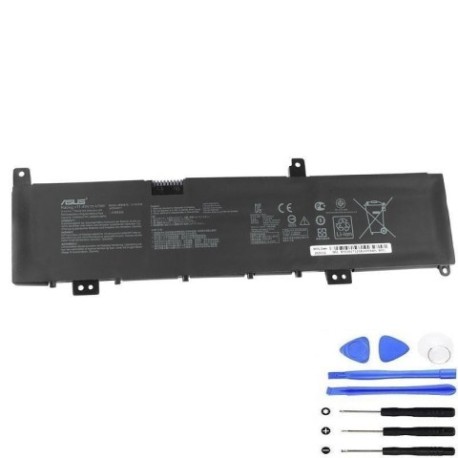
Battery models & part numbers
| Reference / P/N |
|---|
| 0B200-02580000 |
| 0B200-02580100 |
| 0B200-02580200 |
| Asus-C31N1636-47Wh |
| C31PnCH |
Compatible models
| Model |
|---|
| Asus VivoBook Pro 15 N580GD |
| Asus VivoBook Pro 15 N580VD |
| Asus VivoBook Pro X580VD |
| Asus VivoBook Pro X580VN |
| Asus X580GD |
| Asus ZenBook Pro 15 UX580GD |
Introduction
The ASUS C31N1636 47Wh battery is a high-quality replacement power source designed specifically for ASUS VivoBook Pro and ZenBook Pro 15-inch models. This lithium-ion battery provides reliable performance and extended usage time, making it an essential component for professionals, students, and creative users across Australia and New Zealand who depend on their laptops for daily productivity.
Common signs you need a replacement
| Symptom | Cause | Verification | Recommendation |
|---|---|---|---|
| Rapid power drain | Battery degradation over 2+ years | Check battery health in Windows settings | Replace if capacity below 60% |
| Laptop won’t start on battery | Complete battery failure | Test with power adapter only | Immediate replacement needed |
| Battery swelling | Internal chemical breakdown | Visual inspection of battery compartment | Stop using immediately and replace |
| Inconsistent charging | Faulty battery cells or circuitry | Monitor charging percentage changes | Replace to prevent damage |
| Overheating during use | Inefficient battery operation | Check temperature with monitoring software | Replace for safety and performance |
How to check compatibility
Finding your exact ASUS laptop model is crucial for battery compatibility. Look for the model number on the bottom case sticker, typically near the serial number and regulatory markings. For VivoBook Pro and ZenBook Pro models, the identification is usually clearly marked. You can also check within Windows by pressing Windows Key + R, typing “msinfo32”, and looking under System Model. ASUS provides official support tools on their website where you can enter your serial number to verify exact specifications. Always cross-reference with our compatibility tables above to ensure perfect fit.
When to replace
Most ASUS laptop batteries last 2-3 years with regular use before showing significant degradation. Consider replacement when your battery health drops below 70% of original capacity, when you experience sudden shutdowns at 20-30% charge, or if your laptop becomes unreliable for mobile use. For professional users in Australia and New Zealand who travel frequently or work remotely, maintaining optimal battery performance is essential for productivity.
Installation guide
Replacing the battery in your ASUS VivoBook Pro or ZenBook Pro requires careful preparation. First, ensure you have the correct replacement battery (refer to compatibility tables above), a Phillips head screwdriver, and an anti-static wrist strap. Power down your laptop completely and disconnect the AC adapter. Remove the bottom cover by unscrewing all visible screws – note that some may be hidden under rubber feet. Once opened, locate the battery connector and gently disconnect it from the motherboard. Remove any screws securing the battery, then lift it out carefully. Install the new C31N1636 battery in reverse order, ensuring all connections are secure before reassembling.
Usage & care tips
To maximise your new ASUS battery’s lifespan, avoid frequent full discharges – instead, keep it between 20-80% charge when possible. Don’t leave your laptop plugged in constantly at 100% charge, as this stresses the battery. Store your laptop in temperatures between 10°C and 35°C, avoiding extreme heat or cold. For Australian summer conditions, never leave your laptop in a hot car. Calibrate your new battery by charging to 100%, then discharging to about 5% before recharging completely – repeat this monthly for accurate battery reporting.
Safety & recycling in AU/NZ
Lithium-ion batteries require proper handling and disposal. In Australia, check with your local council for battery recycling programmes – many Officeworks and Battery World stores accept used laptop batteries. In New Zealand, most transfer stations and some electronics retailers provide battery recycling services. Never dispose of laptop batteries in household waste due to fire risk. If your battery shows signs of swelling, damage, or overheating, place it in a fire-proof container and contact professional disposal services immediately.
FAQ
How long does the ASUS C31N1636 battery typically last?
With normal use, expect 2-3 years before significant capacity loss, or approximately 500 full charge cycles.
Will this battery work with my ASUS laptop if it’s not in the compatibility list?
No, only use batteries specifically designed for your model to avoid damage and safety risks.
How do I check my current battery’s health in Windows?
Open Command Prompt as administrator and type “powercfg /batteryreport” to generate a detailed battery health report.
Can I replace the battery myself or should I seek professional help?
Most ASUS laptops allow user-replaceable batteries, but if you’re uncomfortable with electronics, authorised ASUS service centres in major Australian and New Zealand cities can assist.
What warranty comes with this replacement battery?
Quality replacement batteries typically include 12-month warranties covering manufacturing defects.
How long does installation typically take?
For experienced users, 15-30 minutes; beginners may take 45-60 minutes working carefully.
Will replacing the battery void my ASUS warranty?
If your original warranty is still active, check terms – some manufacturers allow user-replaceable components without voiding warranty.