Lenovo L17D2P31 35.8Wh Battery Replacement Guide
Find the perfect replacement battery for your Lenovo laptop with our comprehensive compatibility guide for Australian and New Zealand consumers.
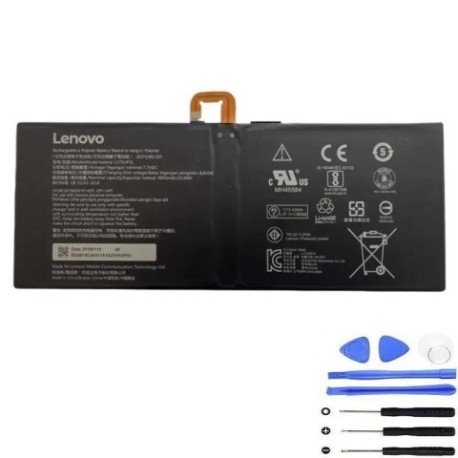
Battery models & part numbers
| Reference / P/N |
|---|
| Lenovo-L17D2P31-35.8Wh |
Compatible laptop models
| Model |
|---|
| Lenovo SB18C21784 |
| Lenovo SB18C21785 |
| Lenovo SB18C46557 |
| Lenovo Yoga Book C930 (ZA3S/ZA3T) |
Introduction
Welcome to your complete guide for replacing the Lenovo L17D2P31 35.8Wh battery. This high-quality replacement ensures your compatible Lenovo laptop maintains optimal performance and mobility.
Common signs you need a replacement
| Symptoms | Causes | Verification | Recommendation |
|---|---|---|---|
| Battery drains quickly | Ageing cells, reduced capacity | Check battery health in system settings | Replace if capacity below 60% |
| Laptop won’t hold charge | Failed battery cells | Test with power adapter removed | Immediate replacement needed |
| Battery swelling | Internal damage, safety hazard | Visual inspection, case bulging | Replace immediately, do not use |
| Overheating during use | Inefficient battery operation | Monitor temperature, check vents | Replace to prevent damage |
How to check compatibility
Verify your laptop model matches our compatibility list above. Check your laptop’s bottom label or system information for exact model numbers. The Lenovo L17D2P31 battery is specifically designed for the listed models to ensure perfect fit and performance.
When to replace
Replace your battery when you notice significant performance decline, typically after 2-3 years of regular use. Look for reduced runtime, charging issues, or physical changes like swelling. Regular replacement maintains your laptop’s portability and prevents potential damage.
Installation guide (overview)
Power off your laptop and disconnect all cables. Remove the bottom panel using appropriate screwdrivers. Carefully disconnect the old battery connector and remove any securing screws. Install the new Lenovo L17D2P31 battery, reconnect the connector, and reassemble. Always consult your device’s service manual for detailed instructions.
Usage & care tips
For optimal battery life, avoid extreme temperatures (ideal range 15-25°C). Don’t leave your laptop plugged in constantly – occasional discharge cycles help maintain battery health. Store in cool, dry conditions when not in use for extended periods. Regular calibration (full discharge/charge cycle) every 2-3 months maintains accurate battery reporting.
Safety & recycling in AU/NZ
In Australia and New Zealand, lithium-ion batteries must be recycled responsibly. Never dispose of batteries in household waste. Use authorised battery recycling centres available at most electronics retailers. Damaged or swollen batteries should be handled with care and recycled immediately to prevent safety hazards.
FAQ
How long does the Lenovo L17D2P31 battery last?
Typically 2-4 hours depending on usage and laptop model. High-performance tasks will reduce runtime.
Is this battery genuine Lenovo?
This is a high-quality replacement battery designed to meet or exceed original specifications.
Do you provide warranty?
Yes, our batteries come with comprehensive warranty coverage for peace of mind.
How do I recycle my old battery?
Take it to any authorised battery recycling centre in Australia or New Zealand – most electronics stores offer this service.
Will this battery work with my specific laptop model?
Check the compatibility table above – if your model is listed, it’s fully compatible.
How long does shipping take in AU/NZ?
Typically 3-7 business days depending on your location within Australia or New Zealand.
What if the battery doesn’t fit?
We offer returns for incompatible products – always verify your model number before purchasing.