Battery models & part numbers
| Reference / P/N |
|---|
| Sony VGP-BPL34 |
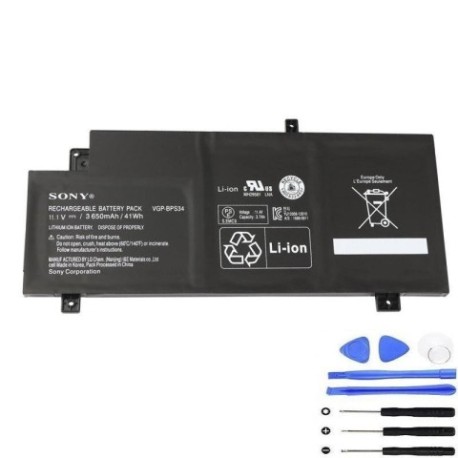
| Sony VGP-BPS34(S) |
| Sony-VGP-BPS34-41Wh |
Compatible laptop models
| Model |
|---|
| Sony Vaio Fit 14 SVF14A |
| Sony Vaio Fit 15 SVF15A |
| Sony Vaio SVF14A15STB |
| Sony Vaio SVF14A15STP |
| Sony Vaio SVF14A15STS |
| Sony Vaio SVF15A1ACXB |
| Sony Vaio SVF15A1ACXS |
| Sony Vaio SVF15A1BCXB |
| Sony Vaio SVF15A1BCXS |
| Sony Vaio SVF15A1CCXB |
| Sony Vaio SVF15A1DPXB |
Introduction
If your Sony Vaio laptop is showing signs of battery fatigue, our genuine replacement battery restores optimal performance. This 41Wh battery is authorised for multiple Vaio models across the Fit series.
Common signs you need a replacement
| Symptoms | Causes | Verification | Recommendation |
|---|---|---|---|
| Battery drains quickly | Ageing cells | Check power settings | Consider replacement |
| Laptop shuts down unexpectedly | Voltage drops | Monitor battery health | Replace battery |
| Battery won’t hold charge | Degraded capacity | Run diagnostic tools | Install new battery |
| Swelling or overheating | Internal damage | Visual inspection | Replace immediately |
How to check compatibility
Verify your laptop model matches our compatibility list above. Check your current battery’s part number (usually printed on the battery) against our reference numbers. For Sony Vaio models, compatibility is confirmed for all listed variants.
When to replace
Replace your battery when runtime drops below 50% of original capacity, or if you notice physical swelling. In AU/NZ’s varying climates, battery lifespan typically ranges 2-3 years with regular use.
Installation guide (overview)
Power off your laptop and disconnect the charger. Remove the battery compartment cover (usually secured with screws). Carefully disconnect the old battery and insert the replacement, ensuring proper alignment. Secure the cover and charge fully before first use.
Usage & care tips
For optimal battery life: avoid extreme temperatures (ideal range 15-25°C), calibrate monthly by fully draining then charging, and store with 40-60% charge if unused. Use only authorised Sony chargers.
Safety & recycling in AU/NZ
Never disassemble batteries. Dispose of old batteries at authorised recycling centres – most electronics retailers offer free battery recycling services. In Australia, check B-cycle programmes; in New Zealand, use recognised e-waste facilities.
FAQ
How long does delivery take in Australia?
Typically 3-7 business days for metro areas.
Is this battery genuine Sony?
Yes, all our batteries are authorised replacements with original specifications.
What warranty do you offer?
12-month warranty covering manufacturing defects.
Can I use this battery with newer Vaio models?
Only compatible with models listed in our compatibility table.
How do I recycle my old battery?
Drop at any participating electronics retailer or recycling centre.
What if my model isn’t listed?
Contact our support team with your laptop’s exact model number.
Is installation difficult?
Most users can install in 5-10 minutes following our guide.