ASUS B31N1729 42Wh Laptop Battery Replacement Guide
If your ASUS laptop is struggling to hold charge or showing battery warning signs, our comprehensive guide helps you identify compatibility and replacement options for Australian and New Zealand users.
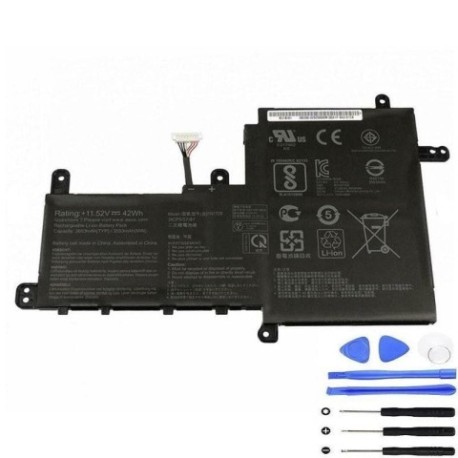
Battery models & part numbers
| Reference / P/N |
|---|
| 0B200-02920000 |
| Asus-B31N1729-42Wh |
Compatible models
| Model |
|---|
| Asus K530FF |
| Asus K530FN |
| Asus P1502FF |
| Asus S5300FF |
| Asus S5300UN |
| Asus S530FF |
| Asus S530FN |
| Asus S530UA |
| Asus S530UF |
| Asus S530UN |
| Asus V530FF |
| Asus VivoBook S15 K530FN |
| Asus VivoBook S15 S530 |
| Asus VivoBook S15 S530FA |
| Asus VivoBook S15 S530FN |
| Asus VivoBook S15 S530U |
| Asus VivoBook S15 S530UA |
| Asus VivoBook S15 S530UF |
| Asus VivoBook S15 S530UN |
| Asus VivoBook S15 X530FA |
| Asus VivoBook S15 X530FN |
| Asus VivoBook S15 X530UA |
| Asus VivoBook S15 X530UF |
| Asus VivoBook S15 X530UN |
| Asus X530 |
| Asus X530FA |
| Asus X530FF |
| Asus X530FN |
| Asus X530UA |
| Asus X530UF |
| Asus X530UN |
Introduction
The ASUS B31N1729 42Wh battery serves as a reliable power source for numerous ASUS VivoBook and X Series laptops popular in the Australian and New Zealand markets. This lithium-ion battery provides consistent performance for daily computing tasks, from university assignments to professional work. Understanding when and how to replace your laptop battery can significantly extend your device’s lifespan and maintain optimal performance.
Common signs you need a replacement
| Symptom | Cause | Verification | Recommendation |
|---|---|---|---|
| Rapid power drain | Reduced battery capacity | Check battery health in Windows | Consider replacement if below 60% capacity |
| Laptop won’t charge | Battery circuit failure | Try different power adapter | Replace battery if adapter works |
| Battery swelling | Internal chemical degradation | Visual inspection of battery compartment | Immediate replacement required |
| Overheating during use | Inefficient power delivery | Monitor temperature with software | Replace if consistently above 45°C |
| Random shutdowns | Voltage instability | Check event viewer for power errors | Battery replacement recommended |
How to check compatibility
Before purchasing a replacement battery for your ASUS laptop, proper compatibility verification is essential. Start by locating your laptop’s model number, typically found on the bottom casing, beneath the battery, or in the system information. For ASUS VivoBook and X Series models, the model number usually begins with letters like K, S, V, or X followed by numbers. You can also check through Windows System Information or ASUS official support tools available on their website. Cross-reference your model with our compatibility list above, and remember that part numbers 0B200-02920000 and Asus-B31N1729-42Wh are interchangeable for these compatible models.
When to replace
Laptop batteries typically last 2-4 years with regular use. Consider replacement when your battery health drops below 70% of original capacity, when you experience significant runtime reduction affecting your daily workflow, or if safety concerns like swelling occur. For Australian and New Zealand users dealing with varying climate conditions, batteries may degrade faster in warmer regions, so monitor performance regularly.
Installation guide
Replacing the battery in compatible ASUS models is generally straightforward. Begin by powering off the laptop and disconnecting all cables. Place the laptop upside down on a soft, clean surface. For most VivoBook S15 and X Series models, you’ll need to remove the bottom panel by unscrewing the visible screws. Some models may have specific battery release mechanisms – consult your user manual for model-specific instructions. Once the compartment is accessible, carefully disconnect the battery connector from the motherboard, remove any securing screws or brackets, and lift the battery out. Install the new ASUS B31N1729 battery by reversing this process, ensuring all connections are secure before reassembling.
Usage & care tips
To maximise your new battery’s lifespan, avoid frequent full discharges and instead perform partial discharges with periodic full cycles. Ideal storage temperature ranges between 15-25°C, and avoid leaving your laptop in hot cars or direct sunlight. For Australian summer conditions, never charge your laptop in temperatures exceeding 35°C. Calibrate your battery monthly by allowing it to discharge fully then charging to 100% uninterrupted. Use power-saving modes when on battery power and adjust screen brightness to extend runtime.
Safety & recycling in AU/NZ
Battery safety is paramount. Never attempt to open or modify lithium-ion batteries, and avoid exposing them to extreme temperatures or moisture. In Australia and New Zealand, laptop batteries must be recycled through authorised e-waste programmes. Most electronics retailers offer free battery recycling services, and local council waste centres provide dedicated battery disposal facilities. Never dispose of batteries in household rubbish due to fire risk and environmental concerns.
FAQ
How long does the ASUS B31N1729 battery typically last?
With normal use, expect 3-5 hours depending on your laptop model and usage patterns. Higher-performance tasks will reduce runtime.
Is this battery compatible with both Australian and New Zealand voltage standards?
Yes, the battery works with standard AU/NZ power adapters and voltage ranges of 100-240V.
Can I replace the battery myself or should I seek professional help?
Most compatible ASUS models allow user-replaceable batteries, but if you’re uncomfortable with the process, authorised service centres throughout Australia and New Zealand can assist.
How do I know if my battery is genuine ASUS?
Genuine batteries feature proper branding, correct part numbers, and come from authorised retailers. Check for authentication stickers and purchase from reputable suppliers.
What warranty comes with this battery?
Genuine ASUS batteries typically carry a 12-month warranty, while third-party alternatives may offer 6-24 months depending on the supplier.
Will replacing the battery void my laptop warranty?
In Australia and New Zealand, replacing the battery yourself shouldn’t void your overall laptop warranty, but any damage caused during installation may not be covered.
How should I store my old battery before recycling?
Store in a cool, dry place with terminals covered to prevent short circuits, and take to a recycling centre within 2-3 months.