Lenovo L15L3A02 24Wh Battery Replacement Guide
Find the right replacement battery for your Lenovo laptop in Australia and New Zealand. This 24Wh battery is compatible with multiple IdeaPad and V-series models.
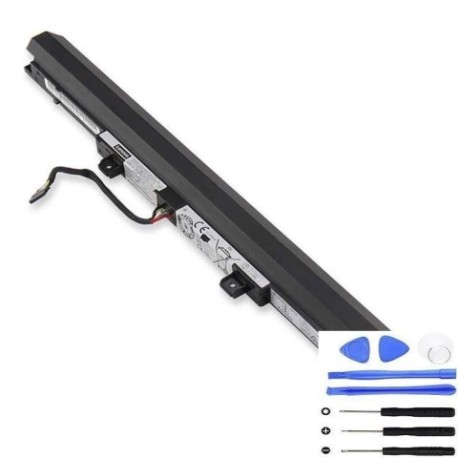
Battery models & part numbers
| Reference / P/N |
|---|
| 5B10L04161 |
| 5B10L04165 |
| 5B10L04214 |
| L15C3A01 |
| L15C4A02 |
| L15C4E01 |
| L15D3A01 |
| L15L3A01 |
| L15L4A02 |
| L15L4E02 |
| L15S3A01 |
| L15S4A02 |
| L15S4E02 |
| Lenovo-L15L3A02-24Wh |
Compatible laptop models
| Model |
|---|
| Lenovo IdeaPad V110 |
| Lenovo IdeaPad V110-14IAP (80TF) |
| Lenovo V110-14AST (80TC) |
| Lenovo V110-14ISK |
| Lenovo V110-15AST (80TD) |
| Lenovo V110-15IAP (80TG) |
| Lenovo V110-15ISK |
| Lenovo V310-14IKB |
| Lenovo V310-14ISK |
| Lenovo V310-15IKB |
| Lenovo V310-15ISK |
| Lenovo V510-14IKB |
| Lenovo V510-15IKB |
Introduction
This guide helps Australian and New Zealand consumers identify compatible replacement batteries for their Lenovo laptops. The Lenovo L15L3A02 24Wh battery is an authorised replacement part that ensures optimal performance.
Common signs you need a replacement
| Symptom | Cause | Verification | Recommendation |
|---|---|---|---|
| Short battery life | Ageing cells | Check power settings | Replace battery |
| Laptop won’t charge | Faulty battery | Try different power point | Test with multimeter |
| Battery swelling | Internal damage | Visual inspection | Replace immediately |
| Overheating | Poor ventilation | Check temperature | Clean vents |
How to check compatibility
Check your laptop’s model number on the bottom case or in system information. Compare it with our compatible models list above. Ensure the physical dimensions match (approximately 210mm x 50mm x 20mm).
When to replace
Replace your battery when it holds less than 50% of its original capacity, shows physical damage, or causes system errors. Most laptop batteries last 2-3 years with regular use.
Installation guide (overview)
1. Power off and unplug your laptop. 2. Remove the bottom cover screws. 3. Disconnect the old battery connector. 4. Remove the old battery. 5. Install the new battery and reconnect. 6. Replace the cover and power on.
Usage & care tips
Avoid extreme temperatures (ideal range 10°C to 35°C). Don’t leave your laptop plugged in constantly. Calibrate your battery monthly by fully charging and discharging. Store in a cool, dry place when not in use.
Safety & recycling in AU/NZ
Never disassemble lithium-ion batteries. In Australia, recycle through Batteryback or council e-waste programmes. In New Zealand, use accredited e-waste recyclers. Damaged batteries should be handled by professionals.
FAQ
How long does delivery take in Australia?
Most orders arrive within 3-7 business days to metro areas.
Is this battery genuine Lenovo?
This is a compatible replacement battery meeting original specifications.
What’s the warranty period?
Typically 12 months from purchase date.
Can I install it myself?
Yes, with basic technical skills and proper tools.
How do I dispose of my old battery?
Take it to an authorised e-waste recycling centre.
Will this work with my V110-15ISK?
Yes, it’s specifically compatible as listed.
What if my laptop model isn’t listed?
Contact the supplier with your exact model number for verification.