Asus A41N1702 44.4Wh Laptop Battery Replacement Guide
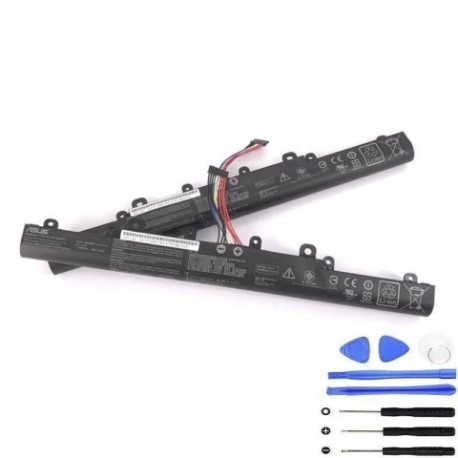
Introduction
If you’re experiencing battery issues with your Asus laptop, you’re not alone. The Asus A41N1702 44.4Wh battery is a common replacement part for several popular Asus models across Australia and New Zealand. This comprehensive guide will help you understand when you need a replacement, how to verify compatibility with your specific model, and provide step-by-step installation instructions. Whether you’re a busy professional relying on your laptop for work or a student needing reliable power for studies, maintaining optimal battery health is crucial for productivity.
Battery models & part numbers
| Reference / P/N |
|---|
| Asus-A41N1702-44.4Wh |
Compatible models
| Model |
|---|
| Asus 0B110-00480000 |
| Asus P1440 |
| Asus P1440U |
| Asus P1440UA |
| Asus P1440UF |
| Asus PRO 434 |
| Asus PRO 434UA |
| Asus PRO 434UF |
| Asus PRO P1440UF |
| Asus PX434 |
| Asus PX434U |
| Asus PX434UF |
Common signs you need a replacement
| Symptoms | Causes | Verification | Recommendation |
|---|---|---|---|
| Battery drains quickly (less than 1 hour) | Ageing cells, reduced capacity | Check battery health in Windows Power Options | Consider replacement if capacity below 60% |
| Laptop won’t hold charge | Failed battery cells | Test with different power outlet | Immediate replacement needed |
| Battery swelling or bulging | Gas buildup from chemical reactions | Visual inspection, uneven surface | Stop using immediately – safety hazard |
| Overheating during charging | Internal short circuits | Monitor temperature with software | Replace to prevent damage to laptop |
| Laptop shuts down unexpectedly | Voltage drops under load | Check event viewer for power events | Replace battery to restore reliability |
How to check compatibility
Finding your exact Asus model number is the first step to ensuring compatibility. For Asus laptops in the P1440, PRO 434, and PX434 series, you can locate your model information in several ways. The most reliable method is to check the label on the bottom of your laptop – look for text that includes “Model:” followed by your specific model number. You can also access system information through Windows by pressing Windows Key + R, typing “msinfo32”, and checking the System Model field. Asus provides official support tools on their website where you can enter your serial number to verify exact specifications. Remember that even within the same series (like P1440), different suffixes (U, UA, UF) indicate variations in specifications, so matching your exact model is crucial for proper fit and performance.
When to replace
Lithium-ion batteries like the A41N1702 typically last 2-3 years with regular use, or 300-500 charge cycles. The Australian climate can accelerate battery degradation, especially in warmer regions where high temperatures above 35°C are common. If your battery capacity has dropped below 60% of its original specification, it’s time to consider replacement. For business users in AU/NZ who rely on their Asus laptops for mobile work, replacing the battery before complete failure prevents unexpected downtime. The 44.4Wh capacity provides approximately 4-6 hours of typical usage for compatible models, so if you’re consistently getting less than 2 hours, replacement will restore your mobility.
Installation guide
Replacing the A41N1702 battery in your Asus laptop is straightforward with proper preparation. First, ensure you have the right tools – typically a Phillips #00 screwdriver and a plastic spudger. Begin by shutting down your laptop completely and disconnecting the AC adapter. Turn the laptop over and locate the battery compartment. For most compatible models, you’ll need to remove several screws securing the battery cover. Carefully lift the cover and disconnect the battery connector from the motherboard – never pull on the wires directly. Remove any screws securing the battery itself, then lift it out. Install the new A41N1702 battery by reversing the process, ensuring all connections are secure. Many users in Australia and New Zealand find this a 15-20 minute process that requires minimal technical skill.
Usage & care tips
To maximise the lifespan of your new A41N1702 battery, follow these best practices tailored for AU/NZ conditions. Avoid exposing your laptop to extreme temperatures – don’t leave it in a hot car during Australian summers where interior temperatures can exceed 60°C. Ideal operating temperature is between 10°C and 35°C. For optimal battery health, maintain charge levels between 20% and 80% for daily use rather than constantly charging to 100%. If you’re using your laptop primarily as a desktop replacement, consider removing the battery and running on AC power when possible. Calibrate your battery monthly by charging to 100%, then discharging completely and recharging. This helps the battery management system accurately report remaining capacity.
Safety & recycling in AU/NZ
Battery safety is particularly important in Australia and New Zealand’s varied climates. Never attempt to open or modify the A41N1702 battery – internal components are under pressure and can be hazardous. If you notice any swelling, overheating, or unusual odours, discontinue use immediately and contact a professional. When your old battery reaches end of life, don’t dispose of it with regular household waste. In Australia, most council waste transfer stations accept e-waste including laptop batteries for free. Major retailers like Officeworks and JB Hi-Fi also provide battery recycling services. In New Zealand, check with your local council for e-waste collection days or use services like Computer Recycling who properly handle lithium-ion batteries. Proper recycling prevents environmental contamination and allows valuable materials to be recovered.
FAQ
How long does the A41N1702 battery typically last?
The A41N1702 44.4Wh battery typically provides 4-6 hours of usage for compatible Asus models under normal conditions. Actual runtime depends on your specific usage patterns, screen brightness, and applications running. With proper care, the battery should maintain good performance for 2-3 years before significant capacity loss occurs.
Will this battery work with my Asus laptop if it’s not listed in compatible models?
We strongly recommend against using the A41N1702 with unlisted models. While some Asus laptops may share similar physical dimensions, electrical specifications including voltage, connector type, and communication protocols can vary. Using an incompatible battery could damage your laptop or present safety risks.
How do I know if my current battery needs replacement?
Several indicators suggest replacement is needed: runtime has significantly decreased (less than 1 hour), the battery doesn’t hold charge, your laptop shuts down unexpectedly when unplugged, or physical swelling is visible. You can also check battery health through Windows Battery Report (run “powercfg /batteryreport” in Command Prompt).
Is the A41N1702 battery genuine Asus or compatible?
The A41N1702 batteries we supply are high-quality compatible replacements that meet or exceed original specifications. They’re manufactured to the same standards with proper safety certifications. While they’re not sold as genuine Asus parts, they provide equivalent performance and reliability at a more affordable price point for Australian and New Zealand consumers.
What warranty comes with the battery?
Our A41N1702 replacement batteries come with a 12-month warranty covering manufacturing defects and premature failure. This warranty is valid for customers in Australia and New Zealand and provides peace of mind for your investment. Keep your purchase receipt and contact customer service for warranty claims.
Can I replace the battery myself or should I seek professional help?
Most users with basic technical skills can successfully replace the A41N1702 battery themselves by following our installation guide. The process typically requires only a screwdriver and takes 15-30 minutes. However, if you’re uncomfortable with electronics or your laptop is still under manufacturer warranty, consider having the replacement done by an authorised service centre.
How should I store my old battery before recycling?
Store used lithium-ion batteries in a cool, dry place away from direct sunlight. Place electrical tape over the terminals to prevent short circuits. Don’t store multiple used batteries together, and keep them away from flammable materials. Most importantly, recycle them promptly rather than storing indefinitely.