Lenovo 45N1038 44Wh Replacement Battery
Keep your Lenovo ThinkPad running at peak performance with our genuine replacement battery. This 44Wh power solution is designed specifically for T420s and T430s series laptops, ensuring reliable power delivery and extended usage time.
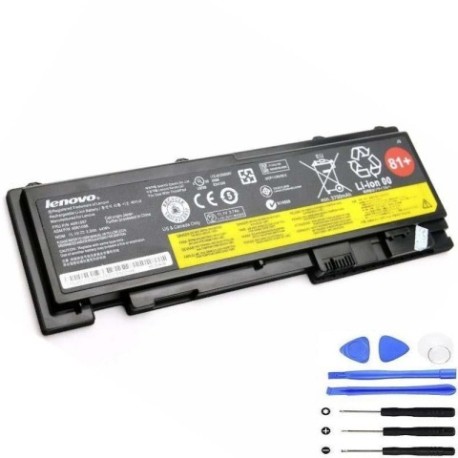
Battery models & part numbers
| Reference / P/N |
|---|
| 0A36287 |
| 0A36309 |
| 42T4844 |
| 42T4845 |
| 42T4846 |
| 42T4847 |
| 45N1036 |
| 45N1037 |
| 45N1038 |
| 45N1039 |
| 45N1065 |
| 45N1067 |
| 45N1143 |
| 66+ 81+ |
| Lenovo-45N1038-44Wh |
Compatible laptop models
| Model |
|---|
| Lenovo ThinkPad T420s |
| Lenovo ThinkPad T420si |
| Lenovo ThinkPad T430s |
| Lenovo ThinkPad T430si |
Introduction
The Lenovo 45N1038 44Wh battery is a high-quality replacement power source for your business laptop. Designed to meet original equipment specifications, this battery provides reliable performance for professionals across Australia and New Zealand who depend on their ThinkPad for daily productivity.
Common signs you need a replacement
| Symptom | Cause | Verification | Recommendation |
|---|---|---|---|
| Battery drains quickly (under 1 hour) | Ageing cells, reduced capacity | Check battery health in Windows Power Options | Replace if capacity below 60% |
| Laptop won’t charge past 80% | Battery protection mode activated | Monitor charging percentage over 2 hours | Replace battery to restore full capacity |
| Battery swelling or bulging | Internal gas buildup, safety hazard | Visual inspection, remove immediately | Replace urgently, recycle properly |
| Overheating during use/charging | Failing cells, internal resistance | Check temperature exceeds 45°C | Replace to prevent damage |
| Random shutdowns at 20-30% | Voltage drops under load | Test under normal workload conditions | Replace for stable performance |
How to check compatibility
Verify your laptop’s compatibility by checking the part number on your current battery. Remove the battery and locate the printed label – match the number with our compatibility list above. Alternatively, use Lenovo’s official support website with your laptop’s serial number for confirmation.
When to replace
Consider replacing your battery when it no longer holds sufficient charge for your work requirements, typically after 2-3 years of regular use. Most lithium-ion batteries maintain about 80% capacity after 300-500 charge cycles. If you’re experiencing frequent power interruptions or your laptop shuts down unexpectedly, it’s time for a replacement.
Installation guide (overview)
Installing your new Lenovo battery is straightforward: (1) Power off your laptop and disconnect the AC adapter, (2) Slide the battery release latches to remove the old battery, (3) Align the new battery with the compartment guides, (4) Press firmly until it clicks into place, (5) Reconnect power and allow initial charge for 4-6 hours. Always refer to your laptop’s user manual for specific instructions.
Usage & care tips
Maximise your battery’s lifespan by avoiding extreme temperatures – ideal operating range is 10°C to 35°C. For optimal performance, perform full discharge cycles monthly and avoid leaving your laptop plugged in constantly. Store in a cool, dry place when not in use for extended periods, maintaining around 50% charge.
Safety & recycling in AU/NZ
In Australia and New Zealand, lithium-ion batteries must be recycled responsibly. Never dispose of batteries in household waste. Use authorised battery recycling centres available at most electronics retailers. Damaged or swollen batteries should be handled with care – place in a fire-proof container and take to a dedicated recycling facility immediately.
FAQ
How long does shipping take within Australia?
Most orders are processed within 1-2 business days with delivery typically 3-7 business days depending on your location.
Is this battery genuine Lenovo?
This battery meets or exceeds original equipment specifications and is fully compatible with your ThinkPad model.
What warranty do you offer?
Our batteries come with a 12-month warranty covering manufacturing defects and performance issues.
Can I use this battery with newer ThinkPad models?
No, this battery is specifically designed for T420s and T430s series laptops only. Check compatibility above.
How do I maximise battery life?
Avoid complete discharges, keep your laptop cool, and update your power management drivers regularly.
Do you ship to New Zealand?
Yes, we ship to both Australia and New Zealand with competitive shipping rates.
What if the battery doesn’t fit my laptop?
Double-check your model compatibility using our tables above. We offer returns for incompatible items within 30 days.