HP MY02XL 21.9Wh Battery Replacement Guide
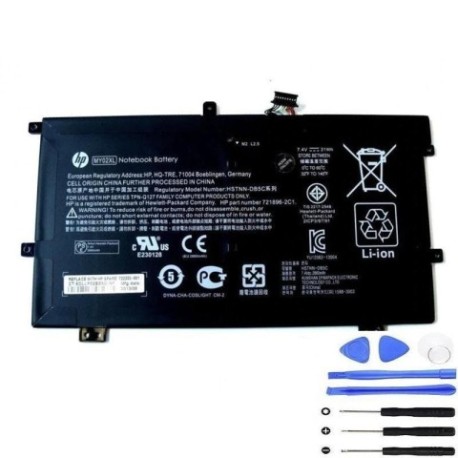
Battery models & part numbers
| Reference / P/N |
|---|
| HP 721896-421 |
| HP HSTNN-LB5C |
| HP MY02021XL |
| HP-MY02XL-21.9Wh |
Compatible laptop models
| Model |
|---|
| HP Pro x2 410 G1 |
| HP SlateBook 10-H000 x2s |
Introduction
If your HP laptop battery is no longer holding charge or showing signs of wear, our authorised HP MY02XL 21.9Wh replacement battery is the perfect solution. This genuine-compatible battery is designed specifically for your HP device and meets Australian safety standards.
Common signs you need a replacement
| Symptoms | Causes | Verification | Recommendation |
|---|---|---|---|
| Battery drains quickly | Ageing battery cells | Check battery health in system settings | Replace if capacity below 60% |
| Laptop shuts down unexpectedly | Voltage instability | Monitor battery percentage drops | Immediate replacement needed |
| Battery won’t charge fully | Charging circuit failure | Test with different charger | Replace battery if issue persists |
| Battery swelling or overheating | Internal damage or defect | Visual inspection, temperature check | Replace immediately for safety |
How to check compatibility
To ensure this battery fits your HP device, check the part number on your current battery or look up your laptop model in our compatibility tables above. All HP Pro x2 410 G1 and SlateBook 10-H000 x2s models are supported.
When to replace
Replace your battery when it holds less than 60% of its original capacity, shows physical damage, or causes system instability. Most HP batteries last 2-3 years with regular use before needing replacement.
Installation guide (overview)
1. Power off your laptop and disconnect all cables
2. Remove the battery compartment cover (if applicable)
3. Carefully disconnect the old battery connector
4. Insert the new HP MY02XL battery and reconnect
5. Replace cover and charge fully before first use
Usage & care tips
• Avoid extreme temperatures (ideal range 15-25°C)
• Charge between 20-80% for optimal lifespan
• Store in cool, dry place when not in use
• Use only authorised HP chargers
• Calibrate battery monthly by full discharge/charge cycle
Safety & recycling in AU/NZ
All our batteries meet Australian/New Zealand safety standards. Never dispose of batteries in household waste. Use local council e-waste recycling programmes or return to authorised battery collection centres. Batteries contain materials that can be hazardous if not handled properly.
FAQ
How long does shipping take in Australia?
Most orders arrive within 3-7 business days depending on your location.
Is this battery genuine HP?
This is a high-quality compatible replacement that meets HP specifications and Australian standards.
What warranty do you offer?
All our batteries come with a 12-month warranty covering manufacturing defects.
Can I install this battery myself?
Yes, most HP laptop batteries are user-replaceable with basic tools and careful handling.
How do I recycle my old battery?
Contact your local council for e-waste disposal options or visit an authorised battery recycling centre.
What if the battery doesn’t fit my laptop?
Check your laptop model and battery part number against our compatibility tables. Contact us if you need assistance.
Is overnight charging safe?
Modern laptops have protection circuits, but we recommend unplugging once fully charged to extend battery life.