Lenovo 01AV494 57Wh Replacement Battery
Find the perfect replacement battery for your Lenovo ThinkPad X1 Carbon laptop. Our comprehensive guide helps Australian and New Zealand customers identify compatible models and understand battery replacement needs.
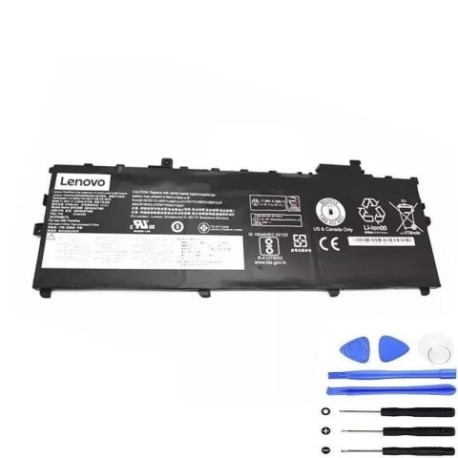
Battery models & part numbers
| Reference / P/N |
|---|
| 01AV429 |
| 01AV430 |
| 01AV431 |
| Lenovo-01AV494-57Wh |
| SB10K97586 |
| SB10K97587 |
| SB10K97588 |
Compatible laptop models
| Model |
|---|
| Lenovo ThinkPad X1 Carbon (20HQ) |
| Lenovo ThinkPad X1 Carbon (20HR) |
| Lenovo ThinkPad X1 Carbon (20K3) |
| Lenovo ThinkPad X1 Carbon (20K4) |
| Lenovo ThinkPad X1 Carbon (20KG) |
| Lenovo ThinkPad X1 Carbon (20KH) |
| Lenovo ThinkPad X1 Carbon 5th Gen (20HR/20HQ) |
| Lenovo ThinkPad X1 Carbon 5th Gen (20K4/20K3) |
| Lenovo ThinkPad X1 Carbon 6th Gen (20KH/20KG) |
Introduction
The Lenovo 01AV494 57Wh battery is a high-quality replacement designed specifically for various ThinkPad X1 Carbon models. This genuine-compatible battery ensures optimal performance and reliability for your business or personal computing needs across Australia and New Zealand.
Common signs you need a replacement
| Symptom | Cause | Verification | Recommendation |
|---|---|---|---|
| Battery drains quickly | Reduced capacity from age/cycles | Check battery health in system settings | Replace if capacity below 60% |
| Laptop won’t hold charge | Battery failure or worn cells | Test with power adapter disconnected | Immediate replacement needed |
| Battery swelling | Internal damage or overheating | Visual inspection of battery case | Replace immediately for safety |
| Overheating during use | Inefficient battery operation | Monitor temperature with software | Replace to prevent damage |
How to check compatibility
Verify your laptop model matches one of the compatible models listed above. Check your current battery part number or laptop model number (usually found on the bottom case or in system information). Cross-reference with our compatibility tables to ensure perfect fit and performance.
When to replace
Replace your battery when you notice significant performance degradation, typically after 2-3 years of regular use. If your battery shows any swelling, doesn’t hold charge, or causes system instability, replacement is recommended for both performance and safety reasons.
Installation guide (overview)
1. Power off your laptop and disconnect all cables
2. Remove the bottom cover using appropriate screwdriver
3. Disconnect the old battery connector
4. Remove mounting screws and carefully lift out old battery
5. Install new battery and reconnect all components
6. Replace cover and power on to initialise new battery
Usage & care tips
• Avoid complete discharges – recharge when battery reaches 20-30%
• Store in cool, dry conditions between 15-25°C
• Use authorised Lenovo power adapters for optimal charging
• Calibrate battery monthly by fully charging then discharging to 5%
• Avoid leaving laptop plugged in constantly at 100% charge
Safety & recycling in AU/NZ
In Australia and New Zealand, lithium-ion batteries must be recycled properly. Do not dispose of in household waste. Use authorised battery recycling centres or return to electronics retailers. Damaged or swollen batteries should be handled with care and recycled immediately through proper channels.
FAQ
How long does this battery last on a single charge?
Typically 6-8 hours depending on usage and laptop configuration.
Is this battery genuine Lenovo?
This is a high-quality compatible battery designed to meet or exceed original specifications.
What warranty is provided?
Check with the retailer for specific warranty details, typically 12 months for quality batteries.
Can I use this battery with newer X1 Carbon models?
Only compatible with the specific models listed in our compatibility table.
How do I recycle my old battery in Australia?
Use Battery World, Officeworks, or other authorised recycling centres.
What’s the delivery time to New Zealand?
Typically 5-10 business days depending on your location and shipping method.
Is professional installation required?
While DIY installation is possible, professional installation is recommended for warranty purposes.