Battery models & part numbers
| Reference / P/N |
|---|
| Medion-N850BAT-6-62Wh |
Compatible laptop models
| Model |
|---|
| Medion Clevo N850HJ1 |
| Medion Clevo N850HL |
| Medion Clevo N857HL |
| Medion Clevo N870EP6 |
| Medion Clevo N870HP6 |
| Medion Exone go Business 1745 II (N870HL) |
| Medion Gaming Guru Neptun (GTX1050TI) |
| Medion Gaming Guru Neptun K Guru Edition |
| Medion Gaming Guru Sun K |
| Medion Gaming Guru Sun K Blackweek |
| Medion Medion 40067991 |
| Medion Medion 40068149 |
| Medion Medion 6-87-N850S-6E71 |
| Medion Medion 6-87-N850S-6E72 |
| Medion Medion 6-87-N850S-6U7 |
| Medion Medion 6-87-N850S-6U71 |
| Medion Medion Erazer P6605 |
| Medion Medion Erazer P6705 |
| Medion Medion Erazer P6705 (N857EK1) |
| Medion Mifcom EG5 (N850EJ1) (ID: 5977) |
| Medion Mifcom EG5 (N850EK1) (ID: 5978) |
| Medion Mifcom EG5 i5 – GTX 1050 (N850HJ1) |
| Medion Mifcom EG7 (N870EK1) (ID: 8314) |
| Medion Mifcom EG7 (N870EK1) (ID: 8315) |
| Medion Mifcom EG7 i5 – GTX 1050 (17.3) (N870HJ1) |
| Medion Mifcom EG7 i5 – GTX 1050 (N870HJ1) |
| Medion Mifcom EG7 i7 – GTX 1050 Ti Premium (N850HK1) |
| Medion Mifcom EG7 i7 – GTX 1050 Ti SSD (17.3) (N870HK1) |
| Medion Mifcom EG7 i7 – GTX 1060 Ultimate (17.3) (N850EP6) |
| Medion Nexoc G1522 GTX 1050TI (N857EK1) |
| Medion One GameStar Notebook 15 |
| Medion One K56-7OU (N850HP6) |
| Medion One K56-80H (N857EK1) |
| Medion One K56-8OM (N857EK1) |
| Medion Sager Notebook NP6870 (N870HJ1) |
| Medion Sager Notebook NP6872 (N870HK1) |
| Medion Schenker Media 17 (N870HK1) |
| Medion Schenker XMG A517 |
| Medion Schenker XMG A707 |
| Medion Wortmann Terra Mobile 1776 |
| Medion Wortmann Terra Mobile 1776P |
Introduction
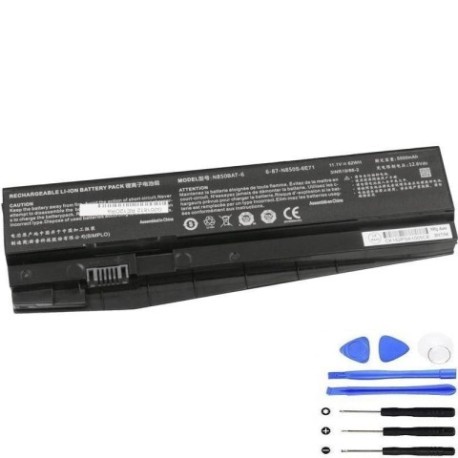
If your Medion laptop is showing signs of battery fatigue, our genuine Medion N850BAT-6-62Wh replacement battery is the authorised solution for Australian and New Zealand users. This high-quality 62Wh battery restores your laptop’s original performance and mobility.
Common signs you need a replacement
| Symptom | Cause | Verification | Recommendation |
|---|---|---|---|
| Short battery life | Ageing cells, reduced capacity | Check power settings, monitor usage | Consider replacement if under 2 hours |
| Laptop won’t hold charge | Battery degradation, faulty cells | Test with power adapter removed | Immediate replacement needed |
| Swelling/bulging case | Gas buildup, internal damage | Visual inspection, uneven surfaces | Stop using immediately, replace |
| Overheating during use | Inefficient power delivery | Monitor temperature, check vents | Replace to prevent damage |
| Random shutdowns | Voltage drops, cell failure | Monitor battery percentage drops | Replace to maintain productivity |
How to check compatibility
Verify your laptop model matches our compatibility list above. Check your current battery’s part number (usually printed on the battery) or consult your laptop’s documentation. All Medion models listed are confirmed compatible with the N850BAT-6-62Wh battery.
When to replace
Replace your battery when it holds less than 50% of its original capacity, shows physical damage, or causes performance issues. Most laptop batteries last 2-4 years with regular use. Don’t wait until complete failure – proactive replacement prevents data loss and inconvenience.
Installation guide (overview)
1. Power off laptop and disconnect charger
2. Remove the battery compartment cover (if applicable)
3. Disconnect the old battery connector
4. Remove any securing screws or clips
5. Insert new battery and reconnect
6. Replace cover and power on
Note: Some models may require professional installation. Always consult your device manual.
Usage & care tips
• Avoid extreme temperatures (ideal range 15-25°C)
• Calibrate new battery by fully charging/discharging 2-3 times
• Store at 40-60% charge if not using for extended periods
• Use authorised chargers only
• Keep battery contacts clean and dry
• Avoid physical impacts or pressure on battery area
Safety & recycling in AU/NZ
In Australia and New Zealand, lithium-ion batteries must be recycled responsibly. Do not dispose of in household waste. Many electronics retailers and local councils offer free battery recycling services. Damaged or swollen batteries should be handled with care and taken to authorised recycling centres immediately.
FAQ
How long does delivery take in Australia?
Most orders arrive within 3-7 business days depending on your location.
Is this battery genuine Medion?
Yes, this is an authorised Medion replacement battery with full compatibility.
What warranty do you offer?
All our batteries come with a 12-month warranty covering manufacturing defects.
Can I install this battery myself?
Most models allow user installation, but we recommend checking your device manual or consulting a professional if unsure.
How do I maximise battery lifespan?
Avoid frequent full discharges, keep between 20-80% charge when possible, and store in cool conditions.
What if my model isn’t listed?
Contact our support team with your laptop’s exact model number for verification.
Do you ship to New Zealand?
Yes, we ship throughout Australia and New Zealand with reliable courier services.