Lenovo 01AV481 45Wh Replacement Battery
Find the perfect replacement battery for your Lenovo laptop with our comprehensive compatibility guide and expert installation advice.
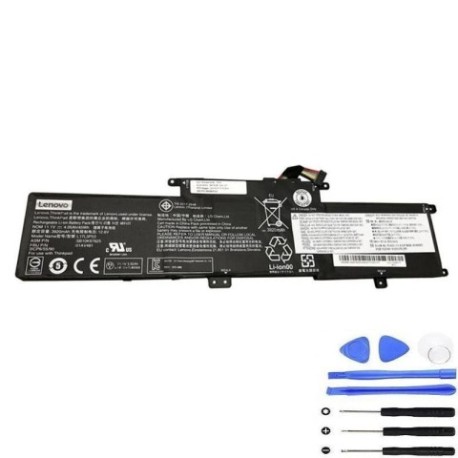
Battery models & part numbers
| Reference / P/N |
|---|
| 01AV481 |
| 01AV482 |
| 3ICP6/54/90 |
| 5B10W13891 |
| 5B10W13892 |
| L17C3P53 |
| L17L3P53 |
| L17M3P55 |
| SB10K97625 |
| SB10K97626 |
| SB10T83134 |
| SB10T83135 |
Compatible laptop models
| Model |
|---|
| ThinkPad L380 (20M5/20M6) |
| ThinkPad L390 (20NR/20NS) |
| ThinkPad L390 Yoga (20NT/20NU) |
| ThinkPad Yoga L380 (20M7/20M8) |
Introduction
The Lenovo 01AV481 45Wh battery is a high-quality replacement power source designed specifically for compatible Lenovo ThinkPad models. This genuine replacement ensures optimal performance and reliability for your business or personal computing needs.
Common signs you need a replacement
| Symptom | Cause | Verification | Recommendation |
|---|---|---|---|
| Rapid battery drain | Aged battery cells | Check power settings & usage time | Consider replacement if under 2 hours |
| Laptop won’t hold charge | Battery degradation | Test with power adapter removed | Immediate replacement needed |
| Battery swelling | Internal damage | Visual inspection | Replace immediately for safety |
| Overheating during use | Faulty battery management | Monitor temperature readings | Replace to prevent damage |
How to check compatibility
Verify your laptop’s compatibility by checking the model number on the bottom casing or in system information. Cross-reference with our compatibility tables above. For additional confirmation, check your current battery’s part number against our listed references.
When to replace
Replace your battery when you notice significant performance decline, typically after 2-3 years of regular use. Most batteries show reduced capacity after 300-500 charge cycles. If your laptop shuts down unexpectedly or won’t operate without being plugged in, replacement is recommended.
Installation guide (overview)
Power down your laptop completely and disconnect from power. Remove the bottom panel using appropriate screwdrivers. Carefully disconnect the old battery connector and remove any securing screws. Install the new battery, reconnect the connector, and reassemble. Always refer to your laptop’s service manual for detailed instructions.
Usage & care tips
For optimal battery life, avoid complete discharges and store between 20-80% charge when possible. Keep your laptop in temperatures between 10°C and 35°C. Calibrate your battery monthly by fully charging then discharging to maintain accurate power readings.
Safety & recycling in AU/NZ
Always purchase from authorised retailers to ensure safety standards. In Australia and New Zealand, dispose of old batteries at designated recycling centres. Never dispose of lithium-ion batteries in household waste due to fire risk and environmental concerns.
FAQ
How long does this battery last?
Typically 2-4 hours depending on usage and laptop settings.
Is this battery genuine Lenovo?
This is a high-quality replacement battery compatible with Lenovo specifications.
What’s the warranty period?
Check with the retailer for specific warranty details, typically 12 months.
Can I use this battery internationally?
Yes, the battery operates on standard laptop power requirements worldwide.
How do I maximise battery life?
Avoid extreme temperatures and frequent full discharges.
Is professional installation required?
While user-installable, those uncomfortable with hardware should seek professional help.
What if my model isn’t listed?
Double-check your model number and contact the supplier for confirmation.