Battery models & part numbers
| Reference / P/N |
|---|
| 462889-542 |
| 462890-142 |
| 462890-242 |
| 462890-2A2 |
| 462890-542 |
| 462890-772 |
| 484170-001 |
| 485041-003 |
| 509458-001 |
| HP-EV06-47Wh |
| HSTNN-52C |
| HSTNN-CB72 |
| HSTNN-IB72 |
| HSTNN-Q34C |
| HSTNN-UB72 |
| HSTNN-W48C |
| HSTNN-W49C |
| HSTNN-W50C |
| HSTNN-W51C |
| HSTNN-W52C |
Compatible laptop models
| Model |
|---|
| HP Compaq Presario CQ40 |
| HP Compaq Presario CQ41 |
| HP Compaq Presario CQ45-100 |
| HP Compaq Presario CQ45-200 |
| HP Compaq Presario CQ45-300 |
| HP Compaq Presario CQ45-400 |
| HP Compaq Presario CQ50 |
| HP Compaq Presario CQ60 |
| HP Compaq Presario CQ60-100 |
| HP Compaq Presario CQ60-200 |
| HP Compaq Presario CQ60-300 |
| HP Compaq Presario CQ60-400 |
| HP Compaq Presario CQ61 |
| HP Compaq Presario CQ61-100 |
| HP Compaq Presario CQ61-200 |
| HP Compaq Presario CQ61-300 |
| HP Compaq Presario CQ61-400 |
| HP Compaq Presario CQ70 |
| HP Compaq Presario CQ70-100 |
| HP Compaq Presario CQ70-200 |
| HP Compaq Presario CQ71 |
| HP Compaq Presario CQ71-100 |
| HP Compaq Presario CQ71-200 |
| HP Compaq Presario CQ71-300 |
| HP Compaq Presario CQ71-400 |
| HP dv4t-1000 |
| HP G50 |
| HP G50-100 |
| HP G50-200 |
| HP G60 |
| HP G60-100 |
| HP G60-200 |
| HP G60-300 |
| HP G60-400 |
| HP G60-500 |
| HP G61 |
| HP G61-400 |
| HP G70 |
| HP G70-100 |
| HP G70-200 |
| HP G70-400 |
| HP HDX 16 |
| HP HDX X16 |
| HP HDX X16-1000 |
| HP HDX X16-1100 |
| HP HDX X16-1200 |
| HP Pavilion dv4-1000 |
| HP Pavilion dv4-2000 |
| HP Pavilion dv5-1000 |
| HP Pavilion dv5-1100 |
| HP Pavilion dv5-1200 |
| HP Pavilion dv5t-1000 |
| HP Pavilion dv5tse-1100 |
| HP Pavilion dv5z-1000 |
| HP Pavilion dv6-1000 |
| HP Pavilion dv6-1100 |
| HP Pavilion dv6-1200 |
| HP Pavilion dv6-1300 |
| HP Pavilion dv6-1400 |
| HP Pavilion dv6-2100 |
| HP Pavilion dv6z-1000 |
Introduction
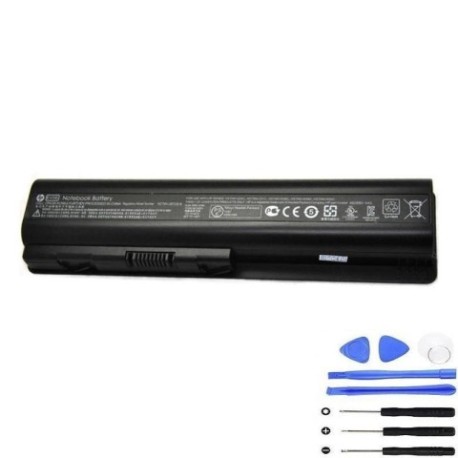
If your HP laptop battery isn’t holding charge like it used to, our HP EV06 47Wh replacement battery is the authorised solution for Australian and New Zealand users. This high-quality battery is compatible with dozens of HP laptop models from the popular Compaq Presario, Pavilion, and HDX series.
Common signs you need a replacement
| Symptom | Cause | How to verify | Recommendation |
|---|---|---|---|
| Short battery life | Battery degradation over time | Check power settings & usage time | Consider replacement if under 2 hours |
| Laptop shuts down unexpectedly | Battery can’t maintain voltage | Monitor battery percentage drops | Replace immediately to prevent data loss |
| Battery won’t charge fully | Charging circuit failure | Check charging indicator & percentage | Test with different charger first |
| Battery swelling or overheating | Internal damage or age | Visual inspection & temperature check | Replace urgently for safety |
| Error messages about battery | System detection of faults | Check device manager or HP diagnostics | Replace with compatible battery |
How to check compatibility
To ensure this battery fits your HP laptop: Check your current battery’s part number (usually on a label), verify it matches one in our compatibility list above, or confirm your laptop model is listed. You can also check your laptop’s service manual or contact HP support for verification.
When to replace
Replace your laptop battery when it holds less than 50% of its original capacity, shows physical damage like swelling, causes unexpected shutdowns, or is over 2-3 years old with regular use. In AU/NZ’s varying climate conditions, battery lifespan may be affected by temperature extremes.
Installation guide (overview)
1. Power off your laptop and disconnect the charger. 2. Remove the battery compartment cover (if applicable). 3. Slide or lift the release latch to remove the old battery. 4. Align the new battery connectors and slide it into place until it clicks. 5. Replace the cover and charge fully before first use. Always refer to your laptop’s specific installation guide.
Usage & care tips
For optimal battery performance in AU/NZ conditions: Avoid extreme temperatures (ideal range 10-35°C), calibrate your battery monthly by fully charging then discharging, store at 40-60% charge if not using for extended periods, and use only authorised HP chargers. Keep the battery contacts clean and avoid physical impacts.
Safety & recycling in AU/NZ
Battery safety is crucial. Never puncture or disassemble batteries. If swelling occurs, stop use immediately and recycle properly. In Australia and New Zealand, take old batteries to authorised recycling centres – many electronics retailers offer free battery recycling services. Never dispose of batteries in household waste.
FAQ
How long does this battery last on a full charge?
Up to 3-4 hours depending on your laptop model and usage patterns.
Is this battery genuine HP?
This is a high-quality replacement battery compatible with HP laptops, meeting original specifications.
What’s the warranty period?
Check the product page for current warranty details – typically 12 months for battery products.
How do I recycle my old battery in Australia?
Take it to any Battery World, Officeworks, or similar electronics retailer offering recycling services.
Will this battery work with my HP laptop charger?
Yes, it’s designed to work with standard HP laptop chargers for these compatible models.
How long does delivery take in NZ?
Typically 5-10 business days depending on your location and shipping method.
Can I use this battery if my original had a different part number?
Only if your laptop model is listed in our compatibility table above.