Huawei HB4692J5ECW 31 42Wh Laptop Battery Replacement
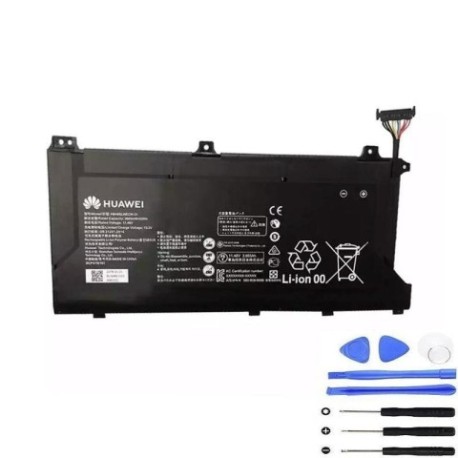
Battery models & part numbers
| Reference / P/N |
|---|
| 3ICP3/78/101 |
| 3ICP5/62/81 |
| Huawei-HB4692J5ECW-31-42Wh |
Compatible laptop models
| Model |
|---|
| Honor MagicBook 15 |
| Honor MagicBook 14 |
| Honor MagicBook KPL-WOOB |
| Honor MagicBook Pro HLY-19R |
| Honor MagicBook VLT-W50 |
| Honor MagicBook VLT-W60A |
| Huawei MateBook D 15 2020 |
| Huawei MateBook D 15 AMD |
| Huawei MateBook D 15-53010TUY |
Introduction
Is your Huawei or Honor laptop struggling to hold charge? The HB4692J5ECW 31 42Wh battery replacement restores your device’s mobility and performance. This genuine compatible battery is specifically designed for multiple Huawei and Honor laptop models commonly used across Australia and New Zealand.
Common signs you need a replacement
| Symptoms | Causes | Verification | Recommendation |
|---|---|---|---|
| Battery drains in under 1 hour | Ageing cells, reduced capacity | Check battery health in system settings | Replace if capacity below 60% |
| Laptop shuts down unexpectedly | Voltage drops under load | Monitor during intensive tasks | Immediate replacement needed |
| Battery won’t charge past 80% | Cell imbalance, protection circuit | Reset battery calibration | Replace if issue persists |
| Battery swelling or overheating | Internal damage, safety risk | Visual inspection, temperature check | Replace immediately, recycle old battery |
How to check compatibility
Verify your laptop model matches our compatibility list above. Check your current battery’s part number (usually printed on the battery itself) against our reference numbers. For Australian and New Zealand customers, ensure you’re purchasing from authorised retailers to guarantee compatibility and safety standards.
When to replace
Replace your battery when it shows significant capacity loss (typically after 2-3 years of regular use), exhibits physical damage or swelling, or fails to hold charge for reasonable work sessions. Don’t wait until complete failure – proactive replacement ensures uninterrupted productivity.
Installation guide (overview)
Power down your laptop completely and disconnect from mains power. Remove the bottom panel using appropriate screwdrivers. Disconnect the battery connector carefully, remove old battery, install new battery ensuring proper connection, and reassemble. Always refer to official service manuals or seek professional assistance if unsure.
Usage & care tips
For optimal battery life in AU/NZ conditions: Avoid extreme temperatures (ideal range 10°C to 35°C), perform regular calibration cycles (full discharge/charge monthly), store at 40-60% charge if not using for extended periods, and use original chargers only. These practices help maintain battery health in our varied climate.
Safety & recycling in AU/NZ
Battery safety is paramount. Never puncture or expose batteries to fire. In Australia and New Zealand, dispose of old batteries responsibly through authorised recycling centres – never in household waste. Many electronics retailers offer free battery recycling services. Damaged or swollen batteries should be handled with extreme care and recycled immediately.
FAQ
How long does shipping take to Australia/New Zealand?
Most orders arrive within 7-10 business days to major cities in Australia and New Zealand, with express options available.
Is this battery genuine Huawei quality?
Yes, this is an original specification replacement battery meeting all Huawei quality and safety standards.
What warranty is provided?
This battery comes with a 12-month warranty covering manufacturing defects, valid across Australia and New Zealand.
Can I install it myself?
Yes, with basic technical skills and proper tools. However, we recommend professional installation if you’re not confident.
Will this battery work with my charger?
Yes, it’s fully compatible with original Huawei and Honor laptop chargers used in AU/NZ.
How do I recycle my old battery in Australia?
Use Batteryback or similar programmes available at most electronics retailers across Australia and New Zealand.
What if my model isn’t listed?
Contact our support team with your exact model number for compatibility verification before purchase.