ASUS B31N1707 42Wh Laptop Battery Replacement Guide
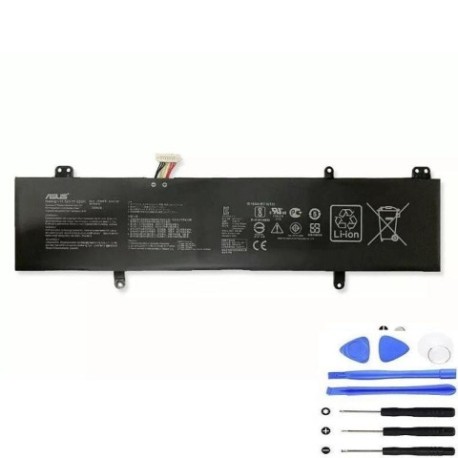
Battery models & part numbers
| Reference / P/N |
|---|
| 0B200-02710000 |
| 3ICP5/57/81 |
| Asus-B31N1707-42Wh |
Compatible models
| Model |
|---|
| Asus A411QA |
| Asus A411U |
| Asus A411UA |
| Asus A411UF |
| Asus F411QA |
| Asus F411U |
| Asus F411UF |
| Asus K410U |
| Asus K410UA |
| Asus K410UF |
| Asus K410UN |
| Asus K410UQ |
| Asus P1410U |
| Asus P1410UA |
| Asus P1410UF |
| Asus R422QA |
| Asus R422U |
| Asus R422UF |
| Asus S401QA |
| Asus S401UA |
| Asus S401UF |
| Asus S4100V |
| Asus S410U |
| Asus S410UA |
| Asus S410UF |
| Asus S410UN |
| Asus S410UQ |
| Asus S4200UF |
| Asus VivoBook 14 X411QR |
| Asus VivoBook 14 X411UA |
| Asus VivoBook 14 X411UQ |
| Asus VivoBook S14 S410UA |
| Asus VivoBook S14 S410UF |
| Asus VivoBook S14 S410UN |
| Asus VivoBook S14 S410UQ |
| Asus VivoBook S14 X411U |
| Asus VivoBook S410UA |
| Asus VivoBook S410UQ |
| Asus VivoBook X411UA |
| Asus VivoBook X411UF |
| Asus VivoBook X411UN |
| Asus VivoBook X411UQ |
| Asus X411QA |
| Asus X411QR |
| Asus X411U |
| Asus X411UA |
| Asus X411UF |
| Asus X411UN |
| Asus X411UQ |
Introduction
If you’re experiencing battery issues with your ASUS laptop, you’re not alone. The ASUS B31N1707 42Wh battery is a common replacement part for numerous VivoBook and other ASUS models popular in Australia and New Zealand. This comprehensive guide will help you understand when you need a replacement, how to verify compatibility with your specific model, and provide step-by-step installation instructions to get your laptop performing like new again.
Common signs you need a replacement
| Symptom | Cause | Verification | Recommendation |
|---|---|---|---|
| Rapid battery drain | Reduced capacity from age/cycles | Check Windows battery report | Replace if capacity below 60% |
| Laptop shuts down unexpectedly | Voltage drops under load | Monitor during intensive tasks | Immediate replacement needed |
| Battery won’t charge fully | Charging circuit degradation | Check charging percentage | Replace battery and check charger |
| Battery swelling | Internal chemical breakdown | Visual inspection | Stop using immediately |
| Overheating during charging | Internal resistance increase | Temperature monitoring | Replace to prevent damage |
How to check compatibility
Finding your exact ASUS model number is crucial for battery compatibility. Look for the model sticker on the bottom of your laptop, typically near the battery compartment or on the chassis. For ASUS VivoBook and other compatible models, you can also check through Windows System Information or the ASUS official support website. The B31N1707 battery is specifically designed for 14-inch ASUS models with similar chassis designs and power requirements.
When to replace
Most laptop batteries last 2-4 years with regular use. If your battery health shows less than 60% of original capacity, it’s time to consider replacement. For ASUS users in Australia and New Zealand, consider replacing before the summer months when higher temperatures can accelerate battery degradation.
Installation guide
Replacing your ASUS battery is straightforward with the right tools and precautions. You’ll need a Phillips screwdriver, plastic spudger, and an anti-static wrist strap. Begin by shutting down your laptop and disconnecting all cables. Remove the bottom panel screws and carefully lift the cover. Locate the battery connector and gently disconnect it. Remove the mounting screws securing the battery, then lift the old battery out. Install the new B31N1707 battery, reconnect all cables, and reassemble your laptop.
Usage & care tips
To maximise your new battery’s lifespan, avoid frequent full discharges and keep your laptop between 20-80% charge when possible. Store your laptop in temperatures between 10-35°C and avoid leaving it in hot cars or direct sunlight. For ASUS users, consider using the ASUS Battery Health Charging software to optimise charging patterns based on your usage habits.
Safety & recycling in AU/NZ
In Australia and New Zealand, lithium-ion batteries must be recycled properly. Never dispose of laptop batteries in household waste. Use authorised battery recycling centres like Battery World, Officeworks, or council e-waste collection points. Damaged or swollen batteries should be handled with extreme care and taken to professional recycling facilities immediately.
FAQ
How long does the B31N1707 battery last on a single charge?
The 42Wh capacity typically provides 4-7 hours of normal usage depending on your specific ASUS model and usage patterns. Higher-performance models may see shorter battery life.
Is this batterygenuine ASUS or compatible?
Our B31N1707 batteries are high-quality compatible replacements that meet or exceed original specifications. They come with full warranty coverage for peace of mind.
Will replacing the battery void my ASUS warranty?
In Australia and New Zealand, replacing the battery yourself may void the remaining manufacturer warranty. If your laptop is still under warranty, contact ASUS authorised service centres for replacement.
How do I calibrate my new battery?
After installation, charge your laptop to 100%, then use it until it shuts down from low battery. Charge it uninterrupted back to 100% to calibrate the battery meter.
Can I use my laptop while charging the new battery?
Yes, you can use your ASUS laptop while charging. Modern batteries and charging circuits are designed to handle this safely.
What if my model isn’t in the compatibility list?
If your specific ASUS model isn’t listed, we recommend double-checking your model number and consulting with our support team before purchase.
Do you ship to both Australia and New Zealand?
Yes, we ship to both countries with fast delivery options available. Shipping times typically range from 2-7 business days depending on your location.
Don’t let a failing battery limit your productivity. With the right ASUS B31N1707 replacement battery, you can restore your laptop’s mobility and performance. Our batteries come with comprehensive support and warranty to ensure you get the most out of your investment.