Battery models & part numbers
| Reference / P/N |
|---|
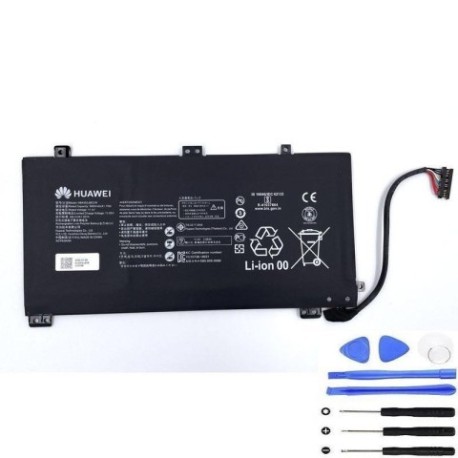
| Huawei-HB4593J6ECW-41.7Wh |
Compatible laptop models
| Model |
|---|
| Huawei MateBook 13 |
| Huawei MateBook 13 2020 |
| Huawei Matebook 13 i7 |
| Huawei MateBook 13 WRT-W19/09 |
Introduction
Keep your Huawei MateBook 13 performing at its best with our genuine replacement battery. The Huawei-HB4593J6ECW-41.7Wh battery is specifically designed for compatibility with multiple MateBook 13 variants available in the Australian and New Zealand markets.
Common signs you need a replacement
| Symptoms | Causes | Verification | Recommendation |
|---|---|---|---|
| Battery drains quickly | Ageing battery cells | Check battery health in system settings | Consider replacement if capacity below 70% |
| Laptop won’t hold charge | Degraded battery chemistry | Monitor charge retention over 24 hours | Replace if unable to hold minimal charge |
| Battery swelling | Internal chemical breakdown | Visual inspection of battery compartment | Immediate replacement required for safety |
| Unexpected shutdowns | Voltage instability | System logs and power diagnostics | Replace to restore stable performance |
How to check compatibility
Verify your laptop model matches one of the compatible models listed above. Check your device’s system information or look for model identification on the bottom casing. For Huawei MateBook 13 devices purchased in Australia or New Zealand, this battery replacement is specifically designed for your regional specifications.
When to replace
Replace your battery when you notice significant performance degradation, typically after 2-3 years of regular use. Australian consumers should consider replacement when battery health drops below 80% capacity or if experiencing any safety concerns like swelling or overheating.
Installation guide (overview)
Power down your laptop completely and disconnect all cables. Remove the bottom casing using appropriate screwdrivers (typically Phillips #00). Disconnect the old battery connector and remove mounting screws. Install the new Huawei-HB4593J6ECW-41.7Wh battery, reconnect the power connector, and reassemble your device. Always refer to authorised service documentation for detailed instructions.
Usage & care tips
For optimal battery life in AU/NZ conditions: avoid extreme temperatures (operate between 10°C and 35°C), perform regular calibration cycles, and store in cool, dry environments. Avoid complete discharges and maintain charge between 20-80% for daily use to extend battery lifespan.
Safety & recycling in AU/NZ
Battery safety is paramount. Never attempt to open or modify lithium-ion batteries. In Australia and New Zealand, dispose of old batteries responsibly through authorised recycling centres. Many electronics retailers offer free battery recycling services. Never dispose of batteries in household waste due to fire risk and environmental concerns.
FAQ
Is this battery compatible with my MateBook 13 purchased in Australia?
Yes, this replacement battery is designed for all Huawei MateBook 13 models sold in the Australian and New Zealand markets.
How long does installation typically take?
Most users can complete the replacement in 15-30 minutes with basic technical skills and proper tools.
What warranty is provided?
Our batteries come with a standard 12-month warranty covering manufacturing defects.
Can I use my laptop while charging the new battery?
Yes, you can use your laptop normally while the new battery charges, just like with your original battery.
How do I check my current battery health?
On Windows, use the battery report feature (powercfg /batteryreport) or check in your system settings for battery health information.
Is professional installation available?
While designed for user installation, we recommend professional service if you’re uncomfortable with technical procedures.
What’s the expected lifespan of this replacement?
With proper care, expect 2-3 years of optimal performance under normal usage conditions in AU/NZ climates.