Lenovo L16M4PB1 48Wh Battery Replacement Guide
Is your Lenovo laptop not holding charge like it used to? Our comprehensive guide helps Australian and New Zealand users identify compatible models, recognise replacement signs, and safely install a genuine L16M4PB1 48Wh battery.
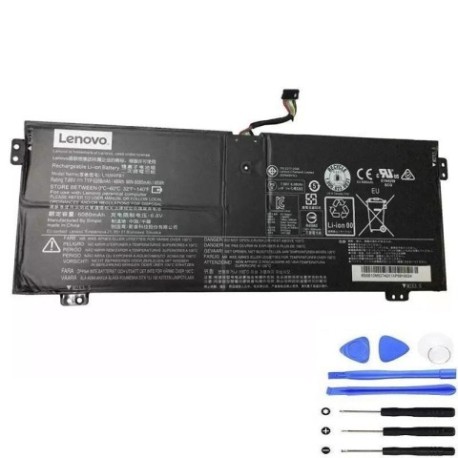
Battery models & part numbers
| Reference / P/N |
|---|
| L16C4PB1 |
| L16L4PB1 |
| Lenovo-L16M4PB1-48Wh |
| SB10W67270 |
Compatible laptop models
| Model |
|---|
| Lenovo 5B10Q38237 |
| Lenovo 5B10Q38238 |
| Lenovo 5B10W67229 |
| Lenovo 5B10W67264 |
| Lenovo Yoga 720-13IKB |
| Lenovo Yoga 730-13IKB |
| Lenovo Yoga 730-13IKB (81CT) |
| Lenovo Yoga 730-13IWL (81JR) |
Introduction
The Lenovo L16M4PB1 48Wh battery is designed for various Lenovo Yoga and compatible laptop models. This high-quality replacement battery ensures your device maintains optimal performance and mobility throughout your day.
Common signs you need a replacement
| Symptom | Cause | Verification | Recommendation |
|---|---|---|---|
| Reduced battery life | Natural battery degradation over time | Check battery health in system settings | Consider replacement if below 50% capacity |
| Laptop shutting down unexpectedly | Battery unable to maintain consistent voltage | Monitor shutdown patterns at specific charge levels | Replace battery to prevent data loss |
| Battery not charging fully | Internal cell damage or charger issues | Test with different charger first | Replace battery if charger is functional |
| Physical swelling or bulging | Gas buildup from chemical reactions | Visual inspection of battery compartment | Immediate replacement required for safety |
How to check compatibility
Verify your laptop’s compatibility by checking the model number on the bottom casing or in system information. Cross-reference with our compatibility table above. For Australian and New Zealand users, ensure you’re purchasing from authorised retailers to guarantee genuine parts.
When to replace
Replace your battery when it holds less than 50% of its original capacity, shows physical damage, or causes system instability. Most laptop batteries last 2-3 years with regular use before requiring replacement.
Installation guide (overview)
1. Power down your laptop and disconnect all cables
2. Remove the bottom panel using appropriate screwdrivers
3. Disconnect the old battery connector carefully
4. Install the new L16M4PB1 battery and reconnect
5. Replace the panel and power on to calibrate
Usage & care tips
• Avoid extreme temperatures (ideal range 15-25°C)
• Don’t leave laptop plugged in constantly
• Perform full discharge cycles monthly
• Store in cool, dry conditions when not in use
• Use only authorised chargers and accessories
Safety & recycling in AU/NZ
In Australia and New Zealand, laptop batteries must be recycled properly through authorised e-waste centres. Never dispose of batteries in household rubbish. Check with your local council for battery recycling programs or return to authorised electronics retailers.
FAQ
How long does the L16M4PB1 battery last?
Typically 2-3 years with normal use, or approximately 500 charge cycles.
Is this battery compatible with my Lenovo Yoga?
Check the compatibility table above – it works with Yoga 720-13IKB, Yoga 730-13IKB, and Yoga 730-13IWL models.
Do you ship to Australia and New Zealand?
Yes, we deliver throughout AU and NZ with reliable shipping options.
What warranty do you offer?
Our batteries come with a 12-month warranty covering manufacturing defects.
How do I calibrate the new battery?
Charge to 100%, use until it shuts down, then charge fully again without interruption.
Can I install this battery myself?
Yes, with basic technical skills and proper tools. Follow our installation guide carefully.
What if my model isn’t listed?
Contact our support team with your laptop’s exact model number for verification.