Battery models & part numbers
| Reference / P/N |
|---|
| MSI-BTY-M491-52.4Wh |
Compatible laptop models
| Model |
|---|
| MSI 925QA048H |
| MSI Commercial 14H A13MG vPro |
| MSI Modern 14 C11M (MS-14J3) |
| MSI Modern 15 A10M (MS-1551) |
| MSI Modern 15 A10RAS (MS-1551) |
| MSI Modern 15 A10RB (MS-1551) |
| MSI Modern 15 A10RBS (MS-1551) |
| MSI Modern 15 A10RC (MS-1551) |
| MSI Modern 15 A10RD (MS-1551) |
| MSI Modern 15 A4M (MS-155K) |
| MSI Modern 15 A4MW (MS-155K) |
| MSI Modern 15 A5M (MS-155L) |
| MSI Modern 15 B7M |
| MSI Modern 15 B7MG |
| MSI Mordern 15 B12M (MS-15H1) |
| MSI Mordern 15 B12MO (MS-15H1) |
| MSI Mordern 15 B13M (MS-15H1) |
| MSI S9N-0B3A210-SB3 |
| MSI S9N-0B3A250-M47 |
| MSI Stealth 15M B12UE (MS-15B1) |
| MSI Stealth 15M B12UEK (MS-15B1) |
| MSI Stealth 15M B12UX (MS-15B1) |
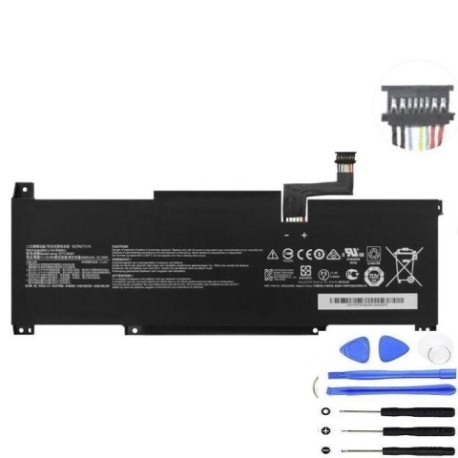
Introduction
Keep your MSI laptop running at peak performance with our genuine replacement battery. The MSI BTY M491 52.4Wh battery is designed specifically for compatibility with multiple MSI laptop models available in Australia and New Zealand.
Common signs you need a replacement
| Symptoms | Causes | Verification | Recommendation |
|---|---|---|---|
| Short battery life | Ageing cells | Check power settings | Consider replacement |
| Laptop won’t charge | Faulty circuitry | Try different charger | Replace battery |
| Battery swelling | Internal damage | Visual inspection | Replace immediately |
| Random shutdowns | Power instability | Monitor usage | Test with new battery |
How to check compatibility
Verify your laptop model matches one of the compatible models listed above. Check your laptop’s bottom label or system information for the exact model number. Cross-reference with our compatibility table to ensure perfect fit.
When to replace
Replace your battery when you notice significant performance degradation, typically after 2-3 years of regular use. If your battery holds less than 50% of its original capacity or shows physical damage, immediate replacement is recommended for safety.
Installation guide (overview)
Power off your laptop and disconnect all cables. Remove the bottom panel using appropriate screwdrivers. Carefully disconnect the old battery and install the new MSI BTY M491 52.4Wh battery. Reassemble and perform initial charge cycle for optimal performance.
Usage & care tips
Avoid extreme temperatures (ideal range 15-25°C). Don’t leave your laptop plugged in constantly. Perform regular calibration cycles. Store in cool, dry conditions when not in use for extended periods.
Safety & recycling in AU/NZ
Always use authorised replacement batteries. Dispose of old batteries at designated e-waste recycling centres. In Australia, check with local council recycling programmes. In New Zealand, use accredited battery recycling services.
FAQ
How long does delivery take in Australia?
Typically 3-7 business days depending on your location.
Is this battery genuine MSI?
Yes, this is an authentic MSI replacement battery with full compatibility.
What warranty do you offer?
All our batteries come with 12 months warranty.
Can I install this myself?
Yes, with basic technical skills and proper tools, self-installation is straightforward.
Do you ship to New Zealand?
Yes, we offer shipping to both Australia and New Zealand.
What if my model isn’t listed?
Contact our support team for compatibility verification.
How do I recycle my old battery?
Check with local council or authorised e-waste centres for proper disposal.