HP SP04XL 61.4Wh Battery Replacement Guide for Australian & New Zealand Users
Find the perfect replacement battery for your HP Spectre x360 laptop with our comprehensive compatibility guide and installation tips.
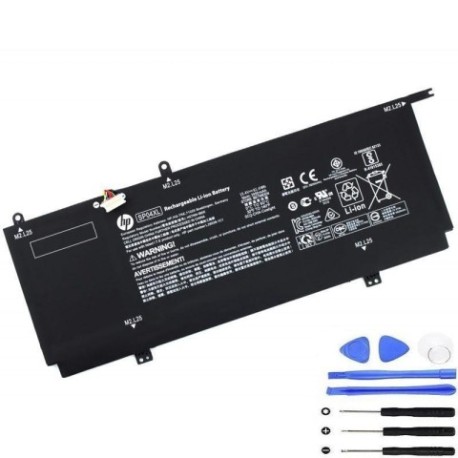
Battery models & part numbers
| Reference / P/N |
|---|
| HP 4ICP5/64/85 |
| HP HSTNN-IB8R |
| HP HSTNN-OB1B |
| HP L28538-1C1 |
| HP L28538-AC1 |
| HP L28764-005 |
| HP SP04061 |
| HP SP04061XL |
| HP SP04XL-61.4Wh |
| HP TPN-Q185 |
Compatible laptop models
| Model |
|---|
| HP Spectre X360 13-AP 13T-APs |
| HP Spectre x360 13-ap0000s |
| HP Spectre x360 13-ap0100s |
| HP Spectre x360 13-ap0300s |
| HP Spectre x360 13-ap0500s |
| HP Spectre x360 13-ap0700s |
| HP Spectre x360 13-ap0900s |
Introduction
Welcome to your complete guide for replacing the battery in your HP Spectre x360 laptop. This HP SP04XL 61.4Wh battery is specifically designed for multiple HP Spectre x360 13-inch models commonly used across Australia and New Zealand.
Common signs you need a replacement
| Symptom | Cause | Verification | Recommendation |
|---|---|---|---|
| Short battery life | Battery degradation over time | Check battery health in Windows | Consider replacement if under 50% capacity |
| Laptop won’t hold charge | Failed battery cells | Test with power adapter removed | Immediate replacement needed |
| Battery swelling | Chemical breakdown | Visual inspection | Replace immediately for safety |
| Overheating during use | Inefficient battery operation | Monitor temperature | Replace to prevent damage |
How to check compatibility
Verify your laptop model matches one of the compatible models listed above. You can find your exact model number on the bottom label of your HP Spectre x360 or in Windows System Information.
When to replace
Replace your battery when you notice significant performance decline, typically after 2-3 years of regular use. Most batteries retain about 80% capacity after 300-500 charge cycles.
Installation guide (overview)
1. Power off laptop and disconnect all cables
2. Remove bottom case screws (typically 8-10 screws)
3. Carefully lift bottom case
4. Disconnect old battery connector
5. Remove battery mounting screws
6. Install new HP SP04XL battery
7. Reconnect battery connector
8. Replace bottom case and screws
Usage & care tips
• Avoid extreme temperatures (ideal range 10°C to 35°C)
• Don’t leave laptop plugged in constantly
• Perform occasional full discharge cycles
• Store in cool, dry conditions when not in use
Safety & recycling in AU/NZ
In Australia and New Zealand, lithium-ion batteries must be recycled properly. Do not dispose of in household waste. Check with your local council for battery recycling programs or authorised e-waste collection centres.
FAQ
How long does this battery last?
Typically 4-6 hours depending on usage and laptop settings.
Is this an original HP battery?
This is a high-quality replacement battery compatible with HP Spectre x360 models.
Does installation void my warranty?
Check your current warranty status. Self-installation may affect remaining manufacturer warranty.
How do I check battery health in Windows?
Open Command Prompt as administrator and type: powercfg /batteryreport
What’s the battery capacity?
61.4Wh (Watt-hours) providing reliable performance for your HP Spectre x360.
Is professional installation available?
Many computer repair shops across Australia and New Zealand offer battery replacement services.
What’s the return policy?
Check the retailer’s return policy, typically 30 days for defective items.