Battery models & part numbers
| Reference / P/N |
|---|
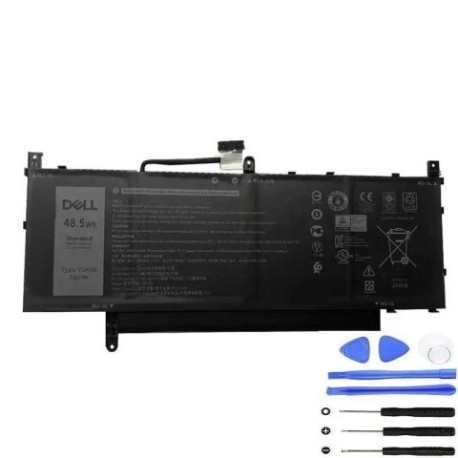
| Dell-V5K68-48.5Wh |
Compatible laptop models
| Model |
|---|
| Dell Latitude 9520 |
| Dell Latitude 9520 P94F P94F002 |
| Dell Latitude 9520 P95F P95F002 |
Introduction
Keep your Dell Latitude 9520 running at peak performance with our genuine replacement battery. Designed specifically for Australian and New Zealand conditions, this 48.5Wh battery ensures reliable power for your mobile computing needs.
Common signs you need a replacement
| Symptoms | Causes | Verification | Recommendation |
|---|---|---|---|
| Battery drains quickly | Ageing cells, reduced capacity | Check battery health in system settings | Consider replacement if under 80% capacity |
| Laptop shuts down unexpectedly | Voltage drops, cell failure | Monitor battery percentage during use | Replace immediately for data safety |
| Battery won’t charge fully | Charging circuit issues, worn cells | Check charging indicator and percentage | Test with different charger first |
| Battery swelling or overheating | Internal damage, safety hazard | Visual inspection, temperature check | Replace urgently – safety critical |
How to check compatibility
Verify your laptop model matches exactly with our compatibility list above. Check your current battery part number (usually found on the battery label) matches Dell-V5K68-48.5Wh. For certainty, cross-reference with your original purchase documentation or Dell support.
When to replace
Replace your battery when it holds less than 80% of original capacity, shows physical damage, causes unexpected shutdowns, or is over 2-3 years old with regular use. In Australia’s varying climate conditions, battery lifespan may be affected by temperature extremes.
Installation guide (overview)
Power down your laptop completely and disconnect from power. Remove the bottom panel (consult your user manual for specific instructions). Disconnect the battery connector, remove any securing screws, and lift out the old battery. Insert the new battery, reconnect the connector, replace screws and panel. Allow the battery to charge fully before first use.
Usage & care tips
For optimal battery life in AU/NZ conditions: avoid extreme temperatures (ideal range 15-25°C), don’t leave laptop in hot cars, calibrate monthly by fully discharging then charging, store at 40-60% charge if not using for extended periods, and use original Dell chargers for best performance.
Safety & recycling in AU/NZ
Never attempt to open or modify the battery. Dispose of old batteries responsibly through authorised recycling centres – most electronics retailers in Australia and New Zealand offer free battery recycling services. Do not dispose in household waste due to environmental regulations.
FAQ
How long does this battery last?
Typically 2-3 years with normal use, or 500-800 charge cycles.
Is this compatible with all Latitude 9520 variants?
Yes, compatible with all models listed in our compatibility table.
Do you provide warranty?
Yes, we offer standard warranty coverage for Australian and New Zealand customers.
How do I check my current battery health?
In Windows, type “battery report” in search or use Dell Power Manager software.
Can I use this battery with different Dell models?
No, this battery is specifically designed for Latitude 9520 series only.
How long for delivery in Australia?
Typically 3-7 business days depending on your location.
Is installation difficult?
Moderate difficulty – recommended for users comfortable with basic laptop disassembly.