HP RR03XL 48Wh Battery Replacement Guide
Find the perfect replacement battery for your HP laptop with our comprehensive compatibility guide. This HP RR03XL 48Wh battery is designed to restore your device’s performance and mobility.
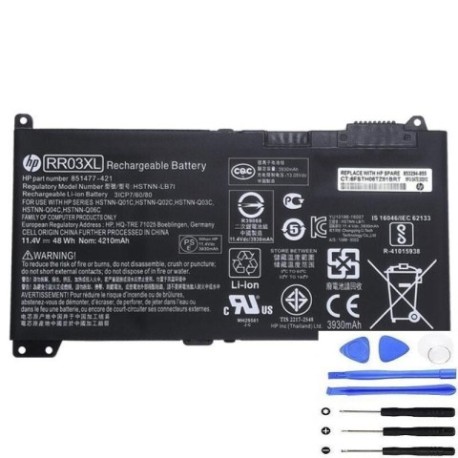
Battery models & part numbers
| Reference / P/N |
|---|
| HP RR03048XL-PR |
| HP-RR03XL-48Wh |
Compatible laptop models
| Model |
|---|
| HP 851477-421 |
| HP 851477-541 |
| HP 851477-831 |
| HP 851477-832 |
| HP 851610-850 |
| HP 851610-855 |
| HP HSTNN-I74C |
| HP HSTNN-LB71 |
| HP HSTNN-LB7I |
| HP HSTNN-PB6W |
| HP HSTNN-Q01C |
| HP HSTNN-Q02C |
| HP HSTNN-Q03C |
| HP HSTNN-Q04C |
| HP HSTNN-Q06C |
| HP mt21 Mobile Thin Clients |
| HP ProBook 430 G4s |
| HP ProBook 430 G5s |
| HP ProBook 440 G4s |
| HP ProBook 440 G5s |
| HP ProBook 450 G4s |
| HP ProBook 450 G5s |
| HP ProBook 455 G4s |
| HP ProBook 455 G5s |
| HP ProBook 470 G0s |
| HP ProBook 470 G4s |
| HP ProBook 470 G5s |
Introduction
The HP RR03XL 48Wh battery is a high-quality replacement power solution for various HP laptop models. This lithium-ion battery delivers reliable performance and is designed to meet original equipment specifications.
Common signs you need a replacement
| Symptoms | Causes | Verification | Recommendation |
|---|---|---|---|
| Battery won’t charge | Ageing cells, faulty circuitry | Check charging indicator, try different power outlet | Replace battery if charging issues persist |
| Short battery life | Reduced capacity from cycle wear | Monitor usage time, check battery health in system settings | Replace if runtime drops below 50% of original |
| Laptop shuts down unexpectedly | Voltage drops under load | Note if shutdown occurs during high-performance tasks | Immediate replacement recommended |
| Battery swelling or overheating | Internal damage, safety risk | Visual inspection, temperature check | Stop using immediately and replace |
How to check compatibility
Verify your laptop model matches one of the compatible models listed above. Check your current battery’s part number (usually printed on the battery) or look up your laptop’s model number in system information or on the original packaging.
When to replace
Consider replacing your battery when you notice significant performance degradation, typically after 2-3 years of regular use. Most lithium-ion batteries maintain about 80% of their original capacity after 300-500 charge cycles.
Installation guide (overview)
1. Power off your laptop and disconnect the charger
2. Remove the old battery (usually secured with latches or screws)
3. Align the new battery with the connectors
4. Secure the battery in place
5. Charge fully before first use
Usage & care tips
• Avoid complete discharges – recharge when battery reaches 20-30%
• Store in cool, dry conditions (15-25°C ideal)
• Use authorised HP chargers for optimal performance
• Calibrate battery monthly by fully charging and discharging
Safety & recycling in AU/NZ
In Australia and New Zealand, lithium batteries must be recycled through authorised collection centres. Never dispose of batteries in household waste. Check with your local council for battery recycling options or return to electronics retailers offering take-back programmes.
FAQ
How long does this battery last on a single charge?
Up to 4-6 hours depending on usage and laptop model.
Is this battery genuine HP?
This is a high-quality replacement battery designed to meet HP specifications.
What warranty is included?
Typically 12 months warranty from authorised retailers.
Can I use this battery with newer HP models?
Only with the compatible models listed above – check your specific model.
How do I recycle my old battery in Australia?
Use Batteryback.org.au or check with Officeworks, Bunnings, or Aldi stores.
What’s the delivery time to NZ?
Usually 7-10 business days for standard shipping to New Zealand.
Is installation difficult?
Most HP laptops have user-replaceable batteries – follow our guide above.