ASUS C31N1620 50Wh P5240U Battery Replacement Guide
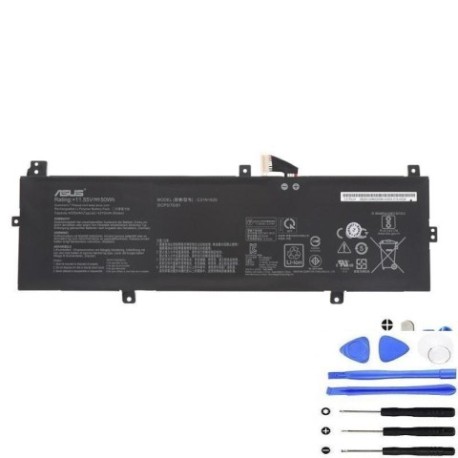
Introduction
If your ASUS ExpertBook or Pro laptop is showing signs of battery fatigue, you’ve come to the right place. The ASUS C31N1620 50Wh P5240U battery replacement is designed specifically for business-grade ASUS laptops commonly used by Australian and New Zealand professionals. This comprehensive guide covers everything from compatibility checking to installation, ensuring you get the most from your investment.
Battery models & part numbers
| Reference / P/N |
|---|
| 0B200-02860000 |
| 0B200-02860200 |
| Asus-C31N1620-50Wh-P5240U |
| C31N1620 |
| C31PoCH 3ICP5/70/81 |
Compatible models
| Model |
|---|
| Asus ExpertBook P5 P5340FF |
| Asus ExpertBook P5 P5340UA |
| Asus ExpertBook P5 P5340UF |
| Asus ExpertBook P5 P5440FA |
| Asus ExpertBook P5 P5440FF |
| Asus ExpertBook P5 P5440UA |
| Asus ExpertBook P5 P5440UF |
| Asus Pro P5240UA |
| Asus Pro P5240UF |
Common signs you need a replacement
| Symptom | Cause | Verification | Recommendation |
|---|---|---|---|
| Battery drains quickly | Reduced capacity from age/cycles | Check Windows battery report | Replace if capacity < 60% |
| Laptop shuts down unexpectedly | Voltage drops under load | Monitor during intensive tasks | Immediate replacement needed |
| Battery won’t charge fully | Charging circuit degradation | Check charging percentage | Replace to prevent damage |
| Battery swelling | Internal chemical breakdown | Visual inspection | Replace immediately – safety risk |
| Overheating during charging | Internal resistance increase | Touch test during charging | Replace to prevent fire hazard |
How to check compatibility
Finding your exact ASUS model number is crucial for battery compatibility. Look for the model sticker on the bottom casing of your laptop – it’s typically near the serial number and regulatory markings. For ASUS ExpertBook and Pro models, the exact model designation (like P5240UA or P5440FF) must match our compatibility list. You can also check through Windows System Information or ASUS official support tools. The MyASUS app provides detailed hardware information including battery specifications. Always cross-reference with multiple sources to ensure accuracy.
When to replace
Most ASUS laptop batteries last 2-3 years with regular use. Consider replacement when your battery health drops below 70% capacity, you experience sudden shutdowns at 20-30% charge, or the battery shows physical swelling. Business users should plan replacement proactively before critical failures occur during important work.
Installation guide
Replacing the battery in your ASUS ExpertBook or Pro model requires careful handling. First, power down completely and disconnect the charger. Remove the bottom panel screws – typically Torx T5 security screws common in business laptops. Gently pry the bottom cover starting from the corners. Locate the battery connector near the centre of the motherboard and carefully disconnect it. Remove the battery mounting screws (usually 4-6) and lift the battery out. Install the new C31N1620 battery in reverse order, ensuring all connectors are firmly seated. Reassemble and perform a full charge cycle.
Usage & care tips
For optimal battery life in your ASUS laptop, avoid frequent full discharges – aim to keep charge between 20-80% for daily use. Store at room temperature (15-25°C) and avoid leaving your laptop in hot cars. Use ASUS Battery Health Charging software to limit maximum charge to 80-90% when primarily using AC power. Calibrate your battery monthly by charging to 100%, then discharging to 5% before recharging.
Safety & recycling in AU/NZ
In Australia and New Zealand, lithium-ion batteries must be recycled properly. Never dispose of laptop batteries in household waste. Use authorised battery recycling programmes available at most electronics retailers, council waste centres, or through Batteryback programmes. Damaged or swollen batteries should be handled with extreme care – place in a fire-proof container and take to a specialist recycling centre immediately.
FAQ
How long does the C31N1620 battery last on a single charge?
The 50Wh capacity typically provides 6-8 hours of mixed usage depending on your specific model and usage patterns. P5440 series models may get slightly longer runtime than P5240 models due to efficiency improvements.
Is this battery genuine ASUS?
Our replacement batteries meet or exceed original specifications and are fully compatible with ASUS systems. They include all necessary safety certifications for use in Australia and New Zealand.
Will replacing the battery void my ASUS warranty?
In Australia, consumer law protects your rights regardless of who performs the replacement. However, if your laptop is still under manufacturer warranty, we recommend checking with ASUS support first.
How do I know if my battery is genuine?
Genuine ASUS C31N1620 batteries will have proper labelling, correct weight (approximately 260g), and should be recognised properly by your laptop’s BIOS and operating system.
Can I use this battery if my original had a different part number?
Yes, as long as your laptop model appears in our compatibility list. ASUS uses multiple part numbers for the same physical battery across different regions and production batches.
What’s the warranty on this replacement battery?
Our batteries come with a 12-month warranty covering manufacturing defects and premature capacity loss under normal usage conditions.
How should I store my old battery before recycling?
Store at 30-50% charge in a cool, dry place away from metal objects. Tape the terminals to prevent short circuits and place in a plastic bag if the casing is damaged.