HP HS04 41Wh Battery Replacement Guide
Find the perfect replacement battery for your HP laptop with our comprehensive compatibility guide. This HP HS04 41Wh battery fits numerous HP laptop models and comes with multiple part numbers for easy identification.
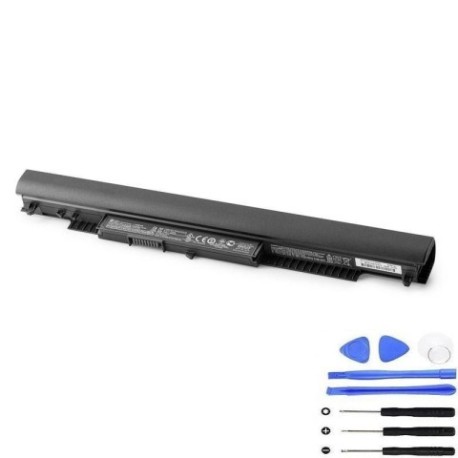
Battery models & part numbers
| Reference / P/N |
|---|
| HP HS04 HS03 |
| HP HS04041 |
| HP HS04041-CL |
| HP HSTNN-LB6V |
| HP M2Q95AA |
| HP N2L85AA |
| HP N2L85AA#ABB |
| HP TPN-I119 |
| HP TPN-I120 |
| HP-HS04-41Wh |
| HP 807611-132 |
| HP 807612-131 |
| HP 807612-141 |
| HP 807612-421 |
| HP 807671-800 |
| HP 807957-001 |
| HP 807957-001BU |
| HP 822903-A21 |
| HP 844198-850 |
| HP 852802-851 |
| HP 853295-850 |
Compatible laptop models
| Model |
|---|
| HP 14-ac000s |
| HP 14-ac100s |
| HP 14-am000s |
| HP 14-am100s |
| HP 14-an000s |
| HP 14-ar000s |
| HP 14g-ad000s |
| HP 14q-aj000s |
| HP 14q-aj100s |
| HP 15-ac500s |
| HP 15-ay000s |
| HP 15-ay100s |
| HP 15-ay500s |
| HP 15-ba000s |
| HP 15-ba100s |
| HP 15-ba500s |
| HP 15-ba600s |
| HP 15-be000s |
| HP 15-bf000s |
| HP 15-bg000s |
| HP 15g-ad000s |
| HP 15g-ad100s |
| HP 15q-aj000s |
| HP 15q-aj100s |
| HP 15t-ac000s |
| HP 17-ac000s |
| HP 17-x000s |
| HP 17-x100s |
| HP 17-x500s |
| HP 17-y000s |
| HP 240 G4s |
| HP 240 G5s |
| HP 245 G4s |
| HP 245 G5s |
| HP 246 G4s |
| HP 250 G4s |
| HP 250 G5s |
| HP 250 G5 SPs |
| HP 255 G4s |
| HP 255 G5s |
| HP 255 G5 SPs |
| HP 256 G4s |
| HP 256 G5s |
| HP 340 G3s |
| HP 340 G4s |
| HP 346 G3s |
| HP 346 G4s |
| HP 348 G3s |
| HP 348 G4s |
| HP Pavilion 15-ac000s |
| HP Pavilion 15-ac100s |
| HP Pavilion 15-ac600s |
| HP Pavilion 15-af000s |
| HP Pavilion 15-af100s |
Common signs you need a replacement
| Symptom | Cause | Verification | Recommendation |
|---|---|---|---|
| Short battery life | Ageing cells, reduced capacity | Check battery health in system settings | Replace if capacity below 60% |
| Battery not charging | Faulty battery circuit, worn connectors | Test with different charger | Replace battery if charger works |
| Laptop shuts down unexpectedly | Voltage drops, cell failure | Monitor battery percentage drops | Immediate replacement needed |
| Battery swelling | Gas buildup, internal damage | Visual inspection, case bulging | Replace immediately – safety risk |
| Overheating during use | Inefficient cells, internal resistance | Check temperature, monitor heat | Replace to prevent damage |
How to check compatibility
Verify your laptop model matches our compatibility list above. Check your current battery’s part number (usually printed on the battery) against our reference numbers. For HP laptops, you can also use the HP Support Assistant software to identify your exact battery model.
When to replace
Replace your battery when it holds less than 60% of its original capacity, shows physical damage or swelling, fails to charge properly, or causes unexpected shutdowns. Most laptop batteries last 2