ASUS B31N1535 48Wh Laptop Battery Replacement Guide
If your ASUS ZenBook is struggling to hold charge or shutting down unexpectedly, you’ve come to the right place. This comprehensive guide covers everything Australian and New Zealand customers need to know about replacing their ASUS laptop battery with the genuine B31N1535 48Wh model.
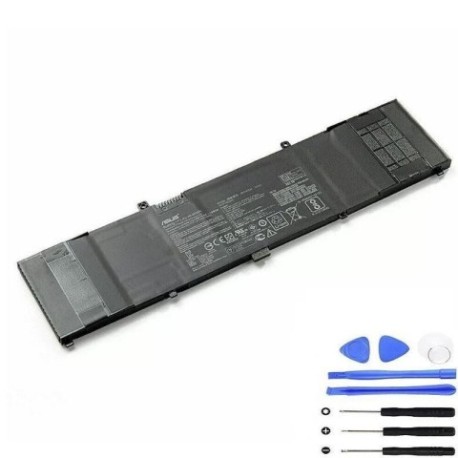
Battery models & part numbers
| Reference / P/N |
|---|
| 0B200-02020000 |
| Asus-B31N1535-48Wh |
Compatible models
| Model |
|---|
| Asus UX310UA |
| Asus UX310UQ |
| Asus UX3410UA |
| Asus UX410UA |
| Asus UX410UQ |
| Asus ZenBook UX310UA |
| Asus ZenBook UX410UA |
Common signs you need a replacement
| Symptoms | Causes | Verification | Recommendation |
|---|---|---|---|
| Battery drains in under 2 hours | Normal wear after 2-3 years of use | Check battery health in Windows settings | Replace if capacity below 60% |
| Laptop shuts down at 20-30% charge | Battery calibration issues | Monitor shutdown patterns | Replace battery immediately |
| Battery won’t charge past 80% | Charging circuit failure | Test with different charger | Replace battery and check charger |
| Laptop feels hot near battery area | Overheating due to aged cells | Check temperature with software | Replace to prevent damage |
| Battery percentage jumps erratically | Faulty battery management system | Observe percentage changes | Replace for accurate monitoring |
How to check compatibility
Finding your exact ASUS model information is crucial for battery compatibility. For ASUS ZenBook UX series laptops, you have several options:
Method 1: Check the bottom label – Turn your laptop over and look for the model number printed on the sticker. It should clearly state “UX310UA”, “UX410UQ”, or similar.
Method 2: Use System Information – Press Windows Key + R, type “msinfo32”, and look for “System Model” in the System Information window.
Method 3: ASUS Official Support – Visit the ASUS Australia support website and use their product identification tool by entering your serial number.
Method 4: Check Original Battery – If you still have access to your current battery, remove it carefully and check the part number printed on it.
The B31N1535 battery is specifically designed for the ultra-slim ZenBook UX series, featuring the exact dimensions and connector type required for these models. Always verify your model matches our compatibility list above before purchasing.
When to replace your ASUS battery
Most ASUS ZenBook batteries last between 2-4 years with normal use. Consider replacement when:
- Your battery health shows less than 60% of original capacity
- You experience sudden shutdowns even with charge remaining
- The battery takes significantly longer to charge
- You notice physical swelling or deformation
- Your laptop can’t complete important tasks on battery power
For Australian and New Zealand customers, it’s particularly important to consider replacement before the summer months when higher temperatures can accelerate battery degradation.
Installation guide
Replacing the battery in your ASUS ZenBook UX series is straightforward with the right tools and precautions:
Tools needed: Phillips #00 screwdriver, plastic spudger, anti-static wrist strap (recommended)
Step 1: Safety first – Shut down your laptop completely and disconnect the AC adapter. Ground yourself to prevent static discharge.
Step 2: Access the battery compartment – Remove the 10-12 screws from the bottom case using your Phillips screwdriver. Gently pry open the bottom cover using a plastic spudger.
Step 3: Disconnect the old battery – Locate the battery connector near the centre of the motherboard. Carefully disconnect the battery cable by pulling the connector straight out.
Step 4: Remove old battery – Unscrew the 4-6 screws securing the battery to the chassis. Lift the battery out carefully.
Step 5: Install new battery – Place your new B31N1535 battery in position, secure with screws, and reconnect the battery cable firmly.
Step 6: Reassemble and test – Replace the bottom cover, screw it back in, and power on your laptop. Allow the battery to charge fully before first use.
Note: Some UX models may have slightly different screw patterns, so take photos during disassembly for reference.
Usage & care tips for longer battery life
Extend the life of your new ASUS battery with these proven techniques:
- Avoid extreme temperatures – Don’t leave your laptop in cars during Australian summers where temperatures can exceed 50°C
- Optimal charging – Keep battery between 20-80% for daily use; avoid constant 100% charging
- Calibrate monthly – Fully discharge then recharge to 100% to maintain accurate battery reporting
- Storage advice – If storing long-term, charge to 50% and store in cool, dry place around 15-25°C
- Power settings – Use ASUS Battery Health Charging software to optimise charging patterns
Safety & recycling in Australia & New Zealand
Battery safety and proper disposal are regulated in both Australia and New Zealand:
Safety precautions:
- Never attempt to open or puncture lithium-ion batteries
- Discontinue use if battery shows signs of swelling, leaking, or overheating
- Only use ASUS-approved chargers and accessories
- Keep batteries away from children and pets
Recycling options:
- Australia: Drop off old batteries at any Officeworks, Battery World, or council e-waste collection points
- New Zealand: Use computer retailers like PB Tech or council transfer stations with e-waste facilities
- Both countries participate in the B-cycle battery recycling program
- Never dispose of lithium batteries in household rubbish – they can cause fires in waste facilities
Frequently Asked Questions
Q: How long does the B31N1535 battery typically last?
A: With normal use, expect 2-4 years or 500-800 charge cycles. Heavy users may see shorter lifespan.
Q: Will this battery work with my ASUS UX310UA purchased in Australia?
A: Yes, the B31N1535 is compatible with all regional variants of the compatible models listed above.
Q: How do I know if my battery is genuine ASUS?
A: Genuine batteries have proper ASUS branding, correct weight (approx. 240g), and come in official packaging with holographic security labels.
Q: Can I replace the battery myself without voiding warranty?
A: For laptops out of warranty, self-replacement is fine. For in-warranty devices, check ASUS Australia/New Zealand policy as some require authorised service centre installation.
Q: What’s the difference between B31N1535 and 0B200-02020000?
A: These are different part numbers for the same battery – both are compatible with your ASUS ZenBook UX series laptop.
Q: How long does shipping take to regional Australia?
A: Most orders reach metropolitan areas in 2-3 business days, regional areas may take 5-7 business days depending on location.
Q: Is the battery pre-charged when it arrives?
A: Yes, batteries typically arrive with 30-50% charge. We recommend fully charging before first use for optimal performance.
Remember that investing in a genuine ASUS replacement battery ensures compatibility, safety, and optimal performance for your valuable ZenBook. Don’t risk your device with cheap imitations that may lack proper safety certifications or provide inconsistent power delivery.