HP BL06XL 42Wh Battery Replacement Guide
Find the right replacement battery for your HP laptop with our comprehensive compatibility guide and expert advice for Australian and New Zealand consumers.
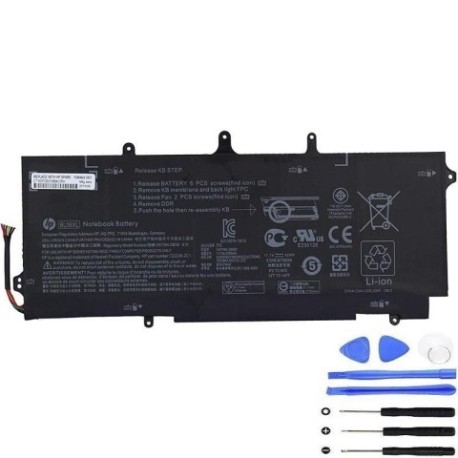
Battery models & part numbers
| Reference / P/N |
|---|
| HP 722236-1C1 |
| HP 722297-005 |
| HP 722297-005B |
| HP BL06 |
| HP BL06042XL-PL |
| HP HSTNN-IB5D |
| HP-BL06XL-42Wh |
Compatible laptop models
| Model |
|---|
| HP EliteBook 940 G1s |
| HP EliteBook Folio 1040 G1s |
| HP Elitebook Folio 1040 G2s |
Introduction
The HP BL06XL 42Wh battery is a high-quality replacement option for various HP business laptops. This guide helps Australian and New Zealand users identify compatibility and make informed purchasing decisions.
Common signs you need a replacement
| Symptom | Cause | Verification | Recommendation |
|---|---|---|---|
| Short battery life | Ageing cells | Check system power report | Consider replacement |
| Laptop won’t hold charge | Battery degradation | Unplug power, check runtime | Replace battery |
| Battery swelling | Internal damage | Visual inspection | Replace immediately |
| Overheating | Faulty cells | Temperature monitoring | Safety replacement |
How to check compatibility
Verify your laptop model matches our compatibility list. Check your current battery’s part number or remove it to find the model number printed on the label. Cross-reference with our authorised compatibility tables above.
When to replace
Replace your battery when it holds less than 50% of its original capacity, shows physical damage, or causes system instability. Most laptop batteries need replacement every 2-3 years with regular use.
Installation guide (overview)
Power off your laptop and disconnect from power. Remove the bottom panel, disconnect the old battery, and install the new one following manufacturer guidelines. Seek professional help if unsure.
Usage & care tips
Avoid extreme temperatures (ideal range 15-25°C). Don’t leave your laptop plugged in constantly. Calibrate your battery monthly by fully charging and discharging. Store in a cool, dry place when not in use.
Safety & recycling in AU/NZ
Never attempt to open or modify batteries. Dispose of old batteries at authorised recycling centres. In Australia, use Batteryback or council collection services. In New Zealand, use recognised e-waste recyclers.
FAQ
How long does shipping take to Australia/New Zealand?
Most orders arrive within 7-14 business days depending on your location and customs processing.
Is this battery genuine HP?
Our batteries are high-quality replacements that meet or exceed OEM specifications and are fully compatible with your HP device.
What warranty do you offer?
We provide a 12-month warranty covering manufacturing defects and performance issues.
Can I install this battery myself?
Yes, most HP laptops have user-replaceable batteries. Follow our installation guide or consult a professional if uncomfortable.
How do I recycle my old battery?
Take it to your local council recycling centre or authorised battery collection point. Never dispose of in household waste.
Will this battery work with my specific model?
Check our compatibility tables above. If your laptop model or part number matches, it will be fully compatible.
What’s the battery capacity?
This is a 42Wh battery providing reliable performance for business use and daily computing tasks.