Battery models & part numbers
| Reference / P/N |
|---|
| 34015838 |
| 34025814 |
| 34025815 |
| 38018461 |
| 38018462 |
| CP422590-02 |
| CP422590-03 |
| CP422595-02 |
| CP422595-XX |
| FMVNBP171 |
| FMVNBP200 |
| FPB0251 |
| FPCBP200 |
| FPCBP215 |
| FPCBP280 |
| FUJ:CP378215-XX |
| FUJ:CP378348-XX |
| FUJ:CP422590-02 |
| FUJ:CP422590-03 |
| FUJ:CP422595-XX |
| FUJ:CP457797-XX |
| FUJ:CP457798-XX |
Compatible laptop models
| Model |
|---|
| LifeBook T1010 |
| LifeBook T4310 |
| LifeBook T4410 |
| LifeBook T5010 |
| LifeBook T730 |
| LifeBook T731 |
| LifeBook T900 |
| LifeBook T901 |
| LifeBook TH700 |
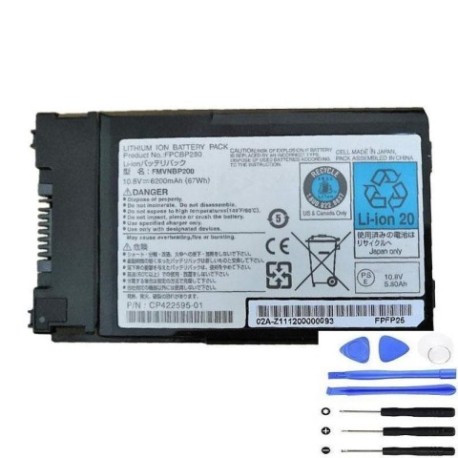
Introduction
Keep your Fujitsu laptop running at peak performance with our authorised replacement battery. The FMVNBP200 67Wh battery is designed to meet original equipment specifications, ensuring reliable power for your mobile computing needs.
Common signs you need a replacement
| Symptoms | Causes | Verification | Recommendation |
|---|---|---|---|
| Battery drains quickly | Ageing cells, reduced capacity | Check power settings, monitor usage | Consider replacement if under 2 hours |
| Laptop won’t hold charge | Failed battery circuitry | Test with power adapter removed | Immediate replacement needed |
| Battery swelling or overheating | Internal damage, safety risk | Visual inspection, temperature check | Replace immediately, do not use |
| Inconsistent charging | Worn connectors, faulty BMS | Monitor charging patterns | Replace if persistent issues |
How to check compatibility
Verify your laptop model matches our compatible list above. Check your current battery’s part number (usually printed on the battery) against our reference list. For Fujitsu LifeBook models, cross-reference both model and part number for perfect fit.
When to replace
Replace your battery when runtime drops below 50% of original capacity, typically after 2-3 years of regular use. Swelling, overheating or failure to charge require immediate replacement for safety.
Installation guide (overview)
Power off and unplug your laptop. Remove the battery compartment cover (if applicable). Disconnect the old battery and insert the new one, ensuring proper alignment. Secure any locking mechanisms and replace the cover.
Usage & care tips
Avoid extreme temperatures (ideal range 15-25°C). Calibrate monthly by fully charging then discharging. Store at 40-60% charge if not used for extended periods. Use only authorised chargers.
Safety & recycling in AU/NZ
Do not disassemble or puncture batteries. Dispose of old batteries at authorised recycling centres. In Australia, use Batteryback program locations. In New Zealand, utilise council e-waste facilities.
FAQ
What’s the warranty period?
Our batteries come with 12 months warranty covering manufacturing defects.
How long does shipping take?
Standard delivery within 3-7 business days across Australia and New Zealand.
Is this battery genuine?
Yes, we supply authorised replacement batteries meeting original specifications.
Can I use this with different laptop brands?
No, this battery is specifically designed for compatible Fujitsu models only.
What’s the battery capacity?
67Wh capacity providing extended runtime for compatible Fujitsu laptops.
How do I recycle my old battery?
Take to any authorised e-waste recycling centre – never dispose in household waste.
Is installation difficult?
Most users find installation straightforward following our guide. Professional installation available if preferred.