Acer AP16L5J 36Wh Battery Replacement: Complete Guide for Australian & New Zealand Users
Is your Acer laptop struggling to hold charge? Our comprehensive guide covers everything you need to know about the AP16L5J 36Wh battery replacement, including compatible models, installation tips, and local recycling options.
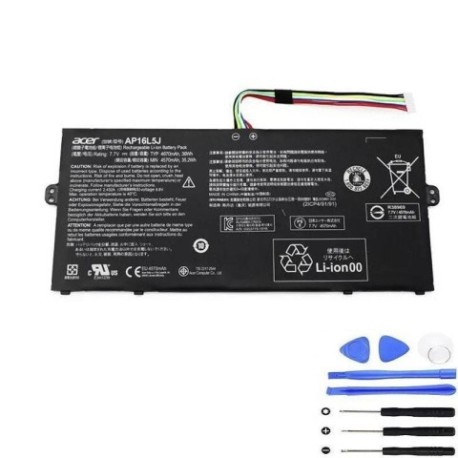
Battery models & part numbers
| Reference / P/N |
|---|
| Acer-AP16L5J-36Wh |
| Acer KT.00205.002 |
| Acer KT.00205.008 |
| Acer KT.00205.009 |
Compatible models
| Model |
|---|
| Acer Chromebook 311 (CB311-11HT) |
| Acer Chromebook Spin 11 (CP311-3H) |
| Acer Chromebook Spin 311 (CP311-3H) |
| Acer Chromebook Spin 513 (CP513-1HL) |
| Acer Spin 1 (SP111-32N) |
| Acer Spin 1 (SP111-33) |
| Acer Spin 1 (SP111-34N) |
| Acer Swift 1 (11-34N-C1TJ) |
| Acer Swift 5 (SF514-52T) |
| Acer Swift 5 (SF514-53T) |
| Acer Swift 5 Pro (SF514-52TP) |
| Acer Switch 3 (SW312-31) |
| Acer Switch 3 (SW312-31P) |
| Acer TravelMate X514-51 |
Introduction
The Acer AP16L5J 36Wh battery is a crucial component powering numerous Acer laptops across different series. As laptops age, battery performance naturally degrades, leading to reduced runtime and potential system instability. Understanding when and how to replace your battery can significantly extend your device’s lifespan and restore its portability.
Common signs you need a replacement
| Symptom | Cause | Verification | Recommendation |
|---|---|---|---|
| Rapid power drain | Reduced battery capacity | Check battery health in system settings | Consider replacement if below 60% capacity |
| Laptop shuts down unexpectedly | Voltage instability | Monitor battery percentage drops | Replace immediately to prevent data loss |
| Battery won’t charge fully | Charging circuit failure | Test with different charger | Replace battery if charger works normally |
| Physical swelling | Internal chemical breakdown | Visual inspection | Replace immediately – safety hazard |
| Overheating during use | Increased internal resistance | Monitor temperature with software | Replace to prevent damage to other components |
How to check compatibility
Finding your exact laptop model is the first step in ensuring battery compatibility. For Acer devices, you can typically find the model number on a sticker located on the bottom case, under the battery compartment, or in the system information through Windows Settings > System > About. The AP16L5J battery is specifically designed for Acer’s ultra-portable and convertible models, particularly those in the Chromebook, Spin, Swift, and TravelMate series manufactured between 2017-2020.
For Australian and New Zealand users, Acer’s official support website provides compatibility checking tools where you can enter your serial number to verify exact part requirements. Many local computer repair shops also offer free compatibility checks if you’re uncertain about your model.
When to replace
Most lithium-ion batteries like the AP16L5J have a typical lifespan of 2-3 years with regular use. However, several factors influence replacement timing. If your laptop can’t last through a standard work session (3-4 hours), frequently drops from 30% to 0% suddenly, or requires constant connection to power, it’s time for replacement. For business users in AU/NZ who rely on portability, replacing before complete failure prevents productivity loss.
Installation guide
Replacing the AP16L5J battery requires careful handling and proper tools. Begin by powering off the laptop and disconnecting all cables. Use a precision screwdriver set to remove the bottom case screws – note that some Acer models use different screw lengths, so keep them organised. Once the case is removed, locate the battery connector and gently disconnect it from the motherboard. Remove any securing screws or adhesive strips holding the battery in place.
For Acer Spin and Switch models, pay special attention to the hinge mechanisms when accessing the battery compartment. The new AP16L5J should seat perfectly in the original position. Reconnect the battery connector firmly, reassemble the laptop, and allow the first charge to complete fully before use. Many users in Australia and New Zealand find the process straightforward with online video tutorials specific to their model.
Usage & care tips
To maximise your new battery’s lifespan in AU/NZ conditions, avoid extreme temperatures – don’t leave your laptop in hot cars or direct sunlight. Ideal operating temperature is between 10°C and 35°C. For daily use, partial discharges are better than full cycles; try to keep the battery between 20% and 80% most of the time. If storing the laptop unused for extended periods, charge to about 50% and store in a cool, dry place.
Australian users should note that high ambient temperatures in summer can accelerate battery degradation. Consider using cooling pads and ensuring proper ventilation during intensive tasks. The 36Wh capacity provides optimal balance between runtime and weight for portable computing needs.
Safety & recycling in AU/NZ
Battery safety is paramount. Never attempt to open or puncture the battery casing, and avoid exposing it to water or extreme heat. In Australia, damaged batteries should be taken to authorised collection points – most electronics retailers offer free battery recycling services. In New Zealand, the Ministry for the Environment provides guidelines for proper battery disposal through local council facilities.
Both countries have strict regulations about lithium-ion battery transportation and disposal. When replacing your battery, ensure the old unit is recycled properly to prevent environmental harm. Many replacement services in AU/NZ include safe disposal of your old battery as part of their service.
FAQ
How long does the AP16L5J battery typically last?
The AP16L5J 36Wh battery typically provides 6-8 hours of normal use depending on the specific laptop model and usage patterns. Chromebook models often achieve longer runtime due to their optimised operating system.
Can I use a higher capacity battery instead?
No, the AP16L5J is specifically designed for these Acer models. Using incompatible batteries can damage your laptop and void warranties. Always use the correct part number for your device.
Is professional installation necessary?
While many users successfully self-install, if you’re uncomfortable with electronics disassembly, authorised Acer service centres throughout Australia and New Zealand offer professional installation services.
How do I verify my battery is genuine?
Genuine Acer batteries feature specific holographic labels and serial numbers. Purchase from authorised retailers and verify the packaging includes Acer branding and security features.
Will replacing the battery improve performance?
While battery replacement won’t increase processing speed, it will restore reliable portable operation and prevent unexpected shutdowns during important tasks.
Are there any software calibrations needed after replacement?
After installation, allow the battery to charge fully before first use. Some Acer models benefit from running the battery calibration tool available in Acer Care Center.
What’s the warranty on replacement batteries?
Genuine Acer batteries typically come with 12-month warranties in Australia and New Zealand. Third-party alternatives may offer different warranty terms.
Restoring your Acer laptop’s battery life not only brings back its portability but also ensures reliable performance for work, study, or entertainment. With proper installation and care, your new AP16L5J battery will provide dependable power for years to come.