Asus B41N1341 64Wh Battery Replacement Guide
If your Asus laptop is struggling to hold a charge or showing battery warning signs, this comprehensive guide covers everything you need to know about the B41N1341 64Wh replacement battery. We’ll walk you through compatible models, installation steps, and essential care tips specifically for Australian and New Zealand users.
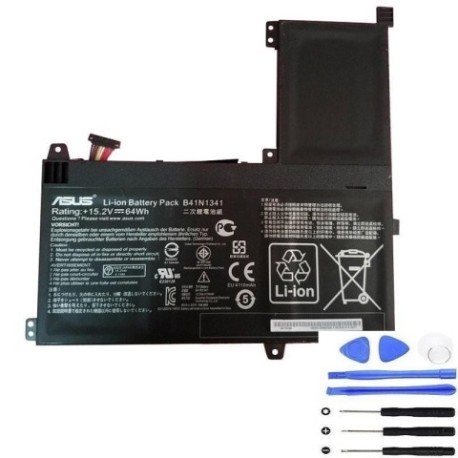
Battery models & part numbers
| Reference / P/N |
|---|
| 0B200-00960000 |
| Asus-B41N1341-64Wh |
| B41Bn95 |
| N542LA |
| Q502LA |
Compatible models
| Model |
|---|
| 0B200-00960000 |
| Asus-B41N1341-64Wh |
| B41Bn95 |
| N542LA |
| Q502LA |
Introduction
Laptop batteries are consumable components that naturally degrade over time. The Asus B41N1341 64Wh battery is a high-quality replacement designed specifically for several Asus laptop models commonly used across Australia and New Zealand. Understanding when and how to replace your battery can save you from unexpected shutdowns and maintain your laptop’s performance.
Common signs you need a replacement
| Symptom | Cause | Verification | Recommendation |
|---|---|---|---|
| Rapid power drain | Battery capacity degradation | Check battery health in system settings | Consider replacement if below 60% capacity |
| Laptop won’t charge fully | Charging circuit or battery failure | Try different power outlet and charger | Replace battery if issue persists |
| Swelling or bulging | Internal chemical breakdown | Visual inspection of battery compartment | Immediate replacement required for safety |
| Random shutdowns | Voltage instability | Monitor shutdown patterns | Replace battery to prevent data loss |
| Overheating during use | Internal resistance increase | Check temperature with monitoring software | Replace to prevent damage to other components |
How to check compatibility
Before purchasing any replacement battery, verifying compatibility is crucial. For Asus laptops, you can find your model information in several ways. Check the bottom casing of your laptop for a sticker containing the model number. Alternatively, you can access system information through Windows by pressing Windows Key + R, typing “msinfo32”, and looking for System Model. The Asus support website also provides compatibility checking tools where you can enter your serial number or model to confirm battery requirements. Always cross-reference with the part numbers listed above to ensure perfect compatibility with your specific Asus model.
When to replace
Most laptop batteries last between 2-4 years with regular use. If your battery can’t hold a charge for more than an hour of light use, or if you notice significant swelling, it’s time for replacement. In Australia’s varying climate conditions, batteries may degrade faster in hotter regions. Regular monitoring through your operating system’s battery health tools can help you plan replacement before complete failure occurs.
Installation guide
Replacing your Asus battery is generally straightforward. First, ensure you’re working in a clean, static-free environment. Power down your laptop completely and disconnect the AC adapter. For most Asus models compatible with the B41N1341 battery, you’ll need to remove the bottom panel using a Phillips screwdriver. Locate the battery connector and gently disconnect it from the motherboard. Remove any screws securing the battery, then lift it out carefully. Insert the new B41N1341 battery, reconnect the connector, replace screws, and reassemble your laptop. Always handle lithium-ion batteries with care to avoid punctures or damage.
Usage & care tips
To maximise your new battery’s lifespan, avoid frequent full discharges. Lithium-ion batteries prefer partial discharges rather than going from 100% to 0% regularly. In Australia’s warmer climates, try to keep your laptop in environments below 35°C when possible. Store your laptop with around 50% charge if you won’t be using it for extended periods. Calibrate your battery monthly by allowing it to discharge fully then charging to 100% without interruption. These practices can help maintain optimal battery health throughout its service life.
Safety & recycling in AU/NZ
Battery safety is paramount. Never attempt to open or modify lithium-ion batteries, as they contain hazardous materials. If you notice any damage, swelling, or leakage, stop using the battery immediately and dispose of it properly. In Australia, you can recycle old laptop batteries through Batteryback.org.au or at designated collection points at electronics retailers. In New Zealand, the Recycle.co.nz programme accepts laptop batteries for safe disposal. Many local councils also offer battery recycling services. Never dispose of batteries in regular household waste due to fire risk and environmental concerns.
FAQ
How long does the B41N1341 battery typically last?
The B41N1341 64Wh battery typically provides 3-5 hours of usage depending on your laptop’s power settings and applications. With normal use, the battery should maintain good performance for 2-3 years before significant capacity loss occurs.
Can I use this battery with other Asus models not listed?
No, we strongly recommend only using the B41N1341 battery with the compatible models listed above. Using incompatible batteries can damage your laptop and void warranties.
Is professional installation required?
While many users successfully install replacement batteries themselves, if you’re uncomfortable with disassembling your laptop, seek assistance from an authorised Asus service centre in Australia or New Zealand.
How do I check my current battery’s health?
In Windows, open Command Prompt as administrator and type “powercfg /batteryreport” to generate a detailed battery health report showing capacity history and current status.
What warranty comes with this battery?
Replacement batteries typically come with 12-month warranties, though specific terms may vary by retailer. Always check warranty details before purchase.
Can I leave my laptop plugged in all the time?
Modern laptops have charging circuits that prevent overcharging, but for optimal battery health, it’s best to unplug occasionally and allow the battery to cycle between 20-80% charge.
Why does my battery drain faster in hot weather?
High temperatures accelerate chemical reactions in batteries, causing faster discharge. In Australian summers, try to keep your laptop in cooler environments when possible.