Battery models & part numbers
| Reference / P/N |
|---|
| Dell 00GFJ6 |
| Dell 0357F9 |
| Dell 071JF4 |
| Dell 0GFJ6 |
| Dell 71JF4 |
| Dell-357F9-74Wh |
Compatible laptop models
| Model |
|---|
| Dell Inspiron 15 (7559) |
| Dell Inspiron 15 (7559-0092) |
| Dell Inspiron 15 (7559-0108) |
| Dell Inspiron 15 (7559-7602) |
| Dell Inspiron 15 (7559-8052) |
| Dell Inspiron 15 (7559-8069) |
| Dell Inspiron 15 (7566) |
| Dell Inspiron 15 (7566-1821) |
| Dell Inspiron 15 (7566-3646) |
| Dell Inspiron 15 (7566-3653) |
| Dell Inspiron 15 (7567) |
| Dell Inspiron 15 (7567-4414) |
| Dell Inspiron Gaming 15 (5576) |
| Dell Inspiron Gaming 15 (5577) |
Introduction
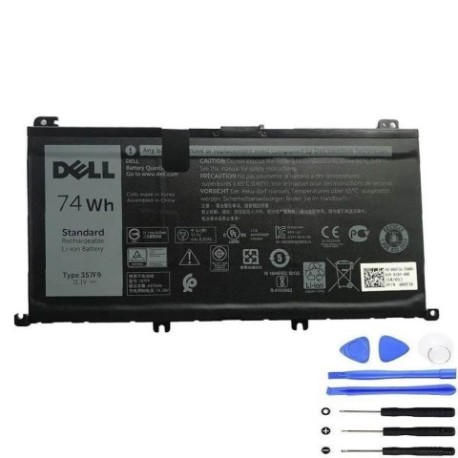
Keep your Dell laptop running at peak performance with our authorised replacement battery. The Dell 357F9 74Wh battery is designed to meet original specifications and provide reliable power for your computing needs.
Common signs you need a replacement
| Symptoms | Causes | Verification | Recommendation |
|---|---|---|---|
| Battery drains quickly | Ageing cells | Check power settings | Consider replacement |
| Laptop won’t hold charge | Battery degradation | Test with power adapter | Replace battery |
| Swelling or bulging | Internal damage | Visual inspection | Replace immediately |
| Overheating during use | Failing components | Monitor temperature | Replace for safety |
How to check compatibility
Verify your laptop model matches our compatibility list above. Check your current battery’s part number or look in your laptop’s system information. All compatible models are Dell Inspiron 15 series and Inspiron Gaming 15 models listed.
When to replace
Replace your battery when it no longer holds a sufficient charge for your needs, shows physical damage, or causes performance issues. Most laptop batteries last 2-4 years with regular use.
Installation guide (overview)
Power off your laptop and disconnect all cables. Remove the bottom panel, disconnect the old battery, and install the new one following proper safety procedures. Refer to your laptop’s service manual for detailed instructions.
Usage & care tips
Store batteries at room temperature (15-25°C). Avoid complete discharges and extreme temperatures. Calibrate your battery monthly by fully charging and discharging. Keep connectors clean and free from dust.
Safety & recycling in AU/NZ
Never dispose of batteries in household waste. Use authorised battery recycling centres available at most electronics retailers. Damaged batteries should be handled with care and recycled promptly.
FAQ
How long does this battery last?
Typically 2-4 years with normal use, depending on usage patterns and charging habits.
Is this battery genuine Dell?
This is a high-quality replacement battery designed to meet original specifications.
What’s the warranty period?
Check the product page for current warranty information and terms.
How do I recycle my old battery?
Take it to any authorised battery recycling centre or electronics retailer in Australia or New Zealand.
Will this work with my specific model?
Check the compatibility tables above – if your model is listed, it’s compatible.
What’s the capacity in watt-hours?
This is a 74Wh battery providing extended runtime for compatible Dell laptops.
How do I maintain battery health?
Avoid extreme temperatures, don’t leave plugged in constantly, and perform regular calibration cycles.