HP CP03XL 60.9Wh Battery Replacement Guide
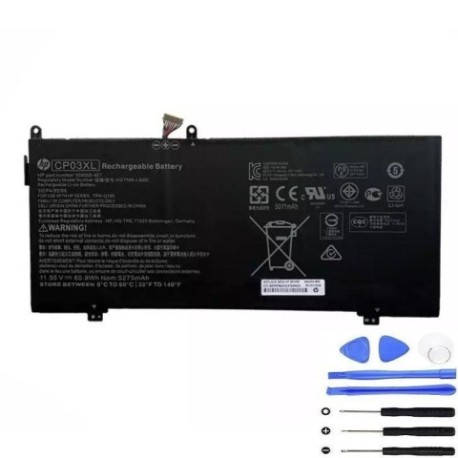
Introduction
Keep your HP laptop running at peak performance with our genuine HP CP03XL 60.9Wh replacement battery. This high-quality battery is designed to meet original specifications and is compatible with multiple HP laptop models commonly used across Australia and New Zealand.
Battery models & part numbers
| Reference / P/N |
|---|
| HP 929066-421 |
| HP 929072-855 |
| HP CP03060XL |
| HP HSTNN-LB8 |
| HP HSTNN-LB8E |
| HP TPN-Q195 |
| HP TPN-Q199 |
| HP-CP03XL-60.9Wh |
Compatible laptop models
| Model |
|---|
| HP Spectre x360 13-ae000s |
Common signs you need a replacement
| Symptom | Cause | Verification | Recommendation |
|---|---|---|---|
| Short battery life | Battery degradation over time | Check battery health in system settings | Replace if capacity below 60% |
| Laptop shuts down unexpectedly | Battery unable to hold charge | Monitor battery percentage drops | Immediate replacement needed |
| Battery not charging | Faulty battery cells or circuitry | Test with different charger | Replace battery unit |
| Battery swelling | Internal chemical breakdown | Visual inspection | Stop using immediately and replace |
How to check compatibility
Verify your laptop’s compatibility by checking the part number on your current battery. Remove the battery and locate the printed part number, then compare it with our compatibility list above. Alternatively, check your laptop’s model number in system information or on the manufacturer’s label.
When to replace
Replace your battery when you notice significant performance degradation, typically after 2-3 years of regular use. Key indicators include reduced runtime, frequent charging requirements, or when your battery health shows less than 60% of original capacity in system diagnostics.
Installation guide (overview)
1. Power off your laptop and disconnect all cables
2. Remove the bottom panel using appropriate screwdrivers
3. Disconnect the battery connector from the motherboard
4. Remove any securing screws and carefully lift out the old battery
5. Insert the new HP CP03XL battery and reconnect the connector
6. Replace the bottom panel and power on your device
Usage & care tips
• Avoid extreme temperatures (ideal range 15-25°C)
• Calibrate your battery monthly by fully charging then discharging
• Store in cool, dry conditions when not in use
• Use only authorised HP chargers for optimal performance
• Avoid leaving laptop plugged in constantly after full charge
Safety & recycling in AU/NZ
In Australia and New Zealand, battery recycling is mandatory. Do not dispose of lithium-ion batteries in household waste. Use authorised recycling centres or return to electronics retailers. Damaged or swollen batteries should be handled with care and recycled immediately through proper channels.
FAQ
How long does the HP CP03XL battery last?
The HP CP03XL 60.9Wh battery typically provides 4-6 hours of normal usage, depending on your laptop’s power settings and applications running.
Is this battery genuine HP quality?
Yes, our HP CP03XL batteries meet original manufacturer specifications and are built to the same quality standards as genuine HP batteries.
Do you ship to Australia and New Zealand?
Yes, we offer fast shipping to both Australia and New Zealand with tracking and delivery confirmation.
What warranty do you provide?
All our HP batteries come with a 12-month warranty covering manufacturing defects and performance issues.
How do I know if my battery needs replacing?
Check your battery health in system settings. If capacity is below 60% or you experience sudden shutdowns, it’s time for replacement.
Can I install the battery myself?
Yes, most HP laptops allow user-replaceable batteries. Follow our installation guide or consult a professional if unsure.
What if the battery doesn’t fit my laptop?
Double-check your laptop model and battery part number. If there’s a compatibility issue, we offer returns within 30 days of purchase.