Complete Guide to ASUS C31N1714 57Wh Battery Replacement for Your ZenBook Flip 14
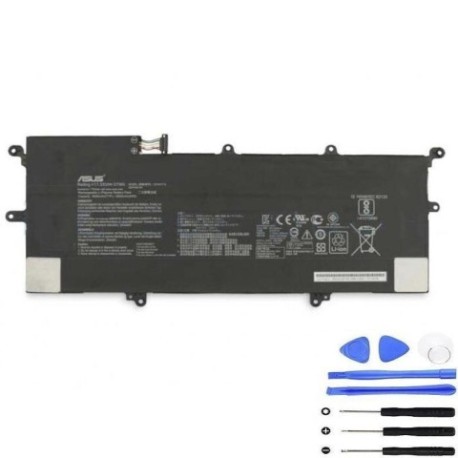
If your ASUS ZenBook Flip 14 is struggling with battery life, you’ve come to the right place. This comprehensive guide covers everything AU/NZ consumers need to know about replacing their laptop battery with the genuine ASUS C31N1714 57Wh model.
Battery models & part numbers
| Reference / P/N |
|---|
| 0B200-02750000 |
| Asus-C31N1714-57Wh |
| C31PQ9H |
Compatible models
| Model |
|---|
| Asus ZenBook Flip 14 UX461FA |
| Asus ZenBook Flip 14 UX461FN |
| Asus ZenBook Flip 14 UX461UA |
| Asus ZenBook Flip 14 UX461UN |
| Asus ZenBook Flip UX461 |
| Asus ZenBook Flip UX461UN PRO |
Introduction
Your ASUS ZenBook Flip 14 is designed for productivity and mobility, but a failing battery can severely impact your computing experience. The ASUS C31N1714 57Wh battery is the official replacement that ensures your device maintains optimal performance and safety standards.
Common signs you need a replacement
| Symptom | Cause | Verification | Recommendation |
|---|---|---|---|
| Battery drains quickly (under 2 hours) | Battery degradation over 500+ cycles | Check battery health in Windows settings | Replace battery if capacity below 60% |
| Laptop shuts down unexpectedly | Voltage drops under load | Monitor battery percentage during use | Immediate replacement recommended |
| Battery won’t charge past 80% | Battery management system failure | Reset battery in BIOS settings | Replace if issue persists |
| Laptop feels hot near battery area | Internal resistance increase | Check temperature with monitoring software | Replace immediately for safety |
| Battery swelling or case bulging | Gas buildup from chemical breakdown | Visual inspection of laptop base | Stop using and replace urgently |
How to check compatibility
Before purchasing any replacement battery, it’s crucial to verify compatibility with your specific ASUS ZenBook Flip model. Here’s how AU/NZ consumers can ensure they’re getting the right battery:
Finding Your Model Information: Turn your laptop over and locate the white sticker on the bottom case. You’ll find the exact model number (UX461FA, UX461FN, etc.) clearly printed. Alternatively, press Windows Key + R, type “msinfo32” and check under “System Model”.
ASUS-Specific Compatibility: The ZenBook Flip 14 series shares the same battery compartment design, making the C31N1714 compatible across all UX461 variants. However, always cross-reference with the compatibility tables above.
Using Official Tools: Visit the ASUS Australia support website and use their compatibility checker tool. Enter your serial number or model to get authorised replacement part recommendations.
Physical Verification: Measure your current battery dimensions (approximately 205mm x 70mm x 4mm) and connector type to ensure the replacement matches perfectly.
When to replace
Most ASUS ZenBook Flip batteries last 2-3 years with regular use. Consider replacement when:
- Battery health shows less than 60% of original capacity
- You experience sudden shutdowns at 20-30% charge
- The battery takes more than 4 hours to fully charge
- Your laptop can’t complete a standard work session unplugged
- Visible swelling or case deformation occurs
For AU/NZ consumers, it’s worth noting that our warmer climate can accelerate battery degradation, so regular monitoring is essential.
Installation guide
Replacing the battery in your ASUS ZenBook Flip 14 requires care and the right tools. Here’s a step-by-step guide:
Tools Required: Phillips #00 screwdriver, plastic spudger, anti-static wrist strap (recommended), clean workspace.
Safety First: Power off the laptop completely and disconnect the AC adapter. Ground yourself to prevent static discharge.
Step-by-Step Process:
- Remove the 10 screws from the bottom case (they’re all the same length)
- Use a plastic spudger to carefully pry open the bottom cover starting from the rear vents
- Locate the battery connector near the centre-left of the motherboard
- Gently disconnect the battery cable by pulling the connector straight up
- Remove the 4 screws securing the battery to the chassis
- Lift the battery out carefully, noting any adhesive strips
- Place the new C31N1714 battery in position and secure with screws
- Reconnect the battery cable until it clicks into place
- Replace the bottom cover and secure all screws
Common Challenges: Some UX461 models have stronger adhesive under the battery. Use isopropyl alcohol and gentle prying if needed. Avoid using metal tools near the battery to prevent short circuits.
Usage & care tips
Maximise your new battery’s lifespan with these AU/NZ specific care tips:
- Optimal Charging: Keep battery between 20-80% for daily use. Avoid frequent full discharges.
- Temperature Management: Don’t leave your laptop in hot cars (common in Australian summers) as temperatures above 45°C damage batteries.
- Storage Advice: If storing long-term, charge to 50% and store in cool, dry conditions (15-25°C ideal).
- Power Settings: Use ASUS Battery Health Charging in MyASUS app to set charging limits based on your usage patterns.
- Regular Maintenance: Calibrate your battery monthly by charging to 100%, then discharging to 5% before recharging.
Safety & recycling in AU/NZ
Battery safety and proper disposal are crucial for Australian and New Zealand consumers:
Safety Precautions:
- Never puncture or crush lithium-ion batteries
- Don’t expose batteries to direct sunlight or heat sources
- Only use ASUS-authorised chargers and accessories
- If battery swells, stop using immediately and contact professionals
Recycling Options:
- Australia: Drop old batteries at any Officeworks, Bunnings, or Battery World for free recycling
- New Zealand: Use the Recycle.co.nz website to find your nearest e-waste drop-off point
- Both countries have strict regulations against landfill disposal of lithium batteries
Legal Compliance: All replacement batteries sold in AU/NZ must meet Australian Communications and Media Authority (ACMA) standards and have the RCM mark.
FAQ
How long does the ASUS C31N1714 57Wh battery last on a single charge?
Under normal usage (web browsing, document editing), expect 6-8 hours. Intensive tasks like video editing may reduce this to 3-4 hours.
Is this battery compatible with ZenBook Flip 15 models?
No, the C31N1714 is specifically designed for the ZenBook Flip 14 UX461 series. Different models require different battery specifications.
Will replacing the battery void my ASUS warranty?
In Australia and New Zealand, replacing the battery yourself may void the remaining warranty. Check your warranty status and consider authorised service centres for in-warranty devices.
How can I verify I’m getting a genuine ASUS battery?
Look for the ASUS hologram sticker, proper packaging, and purchase from authorised resellers. Genuine batteries have precise labelling and build quality.
What’s the typical lifespan of this replacement battery?
With proper care, expect 2-3 years of regular use or approximately 500 full charge cycles before capacity drops to 80% of original.
Can I use my laptop while the battery is charging?
Yes, modern ASUS laptops are designed for simultaneous use and charging without damaging the battery.
What should I do if my new battery isn’t recognised by the system?
Try resetting the EC (Embedded Controller) by holding the power button for 40 seconds with the AC adapter disconnected. If issues persist, contact the seller.
Restore your ZenBook Flip 14 to its full mobile potential with a genuine ASUS C31N1714 57Wh battery replacement. With proper installation and care, you’ll enjoy reliable performance whether you’re working from a Sydney café or a Wellington home office.