Dell 7146W 78Wh Battery Replacement Guide for Australian & New Zealand Users
Find the perfect replacement battery for your Dell laptop with our comprehensive compatibility guide and installation tips tailored for AU/NZ consumers.
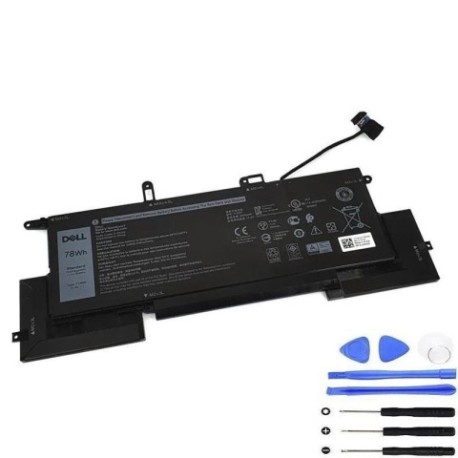
Battery models & part numbers
| Reference / P/N |
|---|
| Dell 02K0CK |
| Dell 0C76H7 |
| Dell 7146W |
| Dell DJ5GG |
| Dell G8F6M |
| Dell-7146W-78Wh |
Compatible laptop models
| Model |
|---|
| Dell Latitude 7400 2-in-1 |
| Dell Latitude 7400 2-in-1 P110G P110G001 |
| Dell Latitude 7400 2-in-1 P110G001 |
| Dell Latitude 9410 P110G001 |
Introduction
The Dell 7146W 78Wh battery is a high-quality replacement solution designed specifically for compatible Dell Latitude models. This genuine replacement ensures optimal performance and longevity for your business or personal laptop in Australian and New Zealand conditions.
Common signs you need a replacement
| Symptom | Cause | Verification | Recommendation |
|---|---|---|---|
| Rapid battery drain | Ageing battery cells | Check battery health in system settings | Consider replacement if below 50% capacity |
| Laptop won’t hold charge | Failed battery components | Test with power adapter disconnected | Immediate replacement needed |
| Battery swelling | Internal damage or overheating | Visual inspection of battery compartment | Replace immediately for safety |
| Overheating during use | Inefficient battery operation | Monitor temperature with system tools | Replace if consistently above 45°C |
How to check compatibility
Verify your laptop’s compatibility by checking the model number on the bottom casing or in system information. Cross-reference with our compatibility tables above. For Dell Latitude models, ensure your device matches exactly with the listed models.
When to replace
Replace your Dell battery when you notice significant performance degradation, typically after 2-3 years of regular use. In AU/NZ climates, batteries may require replacement sooner due to temperature variations affecting lithium-ion cells.
Installation guide (overview)
Power down your laptop completely and disconnect all cables. Remove the bottom panel using the appropriate screwdriver. Carefully disconnect the old battery connector and remove any securing screws. Install the new Dell 7146W 78Wh battery, reconnect the connector, and reassemble your laptop.
Usage & care tips
For optimal battery life in Australian and New Zealand conditions: avoid extreme temperatures (ideal range 15-25°C), perform regular calibration cycles, and store in cool, dry environments when not in use. Avoid complete discharges and maintain between 20-80% charge for daily use.
Safety & recycling in AU/NZ
In Australia and New Zealand, laptop batteries must be recycled through authorised collection centres. Never dispose of lithium-ion batteries in household waste. Check with your local council for battery recycling programs or return to authorised Dell service centres.
FAQ
How long does the Dell 7146W 78Wh battery last?
Typically 2-4 years with normal use, depending on usage patterns and environmental conditions.
Is this battery compatible with my Dell Latitude 7400?
Yes, provided your specific model matches exactly with those listed in our compatibility table.
Do you ship to both Australia and New Zealand?
Yes, we deliver to all major cities and regional areas across both countries.
What warranty comes with the battery?
Our batteries come with a standard 12-month warranty covering manufacturing defects.
How do I properly dispose of my old battery?
Contact your local council or visit an authorised battery recycling centre in your area.
Can I install this battery myself?
Yes, with basic technical skills and the right tools, most users can successfully replace their laptop battery.
What’s the typical delivery time?
3-7 business days for metro areas, slightly longer for regional locations in AU/NZ.