ASUS C32N1516 93Wh Laptop Battery Replacement Guide
If you’re experiencing shorter battery life or power issues with your ASUS gaming laptop, this comprehensive guide covers everything you need to know about the C32N1516 93Wh replacement battery. We’ll help you identify compatibility, recognise replacement signs, and provide expert installation advice specifically for Australian and New Zealand users.
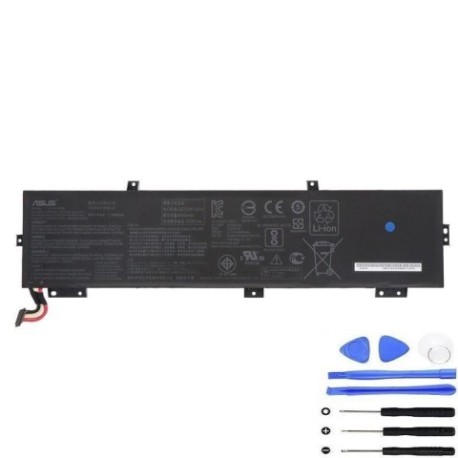
Battery models & part numbers
| Reference / P/N |
|---|
| 0B200-01820000 |
| 3ICP4/70/92-2 |
| Asus-C32N1516-93Wh |
| C32PnC5 |
Compatible models
| Model |
|---|
| Asus G701VI |
| Asus G701VO |
| Asus ROG GX700VO |
Introduction
The ASUS C32N1516 93Wh battery is a high-capacity power solution designed specifically for ASUS’s premium gaming laptops. As these powerful machines age, battery degradation becomes inevitable – especially in our Australian and New Zealand climate where temperature fluctuations can accelerate wear. This guide provides comprehensive information to help you make an informed decision about battery replacement, ensuring your gaming laptop maintains optimal performance.
Common signs you need a replacement
| Symptom | Cause | Verification | Recommendation |
|---|---|---|---|
| Reduced runtime (less than 1 hour) | Battery cell degradation over 300+ cycles | Check battery health in Windows Power Report | Consider replacement if capacity below 60% |
| Laptop shuts down unexpectedly | Voltage drops under load | Monitor during gaming sessions | Immediate replacement recommended |
| Battery won’t charge past 80% | Battery protection circuit failure | Check charging indicator lights | Replace to prevent further issues |
| Physical swelling or bulging | Gas buildup from cell failure | Visual inspection of battery compartment | Stop using immediately and replace |
| Overheating during charging | Internal resistance increase | Monitor temperature with HWMonitor | Replace to prevent safety hazards |
How to check compatibility
Verifying compatibility is crucial before purchasing any replacement battery. For ASUS G701 and GX700 series laptops, start by checking the label on your current battery. This is typically located on the bottom of your laptop or accessible by removing the battery compartment cover. Look for part numbers like C32N1516, 0B200-01820000, or C32PnC5. You can also check your laptop’s original documentation or the ASUS support website using your serial number. For Australian and New Zealand users, the official ASUS support centre can verify compatibility through their online tools or by contacting their local service centres in major cities like Sydney, Melbourne, Auckland, or Wellington.
Another reliable method is to use the ASUS System Control Interface v2 utility, which displays detailed hardware information including battery specifications. If you’ve removed the original battery, compare physical dimensions – the C32N1516 measures approximately 210mm x 70mm x 20mm. Always ensure voltage matches (typically 11.4V for these models) and connector type aligns with your laptop’s power interface.
When to replace
Battery replacement timing depends on usage patterns and environmental factors. In Australia and New Zealand’s variable climate, lithium-ion batteries typically last 2-3 years with regular use. Consider replacement when your battery health drops below 70% of original capacity, which you can check through Windows Battery Report (run “powercfg /batteryreport” in Command Prompt). Gaming laptops like the G701 and GX700 series experience faster degradation due to high power demands during gaming sessions. If you notice your laptop struggling to maintain performance on battery power or experiencing sudden shutdowns during intensive tasks, it’s time for replacement. Seasonal temperature changes in regions like Queensland or Otago can accelerate degradation, so monitor battery health more frequently if you live in areas with extreme temperature variations.
Installation guide
Installing the C32N1516 replacement battery requires careful attention to safety and proper procedure. Begin by completely shutting down your laptop and disconnecting all power sources. Place the laptop on a clean, static-free surface. For G701 models, you’ll typically find the battery compartment secured by several Phillips-head screws. Remove these carefully and gently lift the battery cover. The GX700VO may require additional steps due to its liquid cooling system – consult your specific model’s service manual.
Before removing the old battery, note the connector orientation. Most ASUS gaming laptops use a secure locking connector that may require gentle pressure on retention clips before removal. Avoid using excessive force. When installing the new C32N1516 battery, ensure the connector seats fully and securely. Replace all screws in their original positions, taking care not to overtighten. After installation, connect the power adapter and allow the battery to charge completely before first use. The initial charge cycle may take several hours as the battery management system calibrates.
Many Australian users report improved performance after replacement, with one Sydney-based gamer noting “my G701VO now lasts through entire gaming sessions without needing the power adapter.” Proper installation ensures optimal thermal management and power delivery for demanding applications.
Usage & care tips
Proper battery maintenance extends lifespan and maintains performance. Avoid frequent complete discharges – lithium-ion batteries prefer partial discharges between 20-80%. For gaming laptops like the G701 and GX700 series, consider using the ASUS Battery Health Charging utility available in MyASUS or Armoury Crate software to limit maximum charge to 80% when primarily used plugged in. This significantly reduces stress on battery cells.
Temperature management is particularly important in Australian and New Zealand conditions. Avoid exposing your laptop to direct sunlight or leaving it in hot vehicles, as temperatures above 35°C can permanently damage battery cells. During gaming sessions, ensure adequate ventilation to prevent excessive heat buildup around the battery compartment. If you notice the bottom case becoming uncomfortably warm, consider using a laptop cooling pad.
Storage recommendations vary by season. During summer months in warmer regions like Northern Territory or Northland, store your laptop in climate-controlled environments. For long-term storage (over one month), charge the battery to approximately 50% and power down completely. Recalibrate your battery every 2-3 months by allowing a full discharge followed by a complete uninterrupted charge.
Safety & recycling in AU/NZ
Battery safety is paramount, especially with high-capacity units like the 93Wh C32N1516. Never attempt to disassemble or puncture lithium-ion batteries, as this can cause thermal runaway and fire. If you notice any swelling, leaking, or unusual odours, immediately power down the device and contact a professional recycling service.
In Australia, battery recycling is managed through the B-cycle program, with collection points available at most Officeworks, Battery World, and council waste facilities. New Zealand operates similar programs through the Ministry for the Environment, with drop-off locations at most Mitre 10 and Noel Leeming stores. Both countries prohibit lithium-ion batteries in general household waste due to fire risks in landfill and recycling facilities.
When transporting batteries for recycling, tape the terminals to prevent short circuits and place in separate plastic bags. Many Australian states and New Zealand regions offer household chemical collection services for safe disposal. Check with your local council for specific guidelines in your area – requirements may differ between states like Victoria and Tasmania or regions like Canterbury and Waikato.
FAQ
How long does the C32N1516 battery typically last?
With normal usage, expect 2-3 years of service life. Heavy gaming use may reduce this to 18-24 months. The battery is rated for approximately 500 charge cycles while maintaining 70% of original capacity.
Will this battery work with my ASUS laptop if it’s not listed in compatible models?
Only use with verified compatible models. Using incompatible batteries can damage your laptop’s charging circuit and void warranties. Always cross-reference part numbers with your original battery.
How do I know if my battery is genuine ASUS?
Genuine ASUS batteries feature precise branding, proper serial number formatting, and come in official packaging. Purchase from authorised Australian and New Zealand retailers or the ASUS e-store to ensure authenticity.
Can I use my laptop while the new battery is charging for the first time?
Yes, but avoid intensive tasks like gaming during the initial charge cycle. Allow the battery management system to properly calibrate by completing a full charge cycle without interruptions.
What should I do with my old ASUS battery?
Never dispose of in household waste. Use approved battery recycling services available through major electronics retailers or council collection programs throughout Australia and New Zealand.
Why does my battery percentage seem inaccurate after replacement?
Battery calibration may take several full charge cycles. Use the ASUS Battery Health Charging utility to reset battery statistics and improve accuracy over time.
Is professional installation recommended for ASUS gaming laptops?
While many users successfully self-install, complex models like the GX700VO with liquid cooling may benefit from professional installation at authorised service centres, particularly if you’re uncomfortable with internal components.