ASUS B21N1818 32Wh Laptop Battery Replacement Guide
If your ASUS laptop is struggling to hold charge or shutting down unexpectedly, you’ve come to the right place. This comprehensive guide covers everything Australian and New Zealand customers need to know about replacing their ASUS battery with the genuine B21N1818 32Wh model.
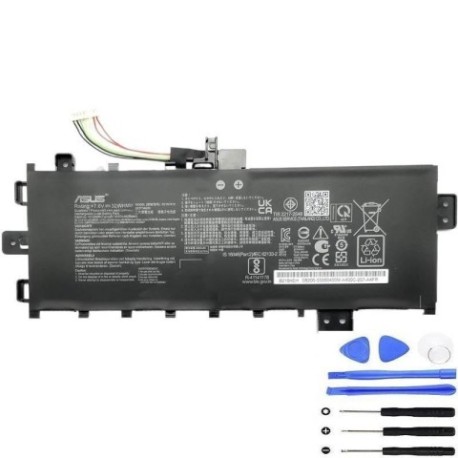
Battery models & part numbers
| Reference / P/N |
|---|
| 0B200-03350400 |
| 0B200-03350500 |
| Asus-B21N1818-32Wh |
| B21Bn2H |
Compatible models
| Model |
|---|
| Asus Business P1701CEA |
| Asus Business P1701CEA-AU210R |
| Asus Business P1701CEA-AU329R |
| Asus Business P1701CEA-AU330 |
| Asus Business P1701CEA-AU330R |
| Asus Business P1701CEA-AU331R |
| Asus Business P1701CEA-AU419X |
| Asus Business P1701CEA-AU423X |
| Asus Business P1701CEA-BX143R |
| Asus Business P1701CEA-BX144R |
| Asus Business P1701CEA-BX14R |
| Asus Business P1701DA |
| Asus Business P1701DA-AU366R |
| Asus Business P1701DA-BX633R |
| Asus P1701DA |
| Asus P1701DA-AU017R |
| Asus P1701DA-BX633R |
| Asus P1701FA |
| Asus P1701FA-AU657 |
| Asus P1701FB |
| Asus P1701FB-AU123R |
| Asus P1701FB-AU270R |
| Asus S732DA |
| Asus S732DA-BX525T |
| Asus VivoBook 17 D712DA |
| Asus VivoBook 17 D712DA-AU017T |
| Asus VivoBook 17 D712DA-AU020T |
| Asus VivoBook 17 D712DA-AU021T |
| Asus VivoBook 17 D712DA-AU039 |
| Asus VivoBook 17 D712DA-AU077T |
| Asus VivoBook 17 D712DA-AU112 |
| Asus VivoBook 17 D712DA-AU117T |
| Asus VivoBook 17 D712DA-BX028T |
| Asus VivoBook 17 D712DA-BX042T |
| Asus VivoBook 17 D712DK |
| Asus VivoBook 17 D712DK-AU001T |
| Asus VivoBook 17 D712DK-AU013T |
| Asus VivoBook 17 F712EA |
| Asus VivoBook 17 F712EA-AU491W |
| Asus VivoBook 17 F712EA-AU678W |
| Asus VivoBook 17 F712FA |
| Asus VivoBook 17 F712FA-AU402T |
| Asus VivoBook 17 F712FA-AU517T |
| Asus VivoBook 17 F712FA-AU518T |
| Asus VivoBook 17 F712FA-AU520T |
| Asus VivoBook 17 F712FA-AU524T |
| Asus VivoBook 17 F712FA-BX124T |
| Asus VivoBook 17 F712FA-BX319T |
| Asus VivoBook 17 F712FA-BX365 |
| Asus VivoBook 17 F712FA-BX417T |
| Asus VivoBook 17 F712FA-BX535T |
| Asus VivoBook 17 F712FB |
| Asus VivoBook 17 F712FB-BX064T |
| Asus VivoBook 17 F712JA |
| Asus VivoBook 17 F712JA-AU073T |
| Asus VivoBook 17 F712JA-AU697W |
| Asus VivoBook 17 F712JA-AU708W |
| Asus VivoBook 17 F712JA-BX273T |
| Asus VivoBook 17 M712DA |
| Asus VivoBook 17 M712DA-AU017 |
| Asus VivoBook 17 M712DA-AU017T |
| Asus VivoBook 17 M712DA-AU077T |
| Asus VivoBook 17 M712DA-AU123T |
| Asus VivoBook 17 M712DA-AU148T |
| Asus VivoBook 17 M712DA-AU166T |
| Asus VivoBook 17 M712DA-BX042 |
| Asus VivoBook 17 M712DA-BX065T |
| Asus VivoBook 17 M712DA-BX070T |
| Asus VivoBook 17 S712EA |
| Asus VivoBook 17 S712EA-AU005T |
| Asus VivoBook 17 S712EA-AU130 |
| Asus VivoBook 17 S712EA-AU131 |
| Asus VivoBook 17 S712EA-AU327T |
| Asus VivoBook 17 S712EA-AU341W |
| Asus VivoBook 17 S712EA-AU402W |
| Asus VivoBook 17 S712EA-AU403W |
| Asus VivoBook 17 S712EA-AU526W |
| Asus VivoBook 17 S712EA-AU650W |
| Asus VivoBook 17 S712EA-BX140T |
| Asus VivoBook 17 S712EA-BX146T |
| Asus VivoBook 17 S712EA-BX289T |
| Asus VivoBook 17 S712EA-BX315T |
| Asus VivoBook 17 S712EA-BX321 |
| Asus VivoBook 17 S712EA-BX379W |
| Asus VivoBook 17 S712UA |
| Asus VivoBook 17 S712UA-AU037T |
| Asus VivoBook 17 S712UA-AU149T |
| Asus VivoBook 17 X712DA |
| Asus VivoBook 17 X712EA |
| Asus VivoBook 17 X712EA-AU157W |
| Asus VivoBook 17 X712EA-AU614W |
| Asus VivoBook 17 X712EA-BX168T |
| Asus VivoBook 17 X712EA-BX177T |
| Asus VivoBook 17 X712EQ |
| Asus VivoBook 17 X712FA |
| Asus VivoBook 17 X712FA-AU192T |
| Asus VivoBook 17 X712FA-AU249T |
| Asus VivoBook 17 X712FA-AU250T |
| Asus VivoBook 17 X712FA-AU310T |
| Asus VivoBook 17 X712FA-AU427T |
| Asus VivoBook 17 X712FA-AU458T |
| Asus VivoBook 17 X712FA-BQ092T |
| Asus VivoBook 17 X712FA-BX020T |
| Asus VivoBook 17 X712FA-BX091T |
| Asus VivoBook 17 X712FA-BX230T |
| Asus VivoBook 17 X712JA |
| Asus VivoBook 17 X712JA-AU058T |
| Asus VivoBook 17 X712JA-AU186T |
| Asus VivoBook R754JA |
| Asus VivoBook R754JA-AU305T |
| Asus VivoBook R754JA-AU305W |
| Asus VivoBook R754JA-AU701W |
| Asus VivoBook S17 S712DA |
| Asus VivoBook S17 S712DA-AU112 |
| Asus VivoBook S17 S712DA-BX252T |
| Asus VivoBook S17 S712DA-BX290T |
| Asus VivoBook S17 S712DA-BX326T |
| Asus VivoBook S17 S712DA-BX330 |
| Asus VivoBook S17 S712DA-BX356T |
| Asus VivoBook S17 S712DA-BX404T |
| Asus VivoBook S17 S712JA |
| Asus VivoBook S17 S712JA-AU122T |
| Asus VivoBook S17 S712JA-AU136T |
| Asus VivoBook S17 S712JA-AU310 |
| Asus VivoBook S17 S712JA-BX284T |
| Asus VivoBook S17 S712JA-BX700W |
| Asus VivoBook S17 S712JA-BX702W |
| Asus VivoBook S17 S732DA-BX570 |
| Asus VivoBook S17 S732JA |
| Asus VivoBook S17 S732JA-BX297 |
| Asus X712FB |
| Asus X712FB-AU115T |
| Asus X712FB-AU116T |
| Asus X712FB-AU121T |
| Asus X712FB-AU262T |
| Asus X712UA |
Introduction
Laptop batteries are consumable components with a finite lifespan, typically lasting 2-4 years with regular use. The ASUS B21N1818 32Wh battery is designed specifically for numerous ASUS Business and VivoBook 17-inch models popular in the Australian and New Zealand markets. This genuine replacement ensures optimal performance, safety, and compatibility with your device.
Common signs you need a replacement
| Symptom | Cause | Verification | Recommendation |
|---|---|---|---|
| Rapid power drain | Reduced battery capacity | Replace battery if capacity below 50% | |
| Laptop shuts down unexpectedly | Battery can’t maintain voltage under load | Monitor system during intensive tasks | Immediate replacement recommended |
| Battery won’t charge fully | Ageing cells or faulty charging circuit | Check charging percentage in system tray | Replace battery and check charger |
| Physical swelling or bulging | Gas buildup from chemical degradation | Visual inspection of battery compartment | Stop using immediately and replace |
| Overheating during use | Increased internal resistance | Monitor temperature with software | Replace to prevent damage to laptop |
How to check compatibility
Before purchasing your replacement battery, it’s crucial to verify compatibility with your specific ASUS model. Here’s how to find your exact model information:
Locating your model number: Check the bottom casing of your laptop for a sticker containing the complete model number. For ASUS devices, this typically includes the series (like P1701CEA or S712DA) followed by regional variants (AU for Australia/NZ models). You can also find this information in Windows by pressing Windows Key + R, typing “msinfo32”, and looking for “System Model”.
Using ASUS official tools: Visit the ASUS support website and use their compatibility checker tool. Enter your serial number or model name to access official replacement part information. The B21N1818 battery is compatible with multiple part numbers including 0B200-03350400 and 0B200-03350500, so cross-reference these with your current battery’s markings.
Physical verification: If possible, remove your current battery (with the laptop powered off and unplugged) and compare the part numbers printed on it. The B21N1818 replacement is designed to match the original specifications exactly.
When to replace
Most laptop batteries need replacement after 300-500 complete charge cycles, or when they hold less than 60% of their original capacity. In Australia’s warmer climate, battery degradation can accelerate, so regular monitoring is essential. Use Windows built-in battery report (run “powercfg /batteryreport” in Command Prompt) to check your battery’s health percentage.
Installation guide
Replacing your ASUS battery is straightforward with the right preparation. Always power down your laptop completely and disconnect the AC adapter before beginning.
Step-by-step installation:
1. Turn the laptop upside down on a soft, clean surface
2. Locate the battery release latches (typically two sliding locks)
3. Slide both latches to the unlock position simultaneously
4. Gently lift the battery out of its compartment
5. Align the new B21N1818 battery with the connectors
6. Press firmly until you hear a click
7. Slide the locking latches back to secure the battery
For integrated batteries in newer VivoBook models, additional care is needed. You may need to remove the bottom panel using a precision screwdriver. If unsure, consult ASUS’s official service guides or seek professional assistance.
Usage & care tips
Maximise your new battery’s lifespan with these Australia/NZ specific tips:
– Avoid exposing your laptop to temperatures above 35°C (common in Australian summers)
– Don’t leave your laptop in direct sunlight or in hot vehicles
– Ideal charging range is between 20-80% for daily use
– Perform a full discharge cycle once monthly to recalibrate the battery meter
– Use only ASUS-approved chargers to prevent damage
– Store in cool, dry conditions when not in use for extended periods
Safety & recycling in AU/NZ
Battery safety is paramount. Never attempt to open or puncture a lithium-ion battery. If you notice swelling, overheating, or unusual odours, discontinue use immediately and contact professionals.
In Australia and New Zealand, laptop batteries must be recycled responsibly. Don’t dispose of them in household waste. Most electronics retailers offer free battery recycling services. You can also check with your local council for e-waste collection days. Proper recycling helps recover valuable materials and prevents environmental contamination.
FAQ
How long does the B21N1818 battery typically last?
With normal use, expect 3-5 hours depending on your laptop’s power settings and applications. Higher brightness and processor-intensive tasks will reduce runtime.
Is this battery genuine ASUS?
Yes, the B21N1818 is an original ASUS part number manufactured to meet their strict quality standards.
Will replacing the battery void my warranty?
In Australia, consumer law protects your right to replace consumable components like batteries. However, if your laptop is still under manufacturer warranty, check with ASUS first.
How do I calibrate my new battery?
Charge to 100%, then use until it automatically shuts down (around 5%). Charge uninterrupted back to 100% to reset the battery meter.
Can I use this battery with older ASUS models?
Only if your specific model appears in the compatibility list above. Physical fit and electrical specifications must match exactly.
What’s the delivery time to regional Australia/NZ?
Typically 3-7 business days to metropolitan areas, with slightly longer times to regional locations.
Do you offer installation services?
While we provide detailed guides, many local computer repair shops throughout AU/NZ can perform professional installation if preferred.