Lenovo L19C4PF4 60.7Wh Battery Replacement Guide
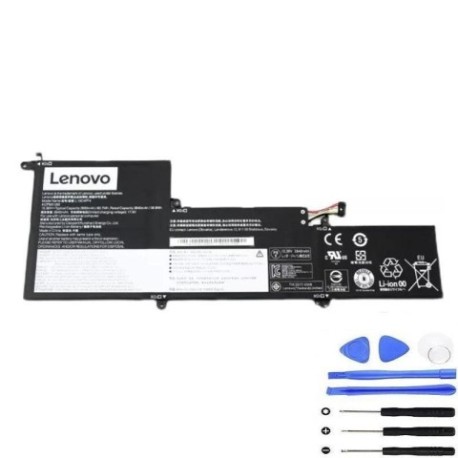
Battery models & part numbers
| Reference / P/N |
|---|
| Lenovo L19D4PF4 |
| Lenovo L19M4PF4 |
| Lenovo-L19C4PF4-60.7Wh |
Compatible laptop models
| Model |
|---|
| Lenovo 5B10W65273 |
| Lenovo 5B10W65276 |
| Lenovo 5B10W65297 |
| Lenovo IdeaPad Slim 7-14ILL05 |
| Lenovo IdeaPad Slim 7-14ITL05 (82A6) |
| Lenovo SB10W65282 |
| Lenovo Slim 7-14ARE05 |
| Lenovo Slim 7-14ILL05 (82A4) |
| Lenovo Slim 7-14ITL05 (82A6) |
| Lenovo Yoga Slim 7-14ARE05 (82A2) |
| Lenovo Yoga Slim 7-14ARE05 (82A5) |
| Lenovo Yoga Slim 7-14ILL05 (82A1) |
| Lenovo Yoga Slim 7-14ITL05 (82A3) |
| Lenovo Yoga Slim 7-14ITL05 (82HA) |
Introduction
Keep your Lenovo laptop running at peak performance with our authorised replacement battery. The Lenovo L19C4PF4 60.7Wh battery is designed specifically for compatible Slim and Yoga series models, ensuring reliable power delivery and extended usage time.
Common signs you need a replacement
| Symptoms | Causes | Verification | Recommendation |
|---|---|---|---|
| Battery drains quickly | Ageing cells, reduced capacity | Check battery health in system settings | Replace if capacity below 60% |
| Laptop won’t hold charge | Failed battery circuitry | Test with power adapter disconnected | Immediate replacement needed |
| Battery swelling | Internal damage, safety risk | Visual inspection, case misalignment | Replace immediately, do not use |
| Overheating during use | Inefficient power delivery | Monitor temperature, check vents | Replace to prevent damage |
How to check compatibility
Verify your laptop model matches our compatibility list above. Check the label on your current battery for part numbers like L19C4PF4, L19D4PF4, or L19M4PF4. You can also find your model number on the bottom case of your laptop or in system information.
When to replace
Replace your battery when you notice significant performance decline, typically after 2-3 years of regular use. If your battery shows “Replace Soon” in system diagnostics or holds less than 60% of its original capacity, it’s time for a new one.
Installation guide (overview)
Power off your laptop and disconnect all cables. Remove the bottom case screws (typically 8-10 Phillips head screws). Carefully lift the case and locate the battery connector. Disconnect the battery cable, remove mounting screws, and lift out the old battery. Install the new battery in reverse order, ensuring all connections are secure.
Usage & care tips
For optimal battery life, avoid extreme temperatures (ideal range 15-25°C). Don’t leave your laptop plugged in constantly – occasional discharge cycles help maintain battery health. Store in a cool, dry place when not in use for extended periods.
Safety & recycling in AU/NZ
Never attempt to open or modify the battery. Damaged or swollen batteries should be handled with care and taken to authorised recycling centres. In Australia and New Zealand, most electronics retailers offer free battery recycling services. Never dispose of lithium batteries in household waste.
FAQ
How long does delivery take in Australia?
Most metropolitan areas receive orders within 3-5 business days. Regional areas may take 5-7 business days.
Is this battery genuine Lenovo?
Our batteries meet or exceed original specifications and are compatible with Lenovo systems. They come with full warranty coverage.
What’s the warranty period?
All our replacement batteries come with a 12-month warranty covering manufacturing defects.
Can I install this myself?
Yes, most users can install it following our guide. If unsure, seek professional assistance from an authorised service centre.
How do I recycle my old battery?
Take it to any Officeworks, JB Hi-Fi, or other electronics retailer offering battery recycling services across Australia and New Zealand.
What if my model isn’t listed?
Contact our support team with your exact model number for compatibility verification before purchasing.
Is overnight charging safe?
Modern laptops have protection circuits, but for optimal battery health, avoid leaving plugged in for extended periods after full charge.