Acer AP16M4J 37Wh Battery Replacement Guide for Australian & New Zealand Users
If your Acer laptop is struggling to hold charge or showing battery warning signs, you’ve come to the right place. This comprehensive guide covers everything Australian and New Zealand users need to know about replacing their Acer battery with the genuine AP16M4J 37Wh model.
Battery models & part numbers
| Reference / P/N |
|---|
| Acer AP16M5J |
| Acer-AP16M4J-37Wh |
| Acer KT.00204.008 |
| Acer KT.00204.009 |
| Acer KT.00205.004 |
| Acer KT.00205.005 |
| Acer KT.00205.006 |
| Acer KT.00205.007 |
| Acer KT00204009 |
| Acer KT00205004 |
| Acer KT00205008 |
Compatible models
| Model |
|---|
| Acer Aspire (A317-52) |
| Acer Aspire 1 (A111-31) |
| Acer Aspire 1 (A114-21) |
| Acer Aspire 1 (A114-31) |
| Acer Aspire 1 (A114-32) |
| Acer Aspire 1 (A114-33) |
| Acer Aspire 1 (A115-31) |
| Acer Aspire 1 (A115-32) |
| Acer Aspire 3 (A311-31) |
| Acer Aspire 3 (A314-21) |
| Acer Aspire 3 (A314-22) |
| Acer Aspire 3 (A314-22G) |
| Acer Aspire 3 (A314-31) |
| Acer Aspire 3 (A314-32) |
| Acer Aspire 3 (A314-35) |
| Acer Aspire 3 (A315-21) |
| Acer Aspire 3 (A315-21G) |
| Acer Aspire 3 (A315-22) |
| Acer Aspire 3 (A315-22G) |
| Acer Aspire 3 (A315-23) |
| Acer Aspire 3 (A315-31) |
| Acer Aspire 3 (A315-32) |
| Acer Aspire 3 (A315-33) |
| Acer Aspire 3 (A315-34) |
| Acer Aspire 3 (A315-35) |
| Acer Aspire 3 (A315-41) |
| Acer Aspire 3 (A315-41G) |
| Acer Aspire 3 (A315-42) |
| Acer Aspire 3 (A315-42G) |
| Acer Aspire 3 (A315-51) |
| Acer Aspire 3 (A315-53) |
| Acer Aspire 3 (A315-54) |
| Acer Aspire 3 (A315-54K) |
| Acer Aspire 3 (A315-55G) |
| Acer Aspire 3 (A315-55KG) |
| Acer Aspire 3 (A315-56) |
| Acer Aspire 3 (A315-57G) |
| Acer Aspire 3 (A315-58) |
| Acer Aspire 3 (A315-58G) |
| Acer Aspire 3 (A317-32) |
| Acer Aspire 3 (A317-33) |
| Acer Aspire 3 (A317-51) |
| Acer Aspire 3 (A317-51G) |
| Acer Aspire 3 (A317-51K) |
| Acer Aspire 3 (A317-51KG) |
| Acer Aspire 3 (A317-52) |
| Acer Aspire 3 (A317-53) |
| Acer Aspire 3 (A317-53G) |
| Acer Aspire 3 (B315-34) |
| Acer Aspire 3 A315-23G |
| Acer Aspire Spin (A317-52) |
| Acer Aspire TC-390 |
| Acer Asprie 1 (A115-32) |
| Acer Extensa (EX215-21) |
| Acer Extensa (EX215-51KG) |
| Acer Extensa (EX215-52) |
| Acer Extensa 15 (EX215-21G) |
| Acer Extensa 15 (EX215-22) |
| Acer Extensa 15 (EX215-22G) |
| Acer Extensa 15 (EX215-31) |
| Acer Extensa 15 (EX215-32) |
| Acer Extensa 15 (EX215-35LZ) |
| Acer Extensa 15 (EX215-392Y) |
| Acer Extensa 15 (EX215-51K) |
| Acer Extensa 15 (EX215-53G) |
| Acer Extensa 15 (EX215-54) |
| Acer Extensa 15 (EX215-54G) |
| Acer Extensa 215 (EX215-51) |
| Acer Extensa 215 (EX215-51G) |
| Acer Spin 1 (SP111-33) |
| Acer Spin 1 (SP114-31) |
| Acer Spin 1 (SP114-31N) |
| Acer Swift 5 (SF514-52T) |
| Acer TravelMate (TMB311-32) |
| Acer TravelMate B118-G2-R |
| Acer TravelMate B118-M |
| Acer TravelMate P6 (TMP614-52) |
| Acer TravelMate P6 (TMP614RN-52) |
| Acer TravelMate Spin B3 (B311-32) |
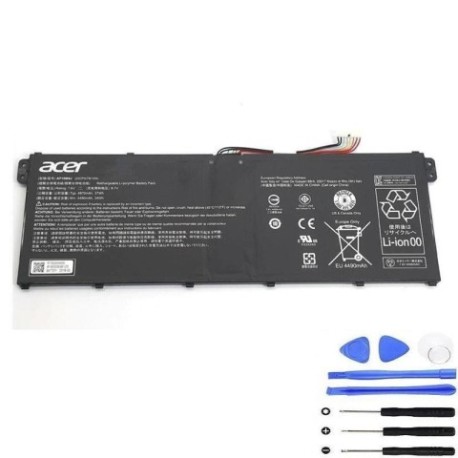
Introduction
As an Acer laptop user in Australia or New Zealand, you rely on your device for work, study, and entertainment. When battery performance starts to decline, it can be incredibly frustrating – especially when you’re trying to work remotely or study online. The Acer AP16M4J 37Wh battery is the genuine replacement solution designed specifically for numerous Acer Aspire, Extensa, Spin, and TravelMate models commonly used across AU and NZ.
This comprehensive guide is tailored specifically for Australian and New Zealand consumers, addressing our unique climate considerations, local warranty support, and recycling options. Whether you’re in Sydney, Melbourne, Auckland, or Wellington, understanding your battery replacement options will save you time, money, and the hassle of unexpected shutdowns.
Common signs you need a replacement
| Symptom | Cause | Verification | Recommendation |
|---|---|---|---|
| Rapid power drain | Battery capacity degradation | Check Windows Battery Report | Replace if capacity < 60% |
| Laptop won’t hold charge | Internal cell failure | Test with different charger | Immediate replacement needed |
| Swollen battery case | Gas buildup from chemical reaction | Visual inspection, uneven surface | Stop using immediately |
| Inaccurate battery percentage | Faulty battery controller | Compare reported vs actual runtime | Replace battery module |
| Overheating during charging | Internal resistance increase | Monitor temperature with software | Replace to prevent damage |
| Random shutdowns at 20-30% | Voltage drop under load | Stress test with heavy applications | Battery no longer reliable |
How to check compatibility
Before purchasing any replacement battery for your Acer laptop in Australia or New Zealand, proper compatibility verification is essential. Start by locating your laptop’s exact model number, which is typically found on a sticker on the bottom casing, under the battery compartment, or in the system information (press Windows Key + R, type “msinfo32”, and check System Model).
For Acer devices specifically, you can also use the Acer Care Centre application pre-installed on most machines. This official tool provides detailed hardware information including battery specifications and compatible part numbers. Cross-reference your findings with the compatibility tables above to ensure the AP16M4J 37Wh battery matches your device.
Many Australian retailers and service centres can also verify compatibility using your laptop’s serial number through Acer’s authorised partner network. If you’re uncertain, contact Acer’s Australian support centre or visit an authorised service provider for professional verification.
When to replace
Timing your battery replacement correctly can save you from unexpected downtime and potential data loss. Most Acer laptop batteries like the AP16M4J 37Wh model typically last 2-3 years with regular use in Australian conditions. However, several factors specific to our region can affect this timeline.
In warmer Australian climates like Queensland or Northern Territory, battery degradation can accelerate due to consistent exposure to higher temperatures. Similarly, New Zealand’s variable coastal conditions can contribute to faster wear. Consider replacement when your battery health drops below 70% capacity, or if you notice any of the warning signs mentioned earlier.
Proactive replacement during seasonal sales (like EOFY or Black Friday) can be cost-effective, as you’re not forced to make an emergency purchase. Many Australian businesses also schedule IT maintenance during quieter periods, making battery replacement part of regular equipment upkeep.
Installation guide
Installing your new Acer AP16M4J 37Wh battery is straightforward with the right preparation. First, ensure you’re working in a clean, static-free environment. Turn off your laptop completely and disconnect the AC adapter. For most compatible Acer models, you’ll need a Phillips #00 screwdriver to remove the bottom panel.
Locate the battery compartment – in Aspire and Extensa models, this is typically centrally positioned. Carefully disconnect the battery connector by pulling the ribbon cable straight out, not at an angle. Remove any securing screws and gently lift the old battery out. Position your new AP16M4J battery, reconnect the cable, and secure with screws before replacing the bottom panel.
After installation, connect your charger and allow the battery to charge fully before first use. The initial charge cycle is crucial for battery calibration. Many Australian users find it helpful to perform this process during the evening, so the laptop is ready for the next day’s use.
Usage & care tips
Maximising your new battery’s lifespan in Australian and New Zealand conditions requires some specific considerations. Avoid exposing your laptop to direct sunlight or leaving it in hot cars, as temperatures above 35°C can permanently damage lithium-ion batteries. Ideal operating temperatures for Acer batteries are between 10°C and 35°C.
For daily usage, partial discharges are better than full cycles. Try to keep your battery between 20% and 80% charge rather than constantly draining to zero then charging to 100%. If you primarily use your laptop plugged in (common in office or home setups), consider setting the maximum charge level to 80% in Acer Care Centre to reduce stress on the battery.
During Australian summer months or in warmer regions, ensure adequate ventilation around your laptop. Using a cooling pad can help maintain optimal battery temperature during extended use. For New Zealand users, be mindful of humidity levels in coastal areas and consider using silica gel packs in laptop bags when storing devices.
Safety & recycling in AU/NZ
Battery safety is particularly important in our region due to varying climate conditions. Never attempt to open, puncture, or modify your Acer battery. If you notice any swelling, overheating, or unusual odours, discontinue use immediately and contact Acer’s Australian support or an authorised service centre.
When your old battery reaches end-of-life, proper recycling is essential and required by law in both Australia and New Zealand. Do not dispose of lithium-ion batteries in household waste. Most electronics retailers including Officeworksand JB Hi-Fi in Australia offer free battery recycling services. In New Zealand, you can return old batteries to most computer stores or designated recycling centres through the e-waste programme. Many local councils also host periodic e-waste collection events where batteries can be safely deposited.
When purchasing your replacement Acer AP16M4J battery in Australia or New Zealand, ensure you’re buying from authorised retailers to guarantee genuine products that meet Australian safety standards (look for RCM marking). Counterfeit batteries not only perform poorly but can pose serious fire risks, especially in our warmer climates.
FAQ
How long does shipping take within Australia and New Zealand?
Most retailers offer 2-5 business day delivery across major Australian cities and 3-7 days for regional areas. In New Zealand, delivery typically takes 3-6 business days depending on your location.
Does the battery come with warranty in AU/NZ?
Yes, genuine Acer AP16M4J batteries typically come with a 12-month warranty that’s valid through authorised Australian and New Zealand retailers. Keep your receipt and ensure the supplier is an authorised Acer partner.
Can I install this battery myself without voiding warranty?
For most Acer laptops, battery replacement is considered user-serviceable and won’t void your overall device warranty. However, if you damage other components during installation, those specific damages may not be covered.
Why does my battery drain faster in summer?
Lithium-ion batteries are sensitive to temperature, and Australian summers can significantly impact performance. Batteries work harder in heat, and chemical reactions accelerate, leading to faster discharge rates.
Is the AP16M4J compatible with both Australian and New Zealand voltage?
Yes, the battery itself operates the same regardless of location. Your Acer laptop’s charging circuitry automatically handles the voltage differences between Australia’s 230V and New Zealand’s 230V systems.
How do I properly dispose of my old battery in regional areas?
Many regional councils in Australia and New Zealand offer battery recycling at local waste transfer stations. Australia Post also provides free battery recycling envelopes at many post offices, which can be mailed back for proper disposal.
What’s the typical lifespan in Australian conditions?
With proper care, expect 2-3 years of good performance. In hotter northern Australian regions, this might reduce to 18-24 months. Following the care tips above can help maximise lifespan regardless of your location.