ASUS A32-X51-46Wh Laptop Battery Replacement Guide
If your ASUS laptop is struggling to hold a charge or shutting down unexpectedly, you’ve come to the right place. This comprehensive guide covers everything Australian and New Zealand users need to know about replacing their ASUS battery with the genuine A32-X51-46Wh model.
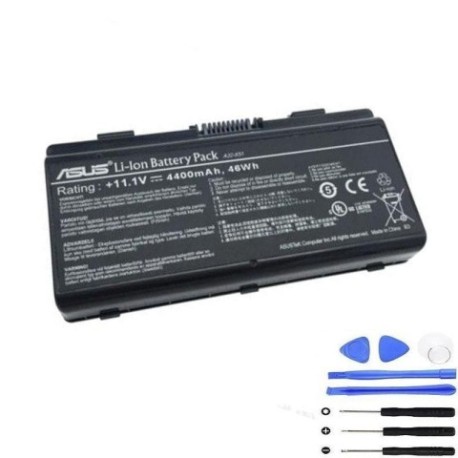
Battery models & part numbers
| Reference / P/N |
|---|
| 07G016QG1865M00A |
| 15G10N345800DPC |
| 70-NJ51B1000Z |
| 90-NQK1B1000Y |
| A31-X58 |
| A32-T12 |
| A32-X51 |
| Asus-A32-X51-46Wh |
Compatible models
| Model |
|---|
| T12 |
| T12Cs |
| T12Er |
| T12Fg |
| T12Jg |
| T12Mg |
| T12Ugs |
| X51 |
| X51A |
| X51Cs |
| X51Hs |
| X51L |
| X51R |
| X51RL |
| X51V |
| X58 |
| X58c |
| X58l |
| X58le |
Introduction
ASUS laptops are renowned for their reliability and performance across Australia and New Zealand, but like all portable devices, their batteries have a finite lifespan. The A32-X51-46Wh battery replacement is specifically designed for multiple ASUS T12, X51, and X58 series models, providing the same quality and performance as your original battery.
When your laptop battery starts failing, it can be incredibly frustrating – especially when you’re in the middle of important work or study. The good news is that replacing your ASUS battery is often straightforward and much more affordable than buying a new laptop. This guide will walk you through everything from recognising the signs of a failing battery to installation and proper care.
Common signs you need a replacement
| Symptom | Cause | Verification | Recommendation |
|---|---|---|---|
| Rapid power drain | Reduced battery capacity from age/cycles | Check battery health in Windows Power Report | Replace if capacity below 60% of original |
| Laptop shuts down unexpectedly | Battery can’t maintain voltage under load | Monitor shutdowns at specific charge levels | Immediate replacement recommended |
| Battery won’t charge fully | Charging circuit or cell degradation | Check charging percentage in system tray | Replace if stuck below 80% maximum |
| Battery swelling or bulging | Gas buildup from chemical breakdown | Visual inspection of battery compartment | Replace immediately – safety hazard |
| Overheating during use | Increased internal resistance | Monitor temperature with HWMonitor | Replace if consistently over 45°C |
How to check compatibility
Before purchasing any replacement battery for your ASUS laptop, it’s crucial to verify compatibility. For ASUS T12, X51, and X58 series models, there are several reliable methods to ensure you’re getting the right battery.
Finding your model information: The easiest way is to check the bottom of your laptop. ASUS typically places a white sticker with the model number near the battery compartment or on the bottom case. Look for designations like “T12Mg,” “X51RL,” or “X58le” – these are your exact model identifiers.
Using ASUS official tools: Visit the ASUS Australia support website and use their product identification tool. You can enter your serial number (found on the same sticker) or let the system automatically detect your model. The official ASUS support centre can also verify compatibility over the phone.
Cross-referencing part numbers: If you still have your original battery, remove it carefully and note the part number printed on it. Compare this with the compatible part numbers listed above. The A32-X51-46Wh battery replaces multiple original ASUS part numbers, making it a versatile replacement option.
Physical compatibility check: Measure your current battery’s dimensions (typically around 205mm x 50mm x 20mm for these models) and connector type. The A32-X51-46Wh uses a standard ASUS battery connector that’s compatible across the T12, X51, and X58 series.
When to replace
Timing your battery replacement correctly can save you from unexpected downtime and potential data loss. Most ASUS laptop batteries are designed to last 2-3 years with regular use, or approximately 500 full charge cycles.
Proactive replacement indicators: Consider replacing your battery when you notice it only holds about 60-70% of its original capacity. You can check this in Windows by generating a battery report (open Command Prompt as administrator and type “powercfg /batteryreport”). If the report shows design capacity significantly higher than full charge capacity, it’s time for a replacement.
Age-based replacement: Even if your battery seems fine, consider replacing it after 3 years of use. Lithium-ion batteries naturally degrade over time, and older batteries are more prone to sudden failure.
Seasonal considerations: In Australia and New Zealand’s varying climates, extreme temperatures can accelerate battery degradation. If you’ve experienced particularly hot summers or cold winters, your battery might need replacement sooner.
Installation guide
Replacing the battery in your ASUS T12, X51, or X58 series laptop is generally straightforward. Always ensure your laptop is completely powered off and unplugged from any power source before beginning.
Step 1: Preparation
Gather your tools – typically just a small Phillips head screwdriver. Work on a clean, flat surface and consider using an anti-static wrist strap if available. Have your new A32-X51-46Wh battery ready.
Step 2: Removing the old battery
Turn your laptop upside down and locate the battery release latch or screws. For most ASUS models in this series, you’ll find two sliding latches – slide both to the unlock position simultaneously. The battery should pop up slightly, allowing you to lift it out. If secured with screws, remove these first.
Step 3: Installing the new battery
Align the new battery with the compartment, ensuring the connector faces the correct direction. Gently press the battery into place until it clicks or sits flush. If your model uses screws, reinstall them securely but don’t overtighten.
Step 4: Initial charging
Before turning on your laptop, plug in the AC adapter and allow the new battery to charge for at least 4 hours. This ensures proper calibration of the battery monitoring system.
Common installation issues: If the battery doesn’t seem to fit, double-check compatibility. If the laptop doesn’t recognise the new battery, try resetting the EC (Embedded Controller) by holding the power button for 40 seconds with the battery and AC adapter removed.
Usage & care tips
Proper battery care can significantly extend the lifespan of your new A32-X51-46Wh battery and maintain optimal performance throughout its life.
Charging best practices: Avoid frequently charging to 100% if you’re primarily using your laptop plugged in. Consider setting a charge limit to 80-90% using ASUS Battery Health Charging software if available for your model. Similarly, don’t let the battery drain completely to 0% regularly.
Temperature management: Keep your laptop away from direct sunlight and heat sources. Ideal operating temperature for lithium-ion batteries is between 15°C and 25°C. Never leave your laptop in a hot car during Australian summers.
Storage recommendations: If storing your laptop for extended periods, charge the battery to about 50-60% and store in a cool, dry place. Check and recharge every 3-6 months to prevent deep discharge.
Performance optimisation: Adjust your power settings in Windows to balance performance and battery life. Use battery saver mode when you need extended runtime. Close unnecessary applications and reduce screen brightness to conserve power.
Safety & recycling in AU/NZ
Battery safety and proper disposal are particularly important in Australia and New Zealand, where we have specific regulations and recycling programmes.
Safety precautions: Never attempt to open or modify the battery casing. Avoid exposing the battery to water or extreme temperatures. If you notice any swelling, overheating, or unusual odours, stop using the battery immediately and contact the supplier.
Australian recycling options: In Australia, you can recycle your old laptop batteries through B-cycle, the official battery stewardship scheme. Many Officeworks, JB Hi-Fi, and ALDI stores have collection points. Some local councils also offer battery recycling services.
New Zealand recycling options: In New Zealand, check with your local council for e-waste collection days or use dedicated recycling centres. Many computer retailers like Noel Leeming and PB Tech offer take-back programmes for old batteries.
FAQ
How long does the A32-X51-46Wh battery typically last?
With normal use, you can expect 2-3 years of service or approximately 500 full charge cycles. Heavy users might see slightly shorter lifespan, while occasional users may get longer service.
Will this battery work with my ASUS laptop if it’s not listed in the compatible models?
We strongly recommend against using this battery with unlisted models. While some physical connections might fit, electrical specifications and communication protocols may differ, potentially causing damage to your laptop or the battery.
How can I maximise my new battery’s lifespan?
Avoid extreme temperatures, don’t leave it plugged in constantly at 100%, and try to keep charge between 20-80% for daily use. Calibrate the battery monthly by charging to full then discharging to about 10%.
Is this battery genuine ASUS or compatible?
This is a high-quality compatible battery designed to meet or exceed original specifications. It’s built to the same standards and includes all necessary safety certifications for use in Australia and New Zealand.
What warranty does this battery come with?
Most reputable suppliers offer 12-24 months warranty. Check with your specific retailer for exact terms. Australian Consumer Law provides additional protections regardless of warranty periods.
My laptop isn’t recognising the new battery – what should I do?
First, ensure the battery is properly seated and connectors are clean. Try an EC reset by removing both battery and AC adapter, then holding the power button for 40 seconds. Reconnect and try again. If issues persist, contact the supplier.
Can I use my laptop while the new battery is charging for the first time?
Yes, you can use your laptop during the initial charge, though we recommend allowing it to charge uninterrupted for the first 4 hours to ensure proper calibration of the battery monitoring system.
Don’t let a failing battery disrupt your work or study. The ASUS A32-X51-46Wh replacement battery offers reliable performance and compatibility with multiple T12, X51, and X58 series models. With proper installation and care, you can restore your laptop’s mobility and avoid unexpected shutdowns. Order today and get back to computing with confidence!