Acer AP16C46 28Wh Battery Replacement: Complete Guide for Australian & New Zealand Users
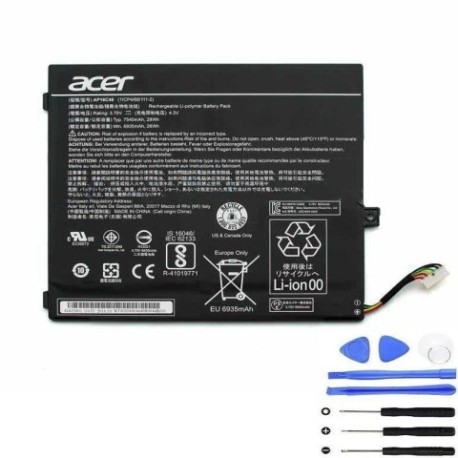
Is your Acer laptop struggling to hold a charge? You’re not alone. Many Australian and New Zealand users of Acer Switch 10 V models experience battery degradation over time. This comprehensive guide covers everything you need to know about replacing your Acer AP16C46 28Wh battery, including compatible models, installation steps, and local recycling options.
Battery models & part numbers
| Reference / P/N |
|---|
| Acer-AP16C46-28Wh |
| KT.00204.004 |
| KT.00205.001 |
| KT00204004 |
Compatible models
| Model |
|---|
| Acer Switch 10 V (SW5-017) |
| Acer Switch 10 V (SW5-017P) |
Introduction
The Acer AP16C46 28Wh battery is specifically designed for Acer Switch 10 V convertible laptops, providing reliable power for work, study, and entertainment. As these devices age, battery performance naturally declines, but replacing your battery can restore your laptop’s mobility and eliminate the frustration of constant charging.
Common signs you need a replacement
| Symptoms | Causes | Verification | Recommendation |
|---|---|---|---|
| Battery drains in under 2 hours | Natural cell degradation | Check Windows Battery Report | Replace if capacity below 60% |
| Laptop shuts down unexpectedly | Voltage drops under load | Monitor during intensive tasks | Immediate replacement needed |
| Battery won’t charge past 80% | Battery protection mode | Check charging indicator | Replace to restore full capacity |
| Laptop feels unusually warm | Inefficient power conversion | Touch test during use | Replace for safety and performance |
| Battery percentage jumps erratically | Faulty battery management | Observe percentage changes | Replace for accurate monitoring |
How to check compatibility
Before purchasing a replacement battery, verify your specific Acer model. For Acer Switch 10 V devices, check the bottom casing for model numbers like SW5-017 or SW5-017P. You can also find this information in Windows Settings under System > About. The Acer AP16C46 28Wh battery is compatible with all variants of the Switch 10 V series. If you’re unsure, contact Acer’s Australian support centre or use their online compatibility checker with your serial number.
When to replace
Most Acer Switch 10 V batteries last 2-3 years with regular use. Consider replacement when your battery health drops below 70% capacity, you experience sudden shutdowns, or the battery bulges (which requires immediate replacement for safety). In Australia’s warmer climate, battery degradation can accelerate, so monitor performance closely during summer months.
Installation guide
Replacing the battery in your Acer Switch 10 V requires careful handling. First, power off the device and disconnect all cables. Use a plastic spudger to carefully pry open the bottom case starting from the corners. Once opened, locate the battery connector and gently disconnect it. Remove the screws securing the battery, then lift it out. Install the new Acer AP16C46 28Wh battery, reconnect the connector, and reassemble the case. The entire process takes about 20-30 minutes with the right tools.
Usage & care tips
To maximise your new battery’s lifespan, avoid extreme temperatures—don’t leave your laptop in hot cars during Australian summers. Ideal operating temperature is 15-25°C. For daily use, keep charge between 20-80% when possible, and perform full discharge cycles monthly to calibrate the battery meter. When storing for extended periods, charge to 50% and store in a cool, dry place.
Safety & recycling in AU/NZ
In Australia and New Zealand, lithium-ion batteries must be recycled properly. Never dispose of batteries in household waste. Most electronics retailers offer free battery recycling services. In Australia, check with Battery World or Officeworks; in New Zealand, use the Recycle Mate app to find local drop-off points. Damaged or swollen batteries should be handled with care—place in a fire-proof container and take to a authorised recycling centre immediately.
FAQ
How long does the Acer AP16C46 28Wh battery last on a full charge?
A new battery typically provides 6-8 hours of mixed use, though this varies based on screen brightness, applications running, and wireless connectivity usage.
Can I use a higher capacity battery in my Acer Switch 10 V?
No, the Acer Switch 10 V is designed specifically for the 28Wh battery. Using incompatible batteries can damage your device and void warranty.
How do I check my current battery health in Windows?
Open Command Prompt as administrator and type “powercfg /batteryreport”. This generates a detailed report showing battery capacity and health history.
Is the battery replacement covered by warranty in Australia?
Most Acer batteries come with 12-month warranty in Australia. Check with your retailer for specific warranty terms and Australian Consumer Law protections.
Can I replace the battery myself without voiding warranty?
For out-of-warranty devices, self-replacement is acceptable. For in-warranty devices, we recommend using Acer’s authorised service centres to maintain coverage.
How should I dispose of my old Acer battery in New Zealand?
Take it to any TechCollect NZ drop-off point or participating retailers. Battery recycling is free and helps protect New Zealand’s environment.
What tools do I need for battery replacement?
You’ll need a Phillips #00 screwdriver, plastic spudger or guitar pick, and anti-static wrist strap. These are available at most electronics stores in Australia and New Zealand.
Replacing your Acer AP16C46 28Wh battery can breathe new life into your Acer Switch 10 V, restoring the portability and reliability you need for work and study. With proper installation and care, your new battery will provide reliable performance throughout Australia’s diverse climate conditions.