Asus B31N1732 42Wh Battery Replacement Guide for Australian & New Zealand Users
If your Asus laptop is struggling to hold charge or showing battery warning signs, you’ve found the right replacement guide. This comprehensive resource covers everything Australian and New Zealand consumers need to know about the Asus B31N1732 42Wh battery replacement.
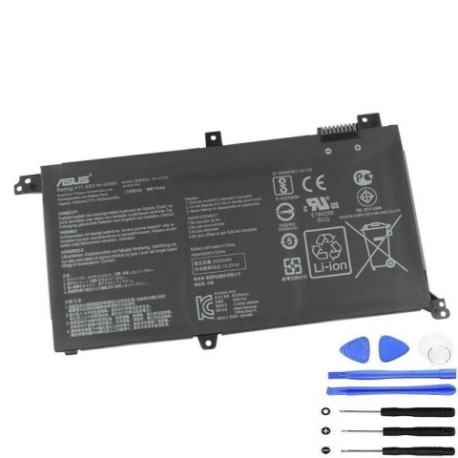
Battery models & part numbers
| Reference / P/N |
|---|
| 0B200-02960000 |
| 0B200-02960400 |
| 0B200-02960500 |
| Asus-B31N1732-42Wh.jpg |
| B31Bl9H |
| B31BMEH |
Compatible models
| Model |
|---|
| Asus TUF FX571GT |
| Asus VivoBook S14 S430FA |
| Asus VivoBook S14 S430FN |
| Asus VivoBook S14 S430UA |
| Asus VivoBook S14 S430UF |
| Asus VivoBook S14 S430UN |
| Asus X430FA |
| Asus X430FN |
| Asus X430UA |
| Asus X430UF |
| Asus X430UN |
| Asus X571GT |
| Asus X571LH |
Introduction
Welcome to your complete guide for replacing the Asus B31N1732 42Wh battery. This high-quality replacement battery is specifically designed for various Asus laptop models popular in Australia and New Zealand. Whether you’re a student, professional, or casual user, understanding when and how to replace your laptop battery can save you from unexpected downtime and frustration.
Modern laptops like the Asus VivoBook and TUF series are essential tools for work, study, and entertainment. When the battery begins to fail, it can disrupt your entire workflow. This guide provides comprehensive information to help you make an informed decision about battery replacement, ensuring your device continues to perform reliably.
Common signs you need a replacement
| Symptom | Cause | Verification | Recommendation |
|---|---|---|---|
| Rapid power drain | Reduced battery capacity from age/cycles | Check battery health in Windows Power Report | Replace if capacity below 60% of original |
| Laptop shuts down unexpectedly | Battery cannot maintain stable voltage | Monitor battery percentage drops suddenly | Immediate replacement recommended |
| Battery won’t charge fully | Charging circuit or battery cell failure | Check if stuck at specific percentage | Replace battery and test with different charger |
| Physical swelling or bulging | Gas buildup from chemical degradation | Visual inspection of battery compartment | Stop using immediately and replace |
| Overheating during charging | Internal resistance increase | Feel battery temperature during charge | Replace to prevent damage to laptop |
| Battery indicator errors | Firmware communication issues | Battery status shows incorrect information | Replace after trying calibration |
How to check compatibility
Before purchasing any replacement battery, verifying compatibility is crucial. For Asus laptops in Australia and New Zealand, here are the most reliable methods to ensure you get the right battery for your specific model.
Finding your laptop model information
Locating your exact laptop model is the first step. For Asus devices, you can find this information in several places:
- Bottom sticker: Turn your laptop over and look for the model number printed on the regulatory label. This is the most accurate method.
- System Information: Press Windows Key + R, type “msinfo32” and look for “System Model” in the System Information window.
- Command Prompt: Open Command Prompt and type “wmic csproduct get name” to display your model.
- Original documentation: Check your purchase receipt, box, or user manual.
Using official Asus resources
Asus provides excellent support resources for Australian and New Zealand customers:
- Visit the Asus Australia support website and use their product search function
- Download the MyASUS app, which can automatically detect your model and provide compatibility information
- Check the original battery part number if you’re replacing an existing battery
- Contact Asus authorised service centres in major cities like Sydney, Melbourne, Auckland, or Wellington for verification
Cross-referencing with our compatibility tables
Once you have your model number, compare it with the tables provided in this guide. The Asus B31N1732 battery is compatible with multiple model series, including VivoBook S14, X-series, and TUF gaming models. Pay close attention to the exact model suffix (FA, FN, UA, UF, UN, GT, LH) as these indicate specific hardware configurations that may affect battery compatibility.
When to replace your battery
Understanding the optimal timing for battery replacement can save you from emergency situations and potential data loss. Here’s when you should consider replacing your Asus laptop battery:
Battery age and cycle count
Lithium-ion batteries like the B31N1732 typically last 2-3 years with regular use. If your laptop is older than three years and you’re noticing reduced performance, replacement is advisable. Most modern laptops track charge cycles – when you reach 500-800 complete cycles, battery degradation becomes noticeable.
Performance thresholds
Replace your battery when:
- Battery runtime drops below 50% of original capacity
- Windows battery report shows “Design Capacity” significantly higher than “Full Charge Capacity”
- You need to carry your charger everywhere because the battery can’t last through your typical work session
- The battery warning light flashes orange or shows persistent warnings
Seasonal considerations for AU/NZ
In Australia and New Zealand, extreme temperatures can accelerate battery degradation. If you live in hot regions like Queensland or Western Australia, or experience very cold winters in South Island areas, your battery may require replacement sooner. Consider replacing before summer heat waves or winter cold snaps if you’re already experiencing battery issues.
Installation guide
Replacing the battery in your Asus laptop is generally straightforward, but requires care and the right tools. This guide covers the installation process for compatible models.
Tools and preparation
Before beginning, gather these essential items:
- Phillips head screwdriver (size #00 or #0)
- Plastic spudger or guitar pick for prying
- Anti-static wrist strap (recommended)
- Clean, well-lit workspace
- Small containers for organising screws
- The new Asus B31N1732 42Wh battery
Step-by-step installation
- Power down completely: Shut down your laptop and disconnect all cables and peripherals.
- Remove bottom panel: Place your laptop upside down on a soft surface. Remove all visible screws from the bottom panel. Some models may have hidden screws under rubber feet – check carefully.
- Open the case: Use a plastic spudger to gently separate the bottom panel from the main body. Work slowly around the edges to avoid damaging plastic clips.
- Locate the battery: The battery is typically located near the front edge of the laptop. It will be a rectangular component with a connector cable.
- Disconnect old battery: Carefully disconnect the battery cable from the motherboard. Some models may have a locking mechanism – release this before pulling the connector.
- Remove old battery: Unscrew any mounting screws securing the battery, then lift it out carefully.
- Install new battery: Place the new B31N1732 battery in position, secure with screws, and reconnect the cable to the motherboard.
- Reassemble: Replace the bottom panel, ensuring all clips engage properly. Reinsert all screws.
Post-installation steps
After installing your new battery:
- Connect the power adapter and charge the battery to 100%
- Allow the battery to calibrate by running a full charge cycle
- Update your BIOS and battery drivers from the Asus support website
- Run Windows battery report to verify the new battery is recognised correctly
Usage & care tips
Proper battery maintenance extends the life of your new Asus B31N1732 battery and ensures optimal performance. Follow these tips specifically relevant to Australian and New Zealand conditions:
Charging best practices
- Avoid frequent full discharges – lithium-ion batteries prefer partial discharges between 20-80%
- Don’t leave your laptop plugged in constantly at 100% – occasional discharge cycles are beneficial
- If storing your laptop for extended periods, charge the battery to about 50-60% first
- Use only Asus-authorised chargers with correct voltage and current ratings
Temperature management
Australian summers and New Zealand’s varying climates require special attention to battery temperature:
- Never leave your laptop in a hot car – temperatures can exceed 60°C in Australian summers
- Avoid direct sunlight on your laptop, especially through windows
- Don’t use your laptop on soft surfaces like beds or couches that block ventilation
- In colder South Island winters, allow your laptop to warm to room temperature before charging
Power settings optimisation
Configure your power settings for battery longevity:
- Use the Asus Battery Health Charging feature in MyASUS or BIOS settings
- Set display brightness appropriate for your environment
- Enable battery saver mode in Windows when working on battery
- Close unnecessary applications and background processes
Safety & recycling in AU/NZ
Proper handling and disposal of laptop batteries is crucial for safety and environmental protection in Australia and New Zealand.
Safety precautions
- Never attempt to open, puncture, or modify the battery
- If the battery becomes damaged, swollen, or hot, stop using immediately
- Only use batteries that have passed Australian and New Zealand safety standards
- Keep batteries away from water and extreme temperatures
Recycling options
Both Australia and New Zealand have excellent battery recycling programs:
- Australia: Use Battery World, Officeworks, or ALDI stores’ battery recycling bins
- New Zealand: Take old batteries to Mitre 10, Bunnings, or specialised e-waste recycling centres
- Many local councils offer e-waste collection services for laptop batteries
- Some retailers offer take-back programs when you purchase a new battery
Legal compliance
All batteries sold in Australia and New Zealand must meet specific safety standards. Our Asus B31N1732 replacement batteries comply with Australian Consumer Law and New Zealand Consumer Guarantees Act, ensuring you receive a quality product with proper warranties.
FAQ
How long does the Asus B31N1732 battery typically last?
The Asus B31N1732 42Wh battery typically provides 2-3 years of reliable service with normal usage patterns. With optimal care and favourable usage conditions, some users may achieve up to 4 years of service. The battery is rated for approximately 500-800 complete charge cycles before capacity drops to about 80% of original.
Will replacing my battery void my Asus warranty?
In Australia and New Zealand, replacing the battery yourself generally does not void your overall laptop warranty, but any damage caused during installation may not be covered. For laptops still under warranty, we recommend using an Asus-authorised service centre for replacement. Consumer protection laws in both countries protect your right to choose repair options.
How can I verify my new battery is genuine?
Genuine Asus B31N1732 batteries feature specific identifiers: precise model numbering, proper regulatory markings, high-quality construction, and accurate capacity ratings. Purchase from reputable suppliers, check for Australian compliance markings, and verify the battery is recognised correctly in Windows System Information. Our batteries come with full authenticity guarantees.
Why does my battery percentage seem inaccurate after replacement?
Battery calibration is necessary after replacement. To calibrate: charge to 100%, use until it shuts down (about 5-10%), then charge uninterrupted to 100% again. The battery controller will recalibrate for accurate percentage readings. This process may take 2-3 complete cycles for optimal accuracy.
Can I use this battery with different Asus models than listed?
We strongly recommend using the B31N1732 battery only with the compatible models listed in this guide. While some physical fits might work with unlisted models, electrical compatibility, firmware communication, and safety cannot be guaranteed. Using incompatible batteries may cause performance issues or potential safety hazards.
What should I do if my new battery isn’t charging?
First, try these troubleshooting steps: reset the EC (Embedded Controller) by holding the power button for 40 seconds with no power connected; update your BIOS; check the power connector is fully seated; try a different power outlet. If issues persist, contact the supplier for warranty support. Most quality batteries include at least 12-month warranties in Australia and New Zealand.
Is the 42Wh capacity sufficient for my needs?
The 42Wh capacity provides approximately 4-7 hours of typical usage depending on your model, settings, and applications. VivoBook S14 models typically achieve 5-6 hours of office use, while TUF gaming models may provide 2-3 hours of gaming or 4-5 hours of video playback. For extended mobility, consider carrying your charger or reducing power-intensive activities when away from power outlets.
Replacing your Asus laptop battery doesn’t have to be stressful or complicated. With the right information, genuine parts, and proper installation, you can restore your laptop’s mobility and reliability. The Asus B31N1732 42Wh battery offers compatible replacement for multiple popular models, ensuring you can continue working, studying, or gaming without interruption. Remember to recycle your old battery responsibly through Australian or New Zealand recycling programs.