Acer AS07B32 71Wh Laptop Battery Replacement Guide
If your Acer laptop is struggling to hold charge or shutting down unexpectedly, you’ve come to the right place. Our comprehensive guide covers everything Australian and New Zealand consumers need to know about the Acer AS07B32 71Wh replacement battery.
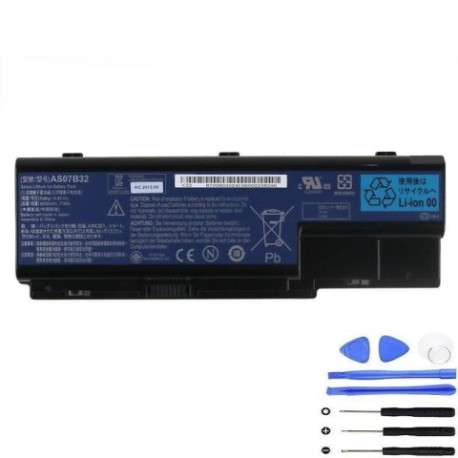
Battery models & part numbers
| Reference / P/N |
|---|
| Acer-AS07B32-71Wh |
| Acer AS07B42 |
| Acer AS07B52 |
| Acer AS07B72 |
| Acer BT.00803.024 |
| Acer BT.00804.020 |
| Acer BT.00805.011 |
| Acer BT.00807.014 |
| Acer BT.00807.015 |
Compatible models
| Model |
|---|
| Acer Aspire 5230 |
| Acer Aspire 5310 |
| Acer Aspire 5320 |
| Acer Aspire 5330 |
| Acer Aspire 5710 |
| Acer Aspire 5710Z |
| Acer Aspire 5715 |
| Acer Aspire 5715Z |
| Acer Aspire 5720 |
| Acer Aspire 5720G |
| Acer Aspire 5720Z |
| Acer Aspire 5730 |
| Acer Aspire 5730-4353 |
| Acer Aspire 5730Z |
| Acer Aspire 5730ZG |
| Acer Aspire 5739 |
| Acer Aspire 5739G |
| Acer Aspire 5910G |
| Acer Aspire 5920 |
| Acer Aspire 5920G |
| Acer Aspire 5930 |
| Acer Aspire 5930G |
| Acer Aspire 5930Z |
| Acer Aspire 5935 |
| Acer Aspire 5935G |
| Acer Aspire 5940G |
| Acer Aspire 5942G |
| Acer Aspire 6530G |
| Acer Aspire 6920 |
| Acer Aspire 6920G |
| Acer Aspire 6930 |
| Acer Aspire 6930-6082 |
| Acer Aspire 6930-6455 |
| Acer Aspire 6930-6771 |
| Acer Aspire 6930-6809 |
| Acer Aspire 6930G |
| Acer Aspire 6930G-Entertain.B |
| Acer Aspire 6935 |
| Acer Aspire 6935-6052 |
| Acer Aspire 6935-6486 |
| Acer Aspire 6935-6924 |
| Acer Aspire 6935-6929 |
| Acer Aspire 6935G |
| Acer Aspire 7230 |
| Acer Aspire 7320 |
| Acer Aspire 7330 |
| Acer Aspire 7330-572G16 |
| Acer Aspire 7530 |
| Acer Aspire 7530G |
| Acer Aspire 7535 |
| Acer Aspire 7535G |
| Acer Aspire 7540 |
| Acer Aspire 7540G |
| Acer Aspire 7720 |
| Acer Aspire 7720G |
| Acer Aspire 7730 |
| Acer Aspire 7730G |
| Acer Aspire 7735 |
| Acer Aspire 7735Z |
| Acer Aspire 7735ZG |
| Acer Aspire 7736 |
| Acer Aspire 7736G |
| Acer Aspire 7736Z |
| Acer Aspire 7736ZG |
| Acer Aspire 7738G |
| Acer Aspire 7740 |
| Acer Aspire 7740G |
| Acer Aspire 8530G |
| Acer Aspire 8730 |
| Acer Aspire 8730G |
| Acer Aspire 8730ZG |
| Acer Aspire 8735G |
| Acer Aspire 8735ZG |
| Acer Aspire 8920 |
| Acer Aspire 8920G |
| Acer Aspire 8930G |
| Acer Aspire 8935 |
| Acer Aspire 8935G |
| Acer Aspire 8940 |
| Acer Aspire 8940G |
| Acer Aspire 8942G |
| Acer TravelMate 7530 |
| Acer TravelMate 7530G |
| Acer TravelMate 7730 |
| Acer TravelMate 7730G |
| Packard Bell EasyNote DT85 |
| Packard Bell EasyNote DT85 (MS2281) |
| Packard Bell EasyNote LJ61 |
| Packard Bell EasyNote LJ65 |
| Packard Bell EasyNote LJ67 |
| Packard Bell EasyNote LJ71 |
| Packard Bell EasyNote LJ73 |
| Packard Bell EasyNote LJ75 |
| Packard Bell EasyNote LJ77 |
| Packard Bell Model KBYF0 |
Common Signs You Need a Replacement Battery
| Symptom | Cause | Verification | Recommendation |
|---|---|---|---|
| Battery drains quickly (under 1 hour) | Ageing cells, reduced capacity | Check battery health in Windows Power Report | Replace if capacity below 60% |
| Laptop shuts down unexpectedly | Voltage drops under load | Monitor during intensive tasks | Immediate replacement needed |
| Battery won’t charge fully | Charging circuit failure | Check charging percentage | Replace battery and check charger |
| Battery swelling or overheating | Internal damage, safety risk | Visual inspection, temperature check | Replace immediately – safety hazard |
How to Check Compatibility
Finding the right battery for your Acer or Packard Bell laptop is crucial. Start by locating your laptop’s model number, typically found on a sticker on the bottom case or under the battery compartment. For Acer models, you’ll see designations like “Aspire 5730” or “TravelMate 7730”. Packard Bell models follow similar numbering like “EasyNote LJ71”. Cross-reference your model with our comprehensive compatibility tables above. You can also check your current battery’s part number – look for codes like AS07B32, BT.00803.024, or similar. If unsure, contact Acer’s Australian support centre or use their online compatibility checker tool.
When to Replace Your Laptop Battery
Most lithium-ion batteries like the AS07B32 last 2-3 years with regular use. Signs it’s time for replacement include reduced runtime (less than 60 minutes), the battery not charging to 100%, or your laptop shutting down suddenly when unplugged. If your battery is swollen or feels hot during charging, replace it immediately for safety. For older Acer Aspire and TravelMate models listed, battery replacement can extend your laptop’s useful life significantly.
Installation Guide
Replacing your Acer battery is straightforward. First, power down your laptop and unplug the AC adapter. Turn the laptop over and locate the battery release latches. For most Acer models, you’ll slide the latches outward simultaneously while lifting the battery out. Insert your new AS07B32 battery at a slight angle, ensuring the connectors align properly. Press down until you hear a click. Charge fully before first use. Always handle batteries carefully and avoid touching the metal connectors.
Usage & Care Tips
To maximise your new battery’s lifespan: avoid frequent full discharges, keep your laptop in cool environments (below 35°C), and calibrate monthly by charging to 100% then discharging to about 20%. Don’t leave your laptop plugged in constantly after full charge. Store in cool, dry conditions if not using for extended periods.
Safety & Recycling in AU/NZ
Never dispose of lithium-ion batteries in household waste. In Australia, use Batteryback or council recycling services. In New Zealand, take to designated recycling centres. Damaged or swollen batteries should be handled with care – place in non-flammable container and take to authorised recycling facilities immediately.
FAQ
How long does the AS07B32 battery last?
Typically 2-3 years with normal use, or 500-800 charge cycles.
Is this battery compatible with my Packard Bell laptop?
Yes, it works with EasyNote DT85, LJ series, and Model KBYF0 as listed.
Does this battery come with warranty?
Most reputable suppliers offer 12-24 months warranty in Australia and New Zealand.
How do I check my current battery’s health?
In Windows, open Command Prompt and type “powercfg /batteryreport” for detailed analysis.
Can I use this battery if my original had different part number?
Yes, as long as your laptop model appears in our compatibility list.
How long for delivery in Australia?
Typically 3-7 business days to major cities, slightly longer to regional areas.
Is installation difficult?
Most Acer and Packard Bell models have user-replaceable batteries – no tools required.