Battery models & part numbers
| Reference / P/N |
|---|
| 05TF10 |
| Dell 5TF10 |
| Dell-5TF10-64Wh |
Compatible laptop models
| Model |
|---|
| Dell 0H6K6V |
| Dell 0RY3F9 |
| Dell 0VRX0J |
| Dell 0WMRC77I |
| Dell 7M0T6 |
| Dell GHXKY |
| Dell NYFJH RY3F9 |
| Dell Precision 7530 P74F P74F001 |
| Dell Precision 7530-0HYDR |
| Dell Precision 7530-303TF |
| Dell Precision 7530-4NKGK |
| Dell Precision 7530-68XJY |
| Dell Precision 7530-7RJY8 |
| Dell Precision 7530-8TRT2 |
| Dell Precision 7530-DK1VC |
| Dell Precision 7530-G7HV2 |
| Dell Precision 7530-JCTXC |
| Dell Precision 7530-V0JGP |
| Dell Precision 7530-V2T43 |
| Dell Precision 7530-V9WRD |
| Dell Precision 7530-W6TRH |
| Dell Precision 7530-X2P2R |
| Dell Precision 7530-X4YDW |
| Dell Precision 7530-X59YX |
| Dell Precision 7530-XVJ6N |
| Dell Precision 7540 7740 |
| Dell Precision 7730 P34E P34E001 |
| Dell Precision 7730-0KPY3 |
| Dell Precision 7730-2DC9W |
| Dell Precision 7730-2P3GN |
| Dell Precision 7730-515VV |
| Dell Precision 7730-5GCJ7 |
| Dell Precision 7730-810JF |
| Dell Precision 7730-8JMT5 |
| Dell Precision 7730-9C0FR |
| Dell Precision 7730-R11CM |
| Dell Precision 7730-RF1CP |
| Dell Precision 7730-SBR30 |
| Dell Precision 7730-TJGT8 |
| Dell Precision 7730-XXN03 |
Introduction
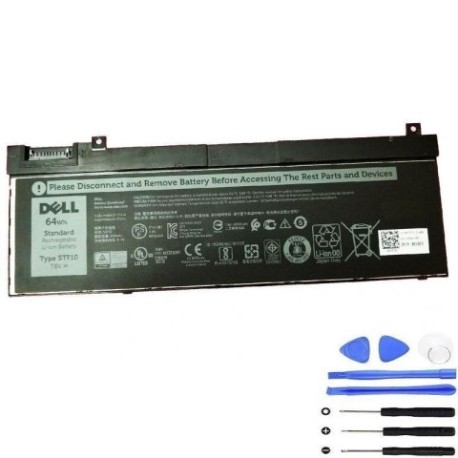
Keep your Dell Precision laptop running at peak performance with our genuine replacement battery. The Dell 5TF10 64Wh battery is specifically designed for Australian and New Zealand conditions, providing reliable power for your mobile workstation.
Common signs you need a replacement
| Symptom | Cause | Verification | Recommendation |
|---|---|---|---|
| Battery drains quickly | Reduced capacity from age/cycles | Check battery health in Windows | Replace if capacity below 60% |
| Laptop won’t hold charge | Failed battery cells | Test with power adapter removed | Immediate replacement needed |
| Battery swelling | Internal chemical breakdown | Visual inspection of battery compartment | Replace immediately for safety |
| Overheating during use | Inefficient power delivery | Monitor temperature with software | Replace if consistently over 45°C |
How to check compatibility
Verify your laptop model matches our compatibility list above. Check your current battery part number (usually printed on the battery) or locate your laptop service tag in system information.
When to replace
Replace your battery when runtime drops below 2 hours, charging takes longer than 4 hours, or you notice physical swelling. Most Dell batteries last 2-3 years with regular use.
Installation guide (overview)
Power down your laptop and disconnect the charger. Remove the bottom panel (typically 6-8 screws), disconnect the old battery connector, and install the new Dell 5TF10. Reassemble and perform a full charge cycle.
Usage & care tips
Avoid extreme temperatures (store between 15-25°C), don’t leave plugged in constantly, and perform monthly full discharge/charge cycles. Keep contacts clean and dry.
Safety & recycling in AU/NZ
Never attempt to open or modify batteries. In Australia, recycle through Batteryback or council e-waste programs. In New Zealand, use accredited e-waste recyclers. Never dispose in household bins.
FAQ
How long does delivery take in Australia?
Most metro areas receive orders within 3-5 business days, regional areas 5-7 days.
Is this battery genuine Dell?
Yes, we supply authorised Dell replacement batteries with full manufacturer warranty.
What’s the warranty period?
All Dell 5TF10 batteries come with 12 months warranty covering defects and performance.
Can I install this myself?
Yes, most Dell Precision models have user-replaceable batteries. Follow our installation guide or seek professional help if unsure.
How do I maximise battery life?
Keep between 20-80% charge, avoid heat exposure, and update your BIOS regularly for optimal power management.
What if my model isn’t listed?
Contact our support team with your laptop service tag for specific compatibility verification.