Acer AP16A4K 42Wh Battery Replacement Guide
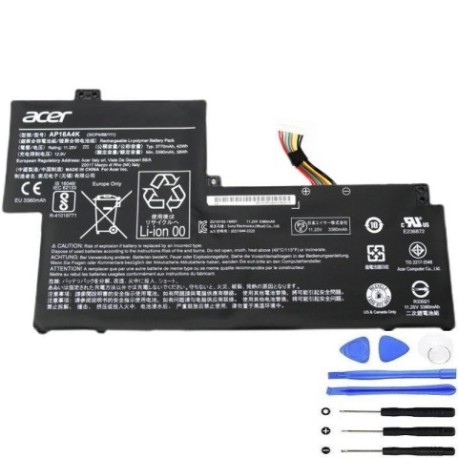
Battery models & part numbers
| Reference / P/N |
|---|
| Acer-AP16A4K-42Wh |
Compatible models
| Model |
|---|
| Acer Aspire One Cloudbook AO1-132 |
| Acer Aspire One Cloudbook AO1-132-C9M9 |
| Acer Aspire One Cloudbook AO1-132-N14N/W |
| Acer KT.00304.007 |
| Acer Swift 1 (SF113-31) |
| Acer Swift 1 (SF113-31-C3MA) |
| Acer Swift 1 (SF113-31-C534) |
| Acer Swift 1 (SF113-31-P4MS) |
| Acer Swift 1 (SF113-31-P5CK) |
Introduction
If you’re experiencing battery issues with your Acer Aspire One Cloudbook or Swift 1 laptop, you’re not alone. Laptop batteries naturally degrade over time, and finding the right replacement can be confusing. The Acer AP16A4K 42Wh battery is specifically designed for these popular Acer models, providing reliable power restoration for your trusted device. Whether you’re a student, professional, or casual user in Australia or New Zealand, understanding your battery replacement options ensures you can continue working, studying, or browsing without interruption.
Common signs you need a replacement
| Symptom | Cause | Verification | Recommendation |
|---|---|---|---|
| Battery drains quickly | Reduced capacity from age/cycles | Check battery health in Windows | Replace if capacity below 60% |
| Laptop shuts down unexpectedly | Battery can’t maintain voltage | Monitor shutdown at specific % | Immediate replacement needed |
| Battery won’t charge fully | Charging circuit or cell failure | Check charging indicator/software | Replace battery first, then charger |
| Battery swelling/bulging | Gas buildup from degradation | Visual inspection of battery compartment | Replace immediately – safety risk |
| Overheating during use | Increased internal resistance | Monitor temperature with software | Replace to prevent damage |
How to check compatibility
Finding your exact Acer model number is crucial for battery compatibility. For Aspire One Cloudbook and Swift 1 models, check the bottom casing label near the serial number. The model number typically starts with “AO1-132” for Cloudbook or “SF113-31” for Swift 1 variants. You can also find this information in Windows by pressing Windows Key + R, typing “msinfo32”, and looking under System Model. Acer’s official support website allows you to enter your serial number for precise part identification. Remember that even small variations in model suffixes matter – an AO1-132-C9M9 requires the same AP16A4K battery as the standard AO1-132, but confirming your exact model ensures perfect compatibility.
When to replace
Most Acer laptop batteries last 2-4 years with regular use. Consider replacement when your battery holds less than 60% of its original capacity, requires frequent charging, or shows physical damage. For students and professionals relying on portability, replacing at the first signs of degradation prevents unexpected downtime during important tasks. The AP16A4K battery typically provides 4-8 hours of usage depending on your specific Acer model and usage patterns, so noticeable reductions in this timeframe indicate replacement time.
Installation guide
Replacing the battery in your Acer Aspire One Cloudbook or Swift 1 is straightforward. First, power off the laptop and disconnect the AC adapter. Flip the device over and locate the battery compartment – for these models, it’s typically secured with several Phillips head screws. Remove the screws and carefully lift the battery cover. You’ll see the battery connected via a small connector – gently disconnect this by pulling straight out (never pull by the wires). Remove the old battery, align the new AP16A4K battery in position, reconnect the connector firmly, replace the cover, and secure with screws. Power on your laptop – it should recognise the new battery immediately. The entire process takes 10-15 minutes with basic screwdrivers.
Usage & care tips
To maximise your new Acer battery’s lifespan, avoid frequent full discharges – lithium-ion batteries prefer partial discharges between 20-80%. Don’t leave your laptop plugged in constantly at 100% charge, as this stresses the battery. Store your device in cool conditions (15-25°C ideal) and avoid extreme temperatures. For occasional long-term storage, charge the battery to about 50% before powering down. These practices can extend your AP16A4K battery’s service life beyond the typical 2-3 year expectation.
Safety & recycling in AU/NZ
Battery safety is paramount in Australia and New Zealand. Never attempt to open or modify the AP16A4K battery casing, as this can cause short circuits or thermal runaway. If you notice swelling, leaking, or unusual heating, discontinue use immediately and contact professional disposal services. When your old Acer battery reaches end-of-life, recycle it responsibly through authorised e-waste programmes available at most electronics retailers, council waste centres, or through battery manufacturer take-back schemes. Proper recycling prevents environmental contamination and recovers valuable materials.
FAQ
How long does the AP16A4K battery typically last?
With normal use, expect 2-4 years of service life or 500-800 charge cycles before noticeable capacity reduction.
Will this battery work with my Acer Swift 1 purchased in New Zealand?
Yes, the AP16A4K is compatible with all regional variants of the supported Acer models, including those sold in AU/NZ markets.
Do I need to calibrate the new battery?
Modern Acer laptops automatically calibrate with new batteries, but for optimal accuracy, perform one full charge/discharge cycle initially.
Can I use my laptop while charging the new battery?
Yes, the AP16A4K supports simultaneous charging and usage without affecting battery lifespan.
What warranty comes with this replacement battery?
Quality replacement batteries typically include 12-24 month warranties – check specific supplier terms for coverage details.
Is professional installation required?
No, the design allows user replacement, but if uncomfortable, authorised Acer service centres can install it for you.
How do I dispose of my old Acer battery safely?
Use council e-waste services or retailer take-back programmes – never dispose of lithium batteries in household rubbish.