Battery models & part numbers
| Reference / P/N |
|---|
| AA-PB2VC6W/B |
| AA-PB3VC6B/E |
| AA-PL2VC6B |
| AA-PL2VC6B/E |
| AA-PL2VC6W/E |
Compatible laptop models
| Model |
|---|
| N143 Plus |
| N143P |
| N145P |
| N148 |
| N148P |
| N150 |
| N150P |
| N230 Plus |
| N230P |
| N250 |
| N250P |
| N260 |
| N260 Plus |
| N260P |
| N350 |
| N350 Plus |
| N350P |
| NP-N143P |
| NP-N145P |
| NP-N148 |
| NP-N150 |
| NP-N350P |
| NT-N143 |
| NT-N143P |
| NT-N145P |
| NT-N148P |
| NT-N150 |
| NT-N150P |
| NT-N230P |
| NT-N250 |
| NT-N250P |
| NT-N260 |
| NT-N260P |
| NT-N350 |
| NT-N350P |
Introduction
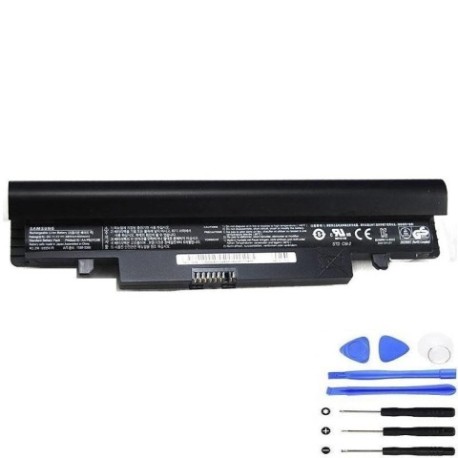
If your Samsung laptop battery isn’t holding charge like it used to, our genuine replacement battery restores your device’s mobility and performance. This 48Wh battery is compatible with multiple Samsung laptop models and part numbers listed above.
Common signs you need a replacement
| Symptoms | Causes | Verification | Recommendation |
|---|---|---|---|
| Battery drains quickly | Ageing cells, reduced capacity | Check battery health in system settings | Consider replacement if under 50% capacity |
| Laptop shuts down unexpectedly | Voltage drops under load | Monitor battery percentage during use | Replace if occurring regularly |
| Battery won’t charge fully | Charging circuit issues, worn cells | Check charging indicator and percentage | Replace if stuck below 80% charge |
| Battery swelling or overheating | Internal damage, safety hazard | Visual inspection, temperature check | Replace immediately, do not use |
How to check compatibility
Verify your laptop model matches one listed in our compatibility table. Check your laptop’s bottom label or system information for the exact model number. Cross-reference with the part numbers to ensure correct fitment.
When to replace
Replace your battery when it holds less than 50% of its original capacity, shows physical damage, or causes performance issues. Most laptop batteries last 2-4 years with regular use.
Installation guide (overview)
1. Power off laptop and disconnect charger
2. Remove bottom panel screws
3. Carefully disconnect old battery connector
4. Install new battery and reconnect
5. Replace panel and power on
Always refer to your device’s service manual for detailed instructions.
Usage & care tips
• Avoid complete discharges – charge at 20-30% remaining
• Store between 15-25°C in dry conditions
• Use authorised chargers only
• Calibrate monthly by fully charging then discharging
Safety & recycling in AU/NZ
Never dispose of batteries in household waste. Use approved battery recycling centres available at most electronics retailers. Damaged or swollen batteries should be handled with care and recycled immediately.
FAQ
How long does delivery take in Australia?
Typically 3-7 business days depending on location.
Is this battery genuine Samsung?
Yes, this is an original Samsung battery with full compatibility.
What warranty is provided?
12-month warranty covering manufacturing defects.
Can I install this myself?
Yes, with basic technical skills and proper tools.
How do I recycle my old battery?
Drop at any battery recycling centre – free service nationwide.
Will this improve my laptop’s performance?
Yes, a new battery restores original runtime and stability.
What if my model isn’t listed?
Contact our support team for compatibility verification.