HP SN03XL 44Wh Battery Replacement Guide
Find the perfect replacement battery for your HP laptop with our comprehensive compatibility guide and expert installation advice.
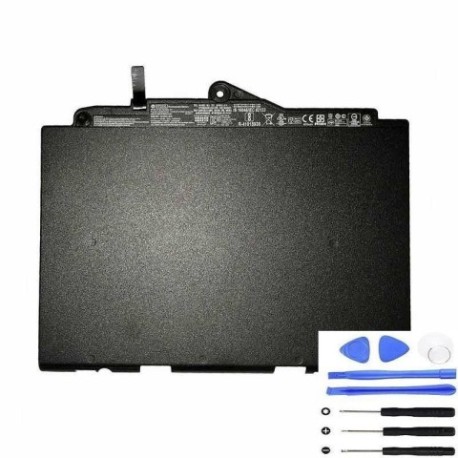
Battery models & part numbers
| Reference / P/N |
|---|
| HP 800232-241 |
| HP 800232-271 |
| HP 800514-001 |
| HP 800514-006 |
| HP HSTNN-DB6V |
| HP HSTNN-I34C |
| HP HSTNN-I42C |
| HP SN03044XL-PL |
| HP T7B33A |
| HP-SN03XL-44Wh |
Compatible laptop models
| Model |
|---|
| HP EliteBook 725 G3s |
| HP EliteBook 820 G3s |
| HP EliteBook 828 G3s |
| HP Workstation Z240s |
Introduction
The HP SN03XL 44Wh battery is a high-quality replacement power solution designed specifically for HP business laptops and workstations. This genuine-compatible battery delivers reliable performance and extended runtime for Australian and New Zealand users.
Common signs you need a replacement
| Symptoms | Causes | Verification | Recommendation |
|---|---|---|---|
| Battery drains quickly (under 1 hour) | Ageing cells, reduced capacity | Check battery health in HP Support Assistant | Replace if capacity below 60% |
| Laptop won’t hold charge | Failed battery circuitry | Test with power adapter removed | Immediate replacement needed |
| Battery swelling or overheating | Internal damage, safety risk | Visual inspection, temperature check | Replace immediately, do not use |
| Charging indicator issues | Battery communication failure | Check LED behaviour, system reports | Replace if persistent errors |
How to check compatibility
Verify your laptop’s compatibility by checking the battery compartment for the part number or using HP’s online support tools. Cross-reference with our compatibility tables above to ensure perfect fitment.
When to replace
Replace your HP battery when runtime drops below 60% of original capacity, typically after 2-3 years of regular use. For business users in AU/NZ, we recommend proactive replacement to maintain productivity.
Installation guide (overview)
Power off your laptop and disconnect the AC adapter. Remove the old battery by releasing the locking mechanism and sliding it out. Insert the new HP SN03XL battery until it clicks into place. Allow full initial charge before first use.
Usage & care tips
Store batteries at room temperature (15-25°C), avoid complete discharges, and calibrate monthly by fully charging then discharging. Use only authorised HP chargers to maintain optimal battery health.
Safety & recycling in AU/NZ
Never dispose of batteries in household waste. Use Batteryback.org.au in Australia or your local council recycling centre in New Zealand. Damaged batteries should be handled by professional recycling services.
FAQ
How long does the HP SN03XL battery last?
Typically 2-3 years with normal use, providing 3-5 hours of runtime depending on usage patterns and laptop settings.
Is this battery genuine HP?
This is a high-quality compatible battery that meets or exceeds original specifications, providing reliable performance at a competitive price.
Do you offer warranty in Australia and New Zealand?
Yes, we provide 12-month warranty coverage with local support for both Australian and New Zealand customers.
How do I recycle my old battery?
Use Batteryback.org.au in Australia or contact your local council in New Zealand for proper battery recycling options.
Will this battery work with my HP EliteBook G3 series?
Yes, this battery is specifically compatible with EliteBook 725 G3s, 820 G3s, and 828 G3s models as listed in our compatibility table.
What’s the delivery time to regional areas?
Most Australian regional areas receive delivery within 3-5 business days, while New Zealand regional delivery typically takes 5-7 business days.
Can I use this battery if my original was a different part number?
Yes, as long as your original part number appears in our compatibility list, this battery will work as a direct replacement.