Toshiba PA5149U-1BRS-60Wh Battery Replacement Guide
Find the perfect replacement battery for your Toshiba laptop with our comprehensive compatibility guide designed for Australian and New Zealand users.
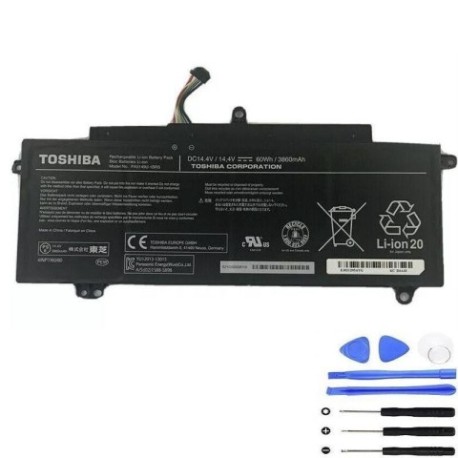
Battery models & part numbers
| Reference / P/N |
|---|
| Toshiba-PA5149U-1BRS-60Wh |
Compatible laptop models
| Model |
|---|
| Toshiba 4NCA596080-B001D |
| Toshiba G71C000GB310 |
| Toshiba G71C000K71AA |
| Toshiba P000589730 |
| Toshiba P000614500 |
| Toshiba P000641720 |
| Toshiba P000660640 |
| Toshiba P000661900 |
| Toshiba P000697280 |
| Toshiba P000697600 |
| Toshiba Tecra Z40-A |
| Toshiba Tecra Z40-B |
| Toshiba Tecra Z40-C |
| Toshiba Tecra Z40T-A |
| Toshiba Tecra Z40T-B |
| Toshiba Tecra Z40T-C |
| Toshiba Tecra Z50-A |
Introduction
Welcome to your complete guide for replacing the Toshiba PA5149U-1BRS-60Wh battery. This high-quality replacement battery is designed specifically for compatible Toshiba laptop models used by Australian and New Zealand consumers.
Common signs you need a replacement
| Symptoms | Causes | Verification | Recommendation |
|---|---|---|---|
| Battery drains quickly | Ageing battery cells | Check battery health in system settings | Replace if capacity below 50% |
| Laptop won’t hold charge | Failed battery circuitry | Test with power adapter removed | Immediate replacement needed |
| Battery swelling | Internal chemical breakdown | Visual inspection of battery case | Replace immediately for safety |
| Overheating during use | Inefficient power delivery | Monitor temperature with software | Replace if consistently over 45°C |
| Random shutdowns | Voltage instability | Check system event logs | Replace to prevent data loss |
How to check compatibility
Verify your laptop model matches one of the compatible models listed above. Check your laptop’s bottom label or system information in Windows settings. The model number should exactly match one in our compatibility table.
When to replace
Replace your battery when it no longer holds a sufficient charge for your needs, shows physical damage, or reaches 2-3 years of regular use. Most laptop batteries in AU/NZ climates last 300-500 charge cycles.
Installation guide (overview)
1. Power off laptop and disconnect charger
2. Remove the battery compartment cover
3. Carefully disconnect the old battery
4. Insert the new Toshiba PA5149U-1BRS-60Wh battery
5. Secure the battery and replace the cover
6. Charge fully before first use
Usage & care tips
• Avoid extreme temperatures (ideal range 10-35°C)
• Calibrate battery monthly by fully discharging then charging
• Store in cool, dry place when not in use
• Use authorised chargers only
• Avoid leaving laptop plugged in constantly
Safety & recycling in AU/NZ
Batteries must be recycled responsibly in Australia and New Zealand. Do not dispose of in household waste. Take old batteries to your local recycling centre or participating electronics retailers. Many councils offer battery recycling services.
FAQ
How long does shipping take to AU/NZ?
Typically 7-14 business days depending on your location.
Is this battery genuine Toshiba?
This is a high-quality replacement battery compatible with Toshiba laptops.
What warranty is offered?
Most replacement batteries come with 12 months warranty.
Can I install this myself?
Yes, most Toshiba batteries are user-replaceable with basic tools.
How do I maximise battery life?
Avoid full discharges, keep between 20-80% charge when possible.
Is overnight charging safe?
Modern laptops have protection circuits, but unplugging when full is recommended.
What if my model isn’t listed?
Double-check your model number and contact support for verification.