Battery models & part numbers
| Reference / P/N |
|---|
| Sony VGP-BPS39 185329111 |
| Sony-VGP-BPS39-29Wh |
Compatible laptop models
| Model |
|---|
| Sony Vaio SVT11213CGW |
| Sony Vaio SVT11213CXB |
| Sony Vaio SVT11215CGB/W |
| Sony Vaio SVT11215CXB |
| Sony Vaio SVT11217CGB/W |
| Sony Vaio SVT11218DJB |
| Sony Vaio SVT112190S |
| Sony Vaio SVT112190X |
| Sony Vaio SVT1121A1J |
| Sony Vaio SVT1121B2E |
| Sony Vaio SVT1121B2EW |
| Sony Vaio SVT1121B4E |
| Sony Vaio SVT1121E2E |
| Sony Vaio SVT1121M9R |
| Sony Vaio SVT1121W9E |
| Sony Vaio SVT11223CG |
| Sony Vaio SVT11223CXW |
| Sony Vaio SVT11225CBW |
| Sony Vaio SVT11225CDB |
| Sony Vaio SVT11225CG |
| Sony Vaio SVT11225CLW |
| Sony Vaio SVT11225CXB |
| Sony Vaio SVT11225CXW |
| Sony Vaio SVT11225SG |
| Sony Vaio SVT11225SH |
| Sony Vaio SVT11226CXB |
| Sony Vaio SVT11226CXW |
| Sony Vaio SVT11227PXB |
| Sony Vaio SVT11228EJB |
| Sony Vaio SVT11229EJB |
| Sony Vaio SVT1122A1J |
| Sony Vaio SVT1122B2E |
| Sony Vaio SVT1122B4E |
| Sony Vaio SVT1122C4E |
| Sony Vaio SVT1122C5E |
| Sony Vaio SVT1122D2E |
| Sony Vaio SVT1122E2R |
| Sony Vaio SVT1122M2E |
| Sony Vaio SVT1122M2EW |
| Sony Vaio SVT1122M2R |
| Sony Vaio SVT1122R2E |
| Sony Vaio SVT1122S9E |
| Sony Vaio SVT1122V9E |
| Sony Vaio SVT1122X9R |
| Sony Vaio SVT1122Y9E |
| Sony Vaio SVT1122Y9EB |
| Sony Vaio SVT-1122-B2E |
| Sony Vaio SVT-1122-E2R/W |
| Sony Vaio SVT-1122-S9EB.BE1 |
| Sony Vaio SVT-T1122C5E3 |
| Sony Vaio Tap 11 Tablet SVT1121A1J |
| Sony Vaio Tap 11 Tablet SVT1122A1J |
Introduction
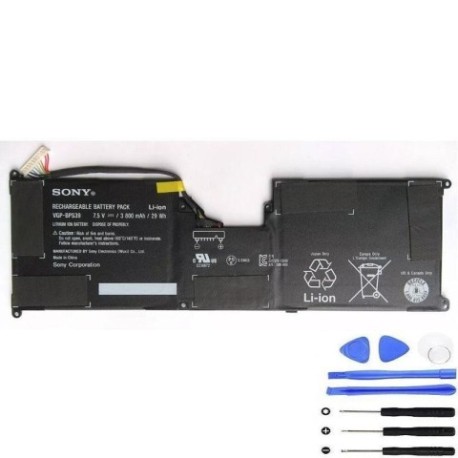
If your Sony Vaio laptop is showing signs of battery fatigue, our genuine replacement Sony VGP-BPS39 29Wh battery restores optimal performance. This high-quality battery is compatible with numerous Vaio models commonly used across Australia and New Zealand.
Common signs you need a replacement
| Symptom | Cause | Verification | Recommendation |
|---|---|---|---|
| Battery drains quickly | Ageing cells, reduced capacity | Check battery health in system settings | Replace battery for longer usage |
| Laptop won’t hold charge | Failed battery cells | Test with power adapter disconnected | Immediate replacement needed |
| Battery swelling | Internal chemical breakdown | Visual inspection of battery compartment | Replace immediately for safety |
| Overheating during use | Inefficient power delivery | Monitor temperature with system tools | Replace to prevent damage |
How to check compatibility
Verify your laptop model matches our compatibility list above. Check your current battery’s part number (usually printed on the battery) matches Sony-VGP-BPS39-29Wh or Sony VGP-BPS39 185329111. For tablets, ensure your model number matches exactly.
When to replace
Replace your battery when it holds less than 50% of its original capacity, shows physical swelling, or fails to charge properly. Most Sony Vaio batteries last 2-3 years with regular use before requiring replacement.
Installation guide (overview)
1. Power off your laptop and disconnect the charger
2. Remove the battery compartment cover
3. Carefully disconnect the old battery
4. Insert the new Sony VGP-BPS39 battery
5. Replace the cover and charge fully before first use
Usage & care tips
• Avoid extreme temperatures (ideal range 10°C to 35°C)
• Calibrate your battery monthly by fully discharging then charging
• Store in cool, dry conditions when not in use
• Use only authorised Sony chargers for optimal performance
Safety & recycling in AU/NZ
Never dispose of batteries in household waste. In Australia, use Batteryback or council recycling centres. In New Zealand, utilise accredited e-waste recycling facilities. Damaged or swollen batteries should be handled with care and recycled immediately.
FAQ
How long does delivery take in Australia?
Most orders arrive within 3-7 business days to metro areas, slightly longer for regional centres.
Is this battery genuine Sony?
Yes, this is an authentic Sony VGP-BPS39 replacement battery with full manufacturer specifications.
What warranty do you offer?
All our batteries come with a 12-month warranty covering manufacturing defects.
Can I use this battery with my Vaio tablet?
Yes, if your tablet model appears in our compatibility list above, this battery is suitable.
How do I maximise battery life?
Avoid complete discharges, keep between 20-80% charge when possible, and store in cool conditions.
Is installation difficult?
Most users find battery replacement straightforward. Follow our guide or consult a professional if unsure.
Do you ship to New Zealand?
Yes, we ship throughout New Zealand with standard delivery times of 5-10 business days.