Samsung AA PLXN4AR 44Wh Laptop Battery Replacement
Find the perfect replacement battery for your Samsung laptop with our comprehensive compatibility guide and expert installation advice for Australian and New Zealand users.
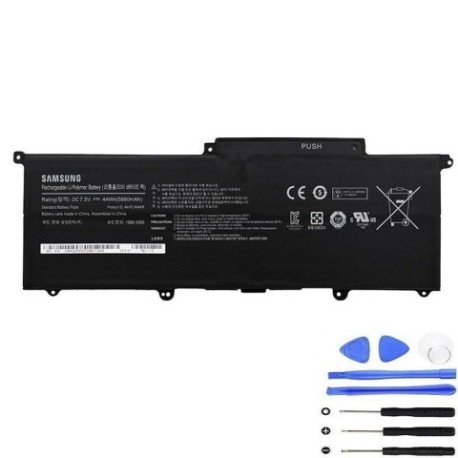
Battery models & part numbers
| Reference / P/N |
|---|
| Samsung-AA-PLXN4AR-44Wh |
Compatible laptop models
| Model |
|---|
| Samsung 900X3B |
| Samsung 900X3C |
| Samsung 900X3E |
| Samsung 921700031 |
| Samsung BA43-00335A |
| Samsung BA43-00350A |
| Samsung BA4300350A |
| Samsung NP900X3C |
| Samsung NP900X3D |
| Samsung NP900X3E |
| Samsung NP900X3F |
| Samsung NP900X3G |
| Samsung P32H01-01-N01 |
Introduction
The Samsung AA PLXN4AR 44Wh battery is designed for various Samsung laptop models, providing reliable power and extended usage time. This replacement battery meets original equipment specifications and is suitable for Australian and New Zealand consumers seeking authorised replacement parts.
Common signs you need a replacement
| Symptoms | Causes | Verification | Recommendation |
|---|---|---|---|
| Battery drains quickly | Ageing cells, reduced capacity | Check battery health in system settings | Consider replacement if under 50% capacity |
| Laptop won’t hold charge | Failed battery cells | Test with power adapter removed | Immediate replacement needed |
| Battery swelling | Internal damage, overheating | Visual inspection, case separation | Replace immediately for safety |
| Overheating during use | Inefficient power delivery | Monitor temperature above 45°C | Replace to prevent damage |
How to check compatibility
Verify your laptop model matches one of the compatible models listed above. Check your laptop’s bottom label or system information for the exact model number. Cross-reference with our compatibility table to ensure proper fit and performance.
When to replace
Replace your battery when you notice significant performance degradation, typically after 2-3 years of regular use. Immediate replacement is required for swollen batteries or those that no longer hold charge. Regular Australian climate conditions can accelerate battery wear.
Installation guide (overview)
Power off your laptop and disconnect the power adapter. Remove the bottom panel using appropriate screwdrivers. Carefully disconnect the old battery connector and remove any mounting screws. Install the new battery, reconnect the connector, and reassemble your laptop.
Usage & care tips
Avoid extreme temperatures – store and use between 10°C and 35°C. Calibrate your new battery by fully charging and discharging it once monthly. Don’t leave your laptop plugged in constantly; occasional battery use maintains cell health. Keep contacts clean and dry.
Safety & recycling in AU/NZ
In Australia and New Zealand, dispose of old batteries at authorised recycling centres. Never dispose of lithium-ion batteries in household waste. Many electronics retailers offer free battery recycling services. Handle damaged batteries with care and store in cool, dry conditions.
FAQ
How long does this battery last?
The Samsung AA PLXN4AR 44Wh typically provides 2-4 hours of usage depending on your laptop model and usage patterns.
Is this battery genuine Samsung?
This replacement battery meets original specifications and is compatible with authorised Samsung laptops.
What’s the warranty period?
Check the product page for current warranty details, typically 12 months for replacement batteries.
How do I recycle my old battery?
Take it to any authorised battery recycling centre in Australia or New Zealand – most electronics stores accept them.
Will this work with my specific model?
Check the compatibility table above – if your model is listed, it should work perfectly.
How long for delivery in AU/NZ?
Delivery times vary by location, typically 3-7 business days within Australia and New Zealand.
Is installation difficult?
Most users can install it themselves with basic tools, but professional installation is available if preferred.