Battery models & part numbers
| Reference / P/N |
|---|
| 38035205 |
| 38039783 |
| CP610763-03 |
| CP629861-XX |
| CP658998-XX |
| CP709256-01 |
| FMVNBT34 |
| FPB0292S |
| FPCBP406 |
| FPCBP406BT |
| FPCBP406Z |
| FUJ:CP629861-XX |
| FUJ:CP658998-XX |
| Fujitsu-FMVNBT34A-28Wh |
| S26391-F1314-L509 |
Compatible laptop models
| Model |
|---|
| LifeBook E733 |
| LifeBook E734 |
| LifeBook E736 |
| LifeBook E743 |
| LifeBook E744 |
| LifeBook E746 |
| LifeBook E753 |
| LifeBook E754 |
| LifeBook E756 |
Introduction
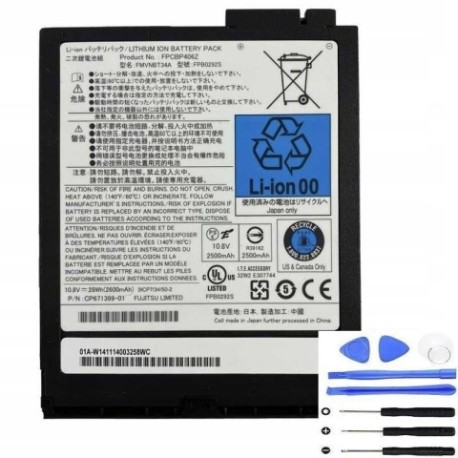
Keep your Fujitsu LifeBook running at peak performance with our genuine replacement battery. This 28Wh power solution is designed specifically for your business laptop needs across Australia and New Zealand.
Common signs you need a replacement
| Symptoms | Possible Causes | How to Verify | Recommendation |
|---|---|---|---|
| Battery drains quickly | Reduced capacity from age/cycles | Check battery health in system settings | Consider replacement if under 2 hours |
| Laptop shuts down unexpectedly | Battery can’t maintain voltage | Monitor battery percentage drops | Replace immediately for data safety |
| Battery won’t charge fully | Charging circuit or cell failure | Check charging indicator and percentage | Test with different charger first |
| Laptop bulging or overheating | Battery swelling or internal damage | Visual inspection and temperature check | Replace urgently – safety hazard |
How to check compatibility
Verify your laptop model matches our compatible list above. Check your current battery’s part number (usually printed on the battery) against our reference numbers. For Australian and New Zealand customers, ensure you’re purchasing from authorised suppliers for warranty protection.
When to replace
Replace your battery when it holds less than 50% of its original capacity, shows physical damage, or causes system instability. Most Fujitsu batteries last 2-3 years with regular use in our climate conditions.
Installation guide (overview)
1. Power off laptop and disconnect charger
2. Remove the battery compartment cover
3. Slide release latch and remove old battery
4. Insert new battery until it clicks into place
5. Replace cover and charge fully before first use
Usage & care tips
• Avoid extreme temperatures (ideal range 15-25°C)
• Calibrate monthly by fully discharging then charging
• Store at 40-60% charge if not using for extended periods
• Use original Fujitsu charger for optimal performance
Safety & recycling in AU/NZ
Never dispose of batteries in household waste. In Australia, use Batteryback or council e-waste services. In New Zealand, utilise accredited e-waste recyclers. Damaged batteries should be handled by professionals – they may pose fire risks in our warmer climates.
FAQ
How long does shipping take to regional areas?
Typically 3-7 business days across Australia and New Zealand.
Is this battery genuine Fujitsu?
Yes, we supply original equipment manufacturer batteries with full warranty.
What’s the warranty period?
12 months warranty covering manufacturing defects.
Can I use this battery with older LifeBook models?
Only if specifically listed in our compatibility table above.
How do I maximise battery life?
Avoid complete discharges and store in cool, dry conditions.
Is installation difficult?
Most users can self-install in under 5 minutes following our guide.
Do you ship to both Australia and New Zealand?
Yes, we deliver to all major cities and regional centres in both countries.